Codex and Claude Code missed 9 in 10 real bugs across 200 test cases. The strongest AI SAST setup caught 72% at a lower cost per vulnerability found. We tested five AI setups against the same 200 code snippets — 100 real vulnerabilities and 100 decoys that look risky but aren’t.
Three ran Fluid Attacks’ AI SAST on three different models. The other two were general-purpose coding agents, Codex and Claude Code, given one detailed security-audit prompt.
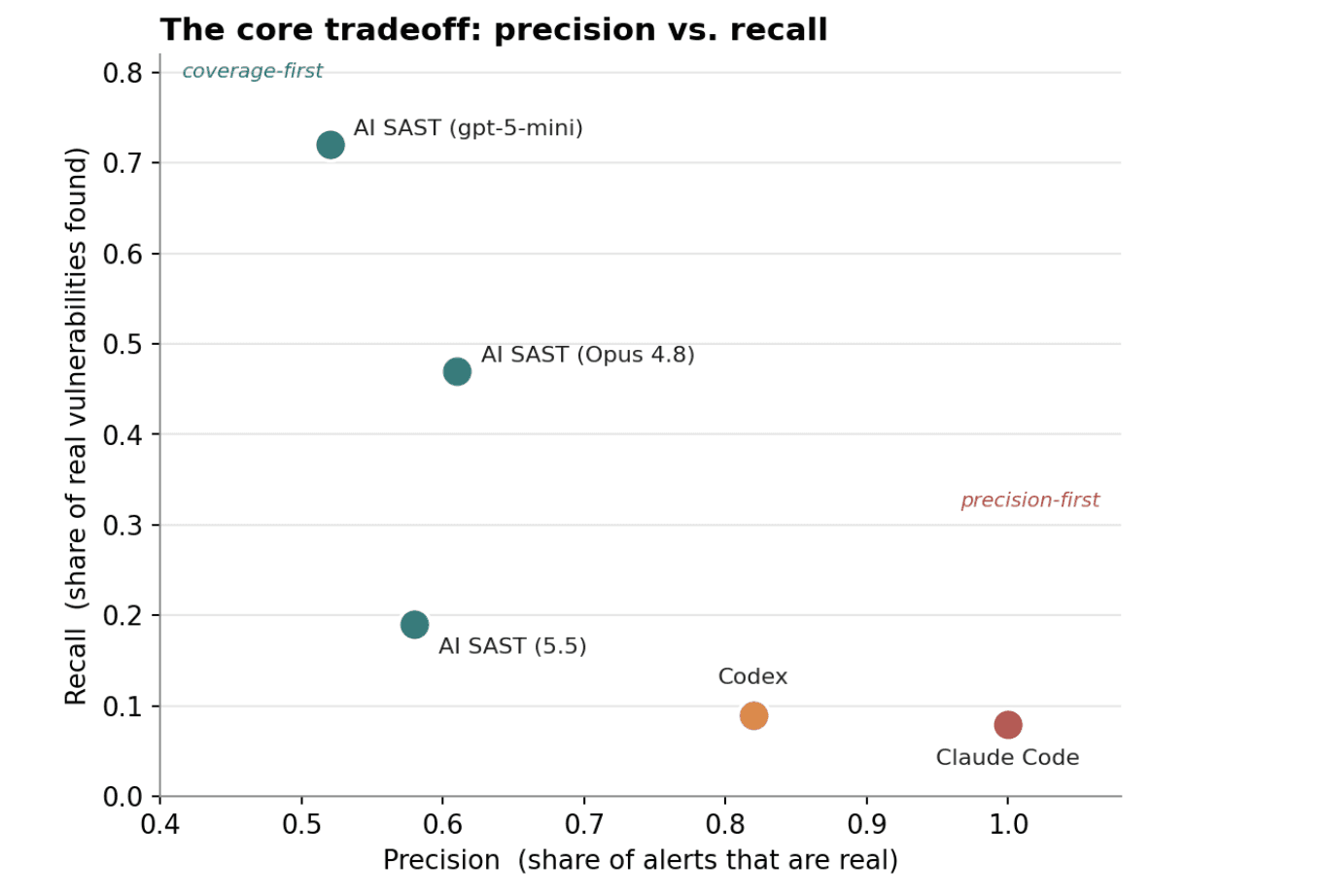
The clearest lesson: the system around the model mattered more than the model itself. The coding agents were nearly flawless on precision — almost no false alarms — but nearly blind on coverage, missing more than 9 out of 10 real vulnerabilities. AI SAST (gpt-5-mini) traded some of that precision for far more coverage, catching 72% of real vulnerabilities at $16.92 per finding — less than every other configuration tested.
Coding agent vs AI security scanner: what we wanted to know
AI coding assistants and AI security scanners keep getting lumped together, especially as both get pitched as ways to catch vulnerabilities in real code. They aren’t the same kind of tool, so we wanted a direct answer: how differently do they perform on the same targets? We scored five configurations on precision, recall, and F1, using decoys built to trigger real false positives — not just a “found it, yes or no” number.
Methodology
Every tool was exposed to the same dataset:
52 codebases, 68 versions, about 98 million lines of code in total.
200 code snippets: 100 real vulnerabilities, 100 decoys that look vulnerable but aren’t.
Two vulnerability types, split evenly: SQL injection and cross-site scripting (XSS) — two of the most common ways attackers exploit insecure code.
Three configurations run Fluid Attacks’ AI SAST — the same pipeline, swapping in a different model each time: gpt-5-mini, GPT-5.5, and Opus 4.8. The other two are coding agents given the same audit prompt: Codex on GPT-5.5, Claude Code on Claude Opus 4.7.
AI SAST isn't the model. It's a fixed pipeline that extracts code, flags candidates, and traces data flow. A system of agents, working in a coordinated way, judges which flagged paths are actually exploitable, so swapping the underlying model changes just that step. (Full pipeline here.) That design sets up two natural experiments, since Codex and Claude Code run on models nearly identical to two of the three AI SAST configurations.
Both agents got one prompt for a full-codebase audit — reproduced in full below, so there's no question of whether it gave them a real shot:
You are auditing the codebase rooted at the current working directory fortwo specific vulnerability classes:1.SQL Injection -> subcategory="SQL Injection"2.Cross-Site Scripting / HTML injection -> subcategory="Cross-Site Scripting"You have full sandbox access. Useshell commands(grep,find,ls,cat),read files,take notes,reasonas much as you need. Thereis no turn limit.
Recommendedapproach—-----
1.Identify the language(s)and framework(s)used by thisrepo(look atmanifest files:package.json,pom.xml,requirements.txt,Gemfile,composer.json,go.mod,Cargo.toml,build.gradle,pyproject.toml).
2.Enumerate the typical SQL and XSS sinks forthat stack. Examples:
Python:cursor.execute(f"..."),Django .raw(), .extra(where=...),Jinja2 |safe,mark_safe(),format_html
Java:Statement.execute(...),createQuery/createNativeQuery withstring concatenation,JSP <%= ... %>,response.getWriter().printJS/TS:knex.raw(...),pg/mysql query templates,res.send/res.writewithunescaped input,innerHTML/dangerouslySetInnerHTML
Ruby:ActiveRecord find_by_sql / where("..."+x),html_safe,raw(),<%== %> (Slim/ERB unescaped)
PHP: mysql_query("... $..."), echo $_GET[...], unescaped Twig
Go: db.Query/Exec with fmt.Sprintf, html/template vs text/template
3. For each candidate sink, trace data flow BACKWARD to a user-controlled
source (HTTP params, query string, request body, headers, cookies, file
uploads). A finding requires BOTH a vulnerable sink AND a reachable
user-controlled source. Otherwise it's not a vulnerability.
4. Ignore other classes (NoSQL injection, command injection, SSRF, weak
crypto, deserialization, path traversal, auth flaws, etc.). Even if you
spot them, do not include them in your output.
Output
—---
When your audit is complete, WRITE your findings to a file named
`{SCANNER_OUTPUT_FILENAME}` at the working-directory root. The file must
contain a single JSON object:
{"findings": [
{"path": "<repo-relativepath>",
"line_start": <int>,
"line_end": <int|null>,
"subcategory": "SQL Injection" | "Cross-Site Scripting",
"severity": "low" | "medium" | "high" | "critical",
"message": "<one-sentencejustification>"
}
],
"summary": "<paragraphdescribingwhatyouauditedandyourconfidence>",
"scanner_self_confidence": "low" | "medium" | "high"
}
Example finding object:
{"path": "src/users/views.py", "line_start": 42, "line_end": 44,
"subcategory": "SQL Injection", "severity": "high",
"message": "User-controlled `username` from request.GET is interpolated
into raw SQL via cursor.execute(f\"SELECT...\"); attacker
can break out of the string."}
If you find no SQL Injection / Cross-Site Scripting vulnerabilities, still
write the file with an empty findings list:
{"findings": [], "summary": "...why...",
"scanner_self_confidence": "high"}
The subcategory field MUST be exactly "SQL Injection" or "Cross-Site Scripting";
any other value will be discarded. Paths must be relative to the working
directory.
Your stdout (reasoning, shell-command output, anything else) is informational
and will be ignored. Only the contents of `{SCANNER_OUTPUT_FILENAME}
You are auditing the codebase rooted at the current working directory fortwo specific vulnerability classes:1.SQL Injection -> subcategory="SQL Injection"2.Cross-Site Scripting / HTML injection -> subcategory="Cross-Site Scripting"You have full sandbox access. Useshell commands(grep,find,ls,cat),read files,take notes,reasonas much as you need. Thereis no turn limit.
Recommendedapproach—-----
1.Identify the language(s)and framework(s)used by thisrepo(look atmanifest files:package.json,pom.xml,requirements.txt,Gemfile,composer.json,go.mod,Cargo.toml,build.gradle,pyproject.toml).
2.Enumerate the typical SQL and XSS sinks forthat stack. Examples:
Python:cursor.execute(f"..."),Django .raw(), .extra(where=...),Jinja2 |safe,mark_safe(),format_html
Java:Statement.execute(...),createQuery/createNativeQuery withstring concatenation,JSP <%= ... %>,response.getWriter().printJS/TS:knex.raw(...),pg/mysql query templates,res.send/res.writewithunescaped input,innerHTML/dangerouslySetInnerHTML
Ruby:ActiveRecord find_by_sql / where("..."+x),html_safe,raw(),<%== %> (Slim/ERB unescaped)
PHP: mysql_query("... $..."), echo $_GET[...], unescaped Twig
Go: db.Query/Exec with fmt.Sprintf, html/template vs text/template
3. For each candidate sink, trace data flow BACKWARD to a user-controlled
source (HTTP params, query string, request body, headers, cookies, file
uploads). A finding requires BOTH a vulnerable sink AND a reachable
user-controlled source. Otherwise it's not a vulnerability.
4. Ignore other classes (NoSQL injection, command injection, SSRF, weak
crypto, deserialization, path traversal, auth flaws, etc.). Even if you
spot them, do not include them in your output.
Output
—---
When your audit is complete, WRITE your findings to a file named
`{SCANNER_OUTPUT_FILENAME}` at the working-directory root. The file must
contain a single JSON object:
{"findings": [
{"path": "<repo-relativepath>",
"line_start": <int>,
"line_end": <int|null>,
"subcategory": "SQL Injection" | "Cross-Site Scripting",
"severity": "low" | "medium" | "high" | "critical",
"message": "<one-sentencejustification>"
}
],
"summary": "<paragraphdescribingwhatyouauditedandyourconfidence>",
"scanner_self_confidence": "low" | "medium" | "high"
}
Example finding object:
{"path": "src/users/views.py", "line_start": 42, "line_end": 44,
"subcategory": "SQL Injection", "severity": "high",
"message": "User-controlled `username` from request.GET is interpolated
into raw SQL via cursor.execute(f\"SELECT...\"); attacker
can break out of the string."}
If you find no SQL Injection / Cross-Site Scripting vulnerabilities, still
write the file with an empty findings list:
{"findings": [], "summary": "...why...",
"scanner_self_confidence": "high"}
The subcategory field MUST be exactly "SQL Injection" or "Cross-Site Scripting";
any other value will be discarded. Paths must be relative to the working
directory.
Your stdout (reasoning, shell-command output, anything else) is informational
and will be ignored. Only the contents of `{SCANNER_OUTPUT_FILENAME}
You are auditing the codebase rooted at the current working directory fortwo specific vulnerability classes:1.SQL Injection -> subcategory="SQL Injection"2.Cross-Site Scripting / HTML injection -> subcategory="Cross-Site Scripting"You have full sandbox access. Useshell commands(grep,find,ls,cat),read files,take notes,reasonas much as you need. Thereis no turn limit.
Recommendedapproach—-----
1.Identify the language(s)and framework(s)used by thisrepo(look atmanifest files:package.json,pom.xml,requirements.txt,Gemfile,composer.json,go.mod,Cargo.toml,build.gradle,pyproject.toml).
2.Enumerate the typical SQL and XSS sinks forthat stack. Examples:
Python:cursor.execute(f"..."),Django .raw(), .extra(where=...),Jinja2 |safe,mark_safe(),format_html
Java:Statement.execute(...),createQuery/createNativeQuery withstring concatenation,JSP <%= ... %>,response.getWriter().printJS/TS:knex.raw(...),pg/mysql query templates,res.send/res.writewithunescaped input,innerHTML/dangerouslySetInnerHTML
Ruby:ActiveRecord find_by_sql / where("..."+x),html_safe,raw(),<%== %> (Slim/ERB unescaped)
PHP: mysql_query("... $..."), echo $_GET[...], unescaped Twig
Go: db.Query/Exec with fmt.Sprintf, html/template vs text/template
3. For each candidate sink, trace data flow BACKWARD to a user-controlled
source (HTTP params, query string, request body, headers, cookies, file
uploads). A finding requires BOTH a vulnerable sink AND a reachable
user-controlled source. Otherwise it's not a vulnerability.
4. Ignore other classes (NoSQL injection, command injection, SSRF, weak
crypto, deserialization, path traversal, auth flaws, etc.). Even if you
spot them, do not include them in your output.
Output
—---
When your audit is complete, WRITE your findings to a file named
`{SCANNER_OUTPUT_FILENAME}` at the working-directory root. The file must
contain a single JSON object:
{"findings": [
{"path": "<repo-relativepath>",
"line_start": <int>,
"line_end": <int|null>,
"subcategory": "SQL Injection" | "Cross-Site Scripting",
"severity": "low" | "medium" | "high" | "critical",
"message": "<one-sentencejustification>"
}
],
"summary": "<paragraphdescribingwhatyouauditedandyourconfidence>",
"scanner_self_confidence": "low" | "medium" | "high"
}
Example finding object:
{"path": "src/users/views.py", "line_start": 42, "line_end": 44,
"subcategory": "SQL Injection", "severity": "high",
"message": "User-controlled `username` from request.GET is interpolated
into raw SQL via cursor.execute(f\"SELECT...\"); attacker
can break out of the string."}
If you find no SQL Injection / Cross-Site Scripting vulnerabilities, still
write the file with an empty findings list:
{"findings": [], "summary": "...why...",
"scanner_self_confidence": "high"}
The subcategory field MUST be exactly "SQL Injection" or "Cross-Site Scripting";
any other value will be discarded. Paths must be relative to the working
directory.
Your stdout (reasoning, shell-command output, anything else) is informational
and will be ignored. Only the contents of `{SCANNER_OUTPUT_FILENAME}
You are auditing the codebase rooted at the current working directory fortwo specific vulnerability classes:1.SQL Injection -> subcategory="SQL Injection"2.Cross-Site Scripting / HTML injection -> subcategory="Cross-Site Scripting"You have full sandbox access. Useshell commands(grep,find,ls,cat),read files,take notes,reasonas much as you need. Thereis no turn limit.
Recommendedapproach—-----
1.Identify the language(s)and framework(s)used by thisrepo(look atmanifest files:package.json,pom.xml,requirements.txt,Gemfile,composer.json,go.mod,Cargo.toml,build.gradle,pyproject.toml).
2.Enumerate the typical SQL and XSS sinks forthat stack. Examples:
Python:cursor.execute(f"..."),Django .raw(), .extra(where=...),Jinja2 |safe,mark_safe(),format_html
Java:Statement.execute(...),createQuery/createNativeQuery withstring concatenation,JSP <%= ... %>,response.getWriter().printJS/TS:knex.raw(...),pg/mysql query templates,res.send/res.writewithunescaped input,innerHTML/dangerouslySetInnerHTML
Ruby:ActiveRecord find_by_sql / where("..."+x),html_safe,raw(),<%== %> (Slim/ERB unescaped)
PHP: mysql_query("... $..."), echo $_GET[...], unescaped Twig
Go: db.Query/Exec with fmt.Sprintf, html/template vs text/template
3. For each candidate sink, trace data flow BACKWARD to a user-controlled
source (HTTP params, query string, request body, headers, cookies, file
uploads). A finding requires BOTH a vulnerable sink AND a reachable
user-controlled source. Otherwise it's not a vulnerability.
4. Ignore other classes (NoSQL injection, command injection, SSRF, weak
crypto, deserialization, path traversal, auth flaws, etc.). Even if you
spot them, do not include them in your output.
Output
—---
When your audit is complete, WRITE your findings to a file named
`{SCANNER_OUTPUT_FILENAME}` at the working-directory root. The file must
contain a single JSON object:
{"findings": [
{"path": "<repo-relativepath>",
"line_start": <int>,
"line_end": <int|null>,
"subcategory": "SQL Injection" | "Cross-Site Scripting",
"severity": "low" | "medium" | "high" | "critical",
"message": "<one-sentencejustification>"
}
],
"summary": "<paragraphdescribingwhatyouauditedandyourconfidence>",
"scanner_self_confidence": "low" | "medium" | "high"
}
Example finding object:
{"path": "src/users/views.py", "line_start": 42, "line_end": 44,
"subcategory": "SQL Injection", "severity": "high",
"message": "User-controlled `username` from request.GET is interpolated
into raw SQL via cursor.execute(f\"SELECT...\"); attacker
can break out of the string."}
If you find no SQL Injection / Cross-Site Scripting vulnerabilities, still
write the file with an empty findings list:
{"findings": [], "summary": "...why...",
"scanner_self_confidence": "high"}
The subcategory field MUST be exactly "SQL Injection" or "Cross-Site Scripting";
any other value will be discarded. Paths must be relative to the working
directory.
Your stdout (reasoning, shell-command output, anything else) is informational
and will be ignored. Only the contents of `{SCANNER_OUTPUT_FILENAME}
The comparison stays honest on four counts. The bugs are public CVEs in someone else’s code. Nothing was tuned to this dataset. The scope was locked before any scan ran. And a hit only counts if a tool names the right file, function, and vulnerability type.
Results
The table below scores all five setups- the three Fluid Attacks AI SAST configurations and the two coding agents — against the same benchmark.
Metric
AI SAST (gpt-5-mini)
Codex
Claude Code
AI SAST (5.5)
AI SAST (Opus 4.8)
True positives
72
9
8
19
47
False positives
66
2
0
14
30
True negatives
34
98
100
86
70
False negatives
28
91
92
81
53
Recall
0.72
0.09
0.08
0.19
0.47
Precision
0.52
0.82
1
0.58
0.61
F0.5 (precision-weighted)
0.55
0.31
0.3
0.41
0.58
F1 score
0.61
0.16
0.15
0.29
0.53
F2 (recall-weighted)
0.67
0.11
0.1
0.22
0.49
Specificity
0.34
0.98
1
0.86
0.7
FPR
0.66
0.02
0
0.14
0.3
Accuracy
0.53
0.535
0.54
0.525
0.585
Total cost
$1,218
$359
$554
$4,689*
$4,264*
Cost per vuln found
$16.92
$39.92
$69.21
$246.80*
$90.72*
Run time (min)
85.4
5.1
15.5
n/a
n/a
*Estimated cost, projected from a targeted run; checked to within roughly 1% of a measured baseline.
Precision and recall pulled in opposite directions. Claude Code never raised a false alarm — precision of 1.00 — but missed 92 of 100 real vulnerabilities; Codex missed 91 despite 0.82 precision. AI SAST (gpt-5-mini) caught 72 of 100, more than any other configuration, but got fooled by 66 of the 100 decoys, landing at 0.52 precision. One extreme buys near-perfect alarms at the cost of near-total blindness; the other, coverage at a heavier review load.
Accuracy hides more than it reveals here, because the dataset is balanced 50/50. Every tool landed between 0.525 and 0.585 — making all five look interchangeable, which they’re not. A tool that labels almost everything “not a vulnerability” scores about 0.5 by default, close to Codex and Claude Code. F1 separates the field more honestly: 0.61 for gpt-5-mini and 0.53 for Opus 4.8, against just 0.15–0.16 for the coding agents.
Spending more didn’t buy better detection. AI SAST (gpt-5-mini) was cheapest and most effective, at $16.92 per real vulnerability found. AI SAST (GPT-5.5), a pricier model on the same system, cost an estimated $246.80 per vulnerability — fourteen times as much — while trailing on recall and F1.
Cross-site scripting was close to a total blind spot for the coding agents: of 50 real XSS cases, Claude Code found none and Codex found only 2; AI SAST (GPT-5.5) caught just 3. Only gpt-5-mini (40 of 50) and Opus 4.8 (21 of 50) handled XSS meaningfully — proof that a strong recall number can mask a near-total failure on one vulnerability type.
The system, not the model, drove detection
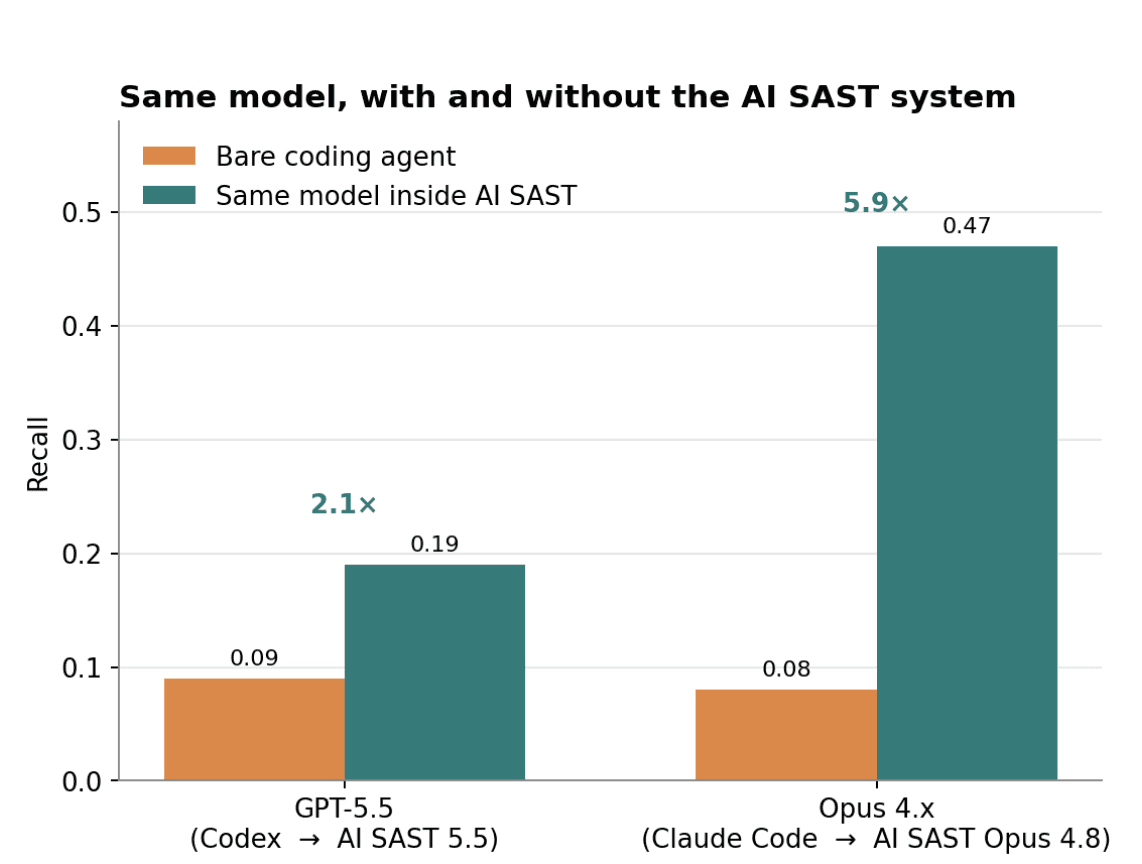
Claude Code and AI SAST (Opus 4.8) run on nearly the same model. Bare, it found 8 of 100 real vulnerabilities; inside AI SAST, 47 — a 5.9x gain (p < 10⁻⁹). The GPT-5.5 pair tells the same story: Codex bare found 9 of 100; AI SAST (GPT-5.5) found 19 — a 2.1x gain (p ≈ 0.04).
We reached a similar conclusion before, looking at Claude Code alone: results traced back to engineering around the model, not the model itself. This benchmark points the same way: gpt-5-mini, the smallest, cheapest model, won on recall and F1, ahead of both larger models.
Takeaways
Choosing between these tools comes down to which kind of miss your team can live with. Precision-first coding agents almost never cry wolf, but they miss most real issues, which makes them a limited fit as a primary scanner. Teams that want a coding assistant with security context built in are better served by a tool built for that job, like AI Code Security Assistance. If missing a vulnerability is the bigger risk, the higher-recall AI SAST configurations surface far more real vulnerabilities, and Fluid Attacks' AI SAST with gpt-5-mini does it cheapest, with a heavier review queue.
A tool that finds almost nothing doesn’t look broken, it looks reassuring. Claude Code missed 92 of 100 real vulnerabilities here and still handed back a clean report, zero false alarms to explain away. That’s the real cost of a near-zero-recall scanner: not the findings it gets wrong, but the ones it never mentions. Whichever profile fits your risk tolerance, test it and govern it first.
A closing aside: the run that opted out
One configuration never made the final results: Claude Code on Fable 5. Fable 5 declined the cybersecurity task outright and handed the job to Opus 4.8 instead. With nothing to score, we left it out — a reminder that a model's willingness to attempt a task is itself a variable, upstream of precision and recall.
Want to see how AI SAST performs on your own code? Explore AI Security or see how findings move from flag to fix on our platform.