Pelican 4.12.0 - OS command injection in WordPress importer
8.4
High
Discovered by

Offensive Team, Fluid Attacks
Abstract
Fluid Attacks discovered CVE-2026-122090, a high-severity command injection vulnerability (CWE-78) in Pelican 4.12.0. An attacker can execute commands as the importing user on affected systems. It has a CVSS v4.0 base score of 8.4. This advisory includes a proof of concept.
Summary
Full name
Pelican 4.12.0 - OS command injection through WordPress post slugs
Code name
State
Public
Release date
Affected product
Pelican
Vendor
getpelican
Affected version(s)
4.12.0
Vulnerability name
OS Command Injection
Vulnerability type
Remotely exploitable
Yes
CVSS v4.0 vector string
CVSS:4.0/AV:L/AC:L/AT:N/PR:N/UI:A/VC:H/VI:H/VA:H/SC:N/SI:N/SA:N
CVSS v4.0 base score
8.4
Exploit available
Yes
CVE ID(s)
CWE
CAPEC
Description
Pelican 4.12.0 contains an OS command injection vulnerability in the pelican-import command-line tool. When converting a WordPress XML export, the importer incorporates the attacker-controlled wp:post_name value into an output filename and then into a shell command executed with shell=True.
A person running pelican-import must import an attacker-supplied WordPress export. On POSIX systems, shell command substitution in a post slug is evaluated despite the surrounding double quotes. The resulting command runs with the operating-system permissions of the person invoking the importer.
Vulnerability
Root cause
wp2fields() reads wp:post_name from the supplied WordPress XML and uses it as filename. get_out_filename() then removes characters reserved by common filesystems, but its regular expression does not remove shell metacharacters such as $, (, ), {, or }.
For an HTML or WordPress-HTML post, fields2pelican() formats out_filename into a Pandoc command string and passes that string to subprocess.call(cmd, shell=True). The output filename is enclosed in double quotes, but POSIX shells still perform command substitution inside double quotes. Thus a slug such as legit$(touch${IFS}CVE_POC_MARKER)post is evaluated by the shell before Pandoc receives its arguments.
Source-to-sink path
wp2fields()obtainsitem.find("post_name").stringfrom the untrusted WordPress XML and passes it throughget_filename()(pelican/tools/pelican_import.py:143-166in tag4.12.0).fields2pelican()passes this value toget_out_filename()(pelican/tools/pelican_import.py:954-1024).get_out_filename()appliesre.sub(r'[<>:"/\\|?*^% ]', '-', filename), which leaves$, parentheses, and braces intact (pelican/tools/pelican_import.py:786-808).For imported HTML,
fields2pelican()places the resultingout_filenamein thepandoc ... -o "{out_filename}" ...command template (pelican/tools/pelican_import.py:1027-1064).subprocess.call(cmd, shell=True)invokes the platform shell on that command (pelican/tools/pelican_import.py:1066-1077). Command substitution is the execution sink.
Impact
The command substitution is evaluated by the shell started by subprocess.call(..., shell=True). The injected command therefore runs with the effective user ID, group memberships, current working directory, environment variables, and filesystem access of the account that invokes pelican-import.
An attacker-controlled WordPress export can consequently cause reads and writes to resources accessible to that account, modification of the generated content tree, execution of further local programs, or outbound connections permitted by the host policy.
PoC
Preconditions
Use Pelican 4.12.0 and Python with the importer dependencies. Pandoc is optional for demonstrating execution but needed if successful content conversion is also desired. Run the importer with a non-privileged account.
Step-by-step
Install the test dependencies. Pandoc is useful to complete a normal conversion, although command substitution executes even if Pandoc is unavailable.
Create
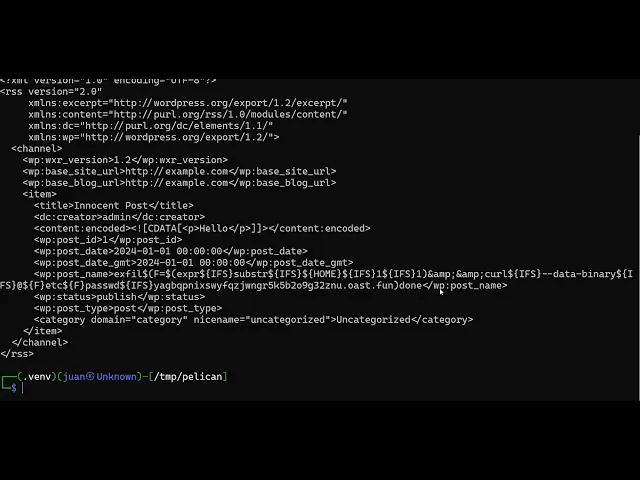
/tmp/poc/malicious.xmlwith the following complete minimal WordPress export. The quoted here-document prevents the invoking shell from expanding the proof payload while the file is created.Run the importer against the crafted export:
A
FileNotFoundErrorfor a path that still literally contains the$(...)payload is expected after execution: the shell has already evaluated the substitution, whereas Pelican subsequently tries to open the original, unexpanded Python string. Confirm that the emptyCVE_POC_MARKERfile was created in the directory from which the command was run. Its creation is the only intended effect of this proof.
Evidence of Exploitation
Video of exploitation:
Static evidence:


Our security policy
We have reserved the ID CVE-2026-122090 to refer to this issue from now on.
System information
Product: Pelican
Version: 4.12.0
Operating System: Linux and macOS
References
GitHub Repository: https://github.com/getpelican/pelican
Pelican 4.12.0 importer source: https://github.com/getpelican/pelican/blob/4.12.0/pelican/tools/pelican_import.py
Solution and Workaround
Solution
Replace the shell command string with a list-based Pandoc invocation, for example subprocess.run(["pandoc", "-f", "html", html_filename, "-o", out_filename], check=True). Each executable name, option, and value must be a separate list element, and the invocation must not use shell=True. This preserves wp:post_name as filename data rather than shell syntax.
The fix should cover every import path that invokes an external converter, retain normal filename validation for filesystem compatibility, and add regression tests using post names containing $, parentheses, braces, ampersands, and whitespace. A release containing the patch should be identified as the fixed version after upstream validation.
Workaround and temporary mitigation
Until a fixed release is available, do not import WordPress XML exports from untrusted sources. Restrict import execution to a dedicated non-privileged account with only the required filesystem access, and review imported post names for shell metacharacters. Character filtering is defense in depth only; it does not remediate interpolation into a shell command.
Credits
The vulnerability was discovered by Juan García from Fluid Attacks' Offensive Team.
Timeline
Vulnerability discovered
Vendor contacted
Public disclosure
Does your application use this vulnerable software?
During our free trial, our tools assess your application, identify vulnerabilities, and provide recommendations for their remediation.