Development
Software development in the agentic era


Content writer and editor
Updated
10 min
A recent conversation with David Acevedo, one of my colleagues of the development department at Fluid Attacks, highlighted the significant changes taking place in his profession: he told me that, at least on his end, he no longer uses an IDE (integrated development environment) for code editing—he has replaced VS Code with a lightweight, resource-efficient editor called Zed—and that in his workflow, AI agents now handle most of the implementation, allowing him to focus on code review and orchestration.
This goes beyond a simple preference for certain tools. It points to a profound shift in what software development actually entails and in who (or what) is responsible for the programming. This shift involves a different working model: developers focus more on architecture, workflows, and the overall behavior of systems, rather than on syntax and implementation details. Tasks like debugging are evolving from inspecting individual lines of code to tracing business flows and understanding the modifications agents make. Software engineers are now more like designers and curators than builders.
Whether you're an engineer navigating this transition, an executive assessing its impact on team performance, or a security professional analyzing the risks it introduces, we believe it's important to understand the move from workflows centered on tools like IDEs to agent-based environments.
The IDE under pressure
For decades, the IDE was the silent engine of software development. Its value proposition was clear: integration saves time. The combination of a text editor, a compiler, a debugger, and a version control system into a single graphical interface made tools like Eclipse, IntelliJ, and VS Code (with its extension ecosystem) the centerpiece of developers' workdays. But as the definition of "development" has expanded to include containerization, cloud-native deployments, and deep AI integration, the IDE has begun to falter in its comprehensiveness and indispensability.
The main complaint among senior engineers is resource consumption. A modern IDE loaded with extensions for every framework in a project's stack can require hundreds of megabytes of RAM; in some configurations, AI plugins alone have been reported to drive CPU utilization above 500%. That overhead is becoming increasingly difficult to justify when AI is doing most of the generative work.
If an agent can generate several hundred lines of well-structured code from a "simple" prompt, developers no longer need (or perhaps need very little) of that complex ribbon of options that defines the experience within an IDE. Just like a writer—an analogy my colleague made during our conversation—who realizes that for months now they've rarely had to use the text formatting toolbar because an AI handles the layout, developers are discovering that a basic code editor is sufficient for the final review before pushing the code.
_____
⚠️ Note: We know that some people might argue that VS Code, for example, isn't an IDE by default, but rather becomes one as you install extensions. We can therefore think of an IDE as a framework that comes with a host of pre-installed tools to facilitate code editing, review, and deployment.
_____
Beyond the excessive use of resources, there is a fundamental design problem: Current IDEs treat AI as a secondary element: a sidebar, a chat window, a plugin bolted onto an interface designed decades before LLMs even existed. This approach fails to harness the potential of agentic workflows. When an AI can debug, refactor, and explain entire systems autonomously, confining it to a corner of the screen feels like a relic of the past. We've seen that true AI-native development requires that the environment be structured around the agent—not the other way around.
The terminal's comeback
The terminal, somewhat unexpectedly, has reclaimed its role as the command center for high-velocity development. Tools like Claude Code, Aider, and the Gemini CLI have demonstrated that, for agentic workflows, a CLI (command-line interface) is often superior to a GUI (graphical user interface). Three properties explain why.
First, text-native composability. The Unix philosophy, in which the output of one program becomes the input to another, is the native language of LLMs. A CLI agent can find all TypeScript files, filter for a specific import, and execute a replacement script by writing a shell command; no complex API integration required.
Second, progressive context management. One of the biggest challenges in AI-assisted development is context pollution. In an IDE, agents often load the entire file tree or persistent schemas into the context window, which is token-expensive and distracts the model. CLI tools treat context as a scarce resource; they use targeted searches to find relevant files, read only what they need, and manage the context window with precision.
Third, binary feedback loops. Autonomous agents need clear signals to self-correct. In a CLI, a command exits with 0 or 1; this lets an agent run a test, observe the failure in 'stderr' (preconnected output stream used by computer programs to output error messages or diagnostics), and iterate on a fix without human intervention. Replicating this loop in a GUI is significantly more complex and prone to friction.
None of this means the terminal wins everywhere. CLI agents excel at parallel tasks, automation, and CI/CD integration; agentic IDEs like Cursor and Windsurf retain clear advantages for visual debugging, onboarding, and frontend work, where seeing the rendered output matters. The question is less about which tool is universally better and more about which tool fits the task at hand.
My colleague, for example, says that the main value a tool like Zed provides him is the 'diff.' He could use the git diff command in the terminal or one of the many specialized tools designed to easily display the before-and-after changes in a repository for review (e.g, GitKraken or VS Code with its Git view and extensions like GitLens). However, he says he turns to Zed because it also provides a convenient way to explore the codebase at the exact moment the AI agent is editing it; he can navigate the file structure and search for specific modifications with ease.
(On April 22, Zed announced its new ability to orchestrate multiple agents running in parallel.)
Three paradigms, not one
AI-assisted development currently encompasses three distinct approaches. These distinctions matter because they define how autonomy, context, and collaboration are handled.
Agentic IDEs extend traditional editors with AI capabilities. They support inline suggestions, code generation, and limited multi-step automation, but they still operate within the constraints of a single workspace and a primary human operator.
CLI agents rely on composable commands, filesystem access, and automation. They are particularly effective in scripted workflows such as CI pipelines, incident response, and repetitive maintenance.
Agentic development environments (ADEs) go further by placing orchestration at the center. Unlike a forked IDE that adds AI features, an ADE is built from the ground up for agent coordination. Key components include workspace isolation through separate Git worktrees (tools like Warp and Google's Antigravity use this pattern to allow multiple agents to work on different branches without polluting the filesystem), a management interface that replaces the code editor with a dashboard for spawning and monitoring agents, and semantic context engines that use dependency-aware indexing so that when an agent modifies a shared library, the system understands the ripple effects across the architecture. In an ADE, the system itself becomes the primary interface; the developer interacts with a control plane rather than a single tool.
From conductor to orchestrator
The industry has adopted new terminology to describe the evolving role of the developer: first a coder, then a "conductor," and now an "orchestrator".
A conductor works closely with a single AI agent focused on a specific task within a tight, synchronous feedback loop, approving or adjusting each suggestion. This is the "AI pair programmer" model, which is already credited with productivity gains of 25–30%. It is effective for micro-level implementation, but it remains linear.
An orchestrator, on the other hand, oversees multiple AI agents working in parallel. In this paradigm, an engineer might assign backend tasks to one agent, frontend updates to another, and test generation to a third. The developer defines high-level goals, resolves conflicts between agents, and reviews the resulting pull requests (PRs). The workflow becomes asynchronous; by the time the developer reviews, several PRs are ready for evaluation.
As Karpathy, cofounder of OpenAI, observed, the bits contributed directly by the programmer are becoming sparse. The new programmable layer involves managing subagents, prompts, memory, and permissions.
Running multiple agents in parallel poses real challenges. Tasks must be isolated to prevent conflicts, typically through separate workspaces or branches. Without such isolation, concurrent modifications can interfere with one another, leading to inconsistent results. Context management becomes critical: agents need access to relevant information without being overwhelmed by noise, and advanced systems address this by organizing context into layers that combine persistent knowledge, task-specific data, and runtime constraints.
In addition, permission models must be granular, ranging from read-only access to actions that require explicit human approval. Human-in-the-loop workflows are essential at high-impact decision points. Indeed, there are documented cases showing that autonomous agents can cause destructive changes when left unsupervised.
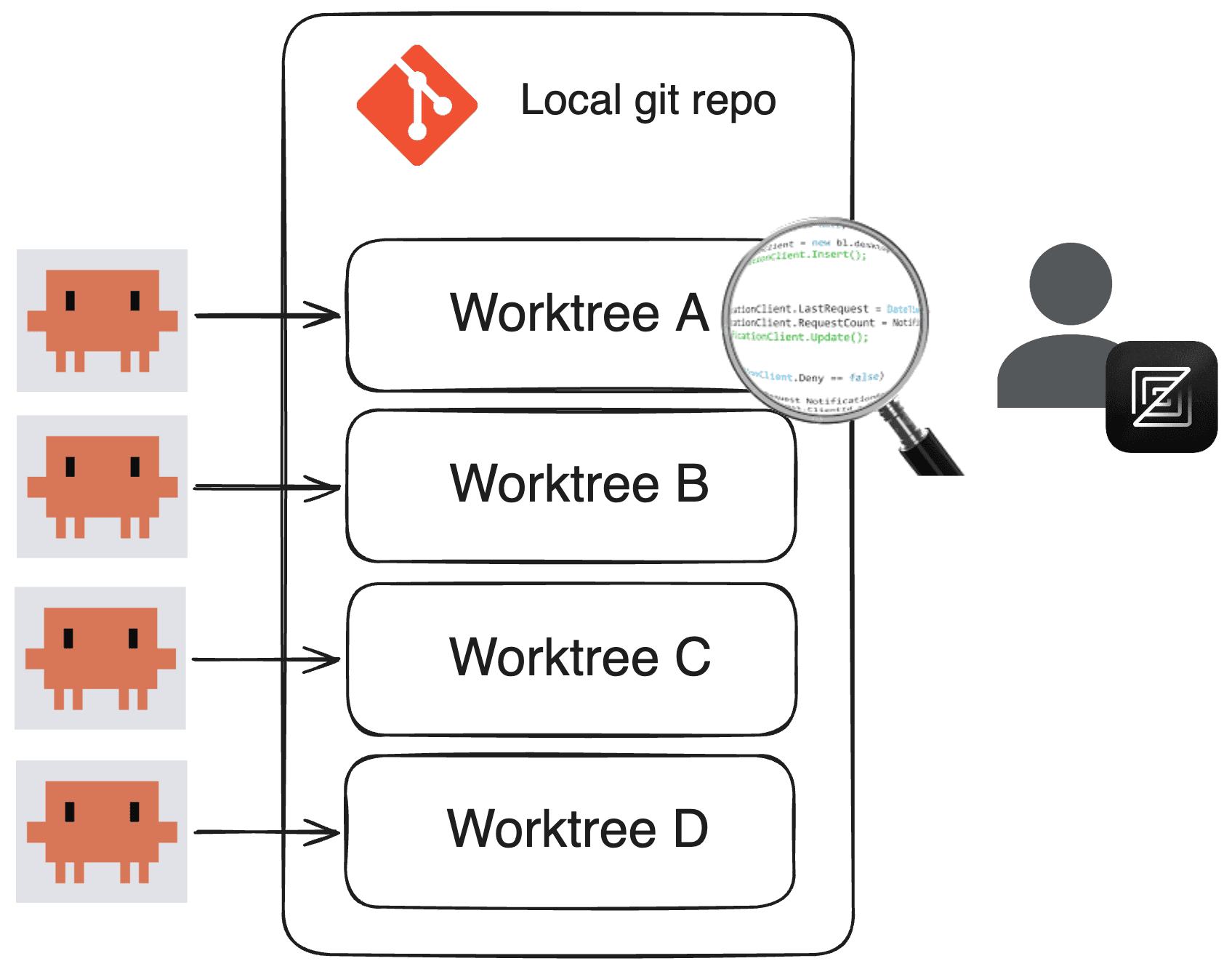
Returning to my colleague's specific experience, he shared details about his current workspace: he uses the "multi-clauding" approach, meaning he runs Claude Code across multiple terminals, assigning different tasks to each for execution in their own Git workspaces (worktrees).
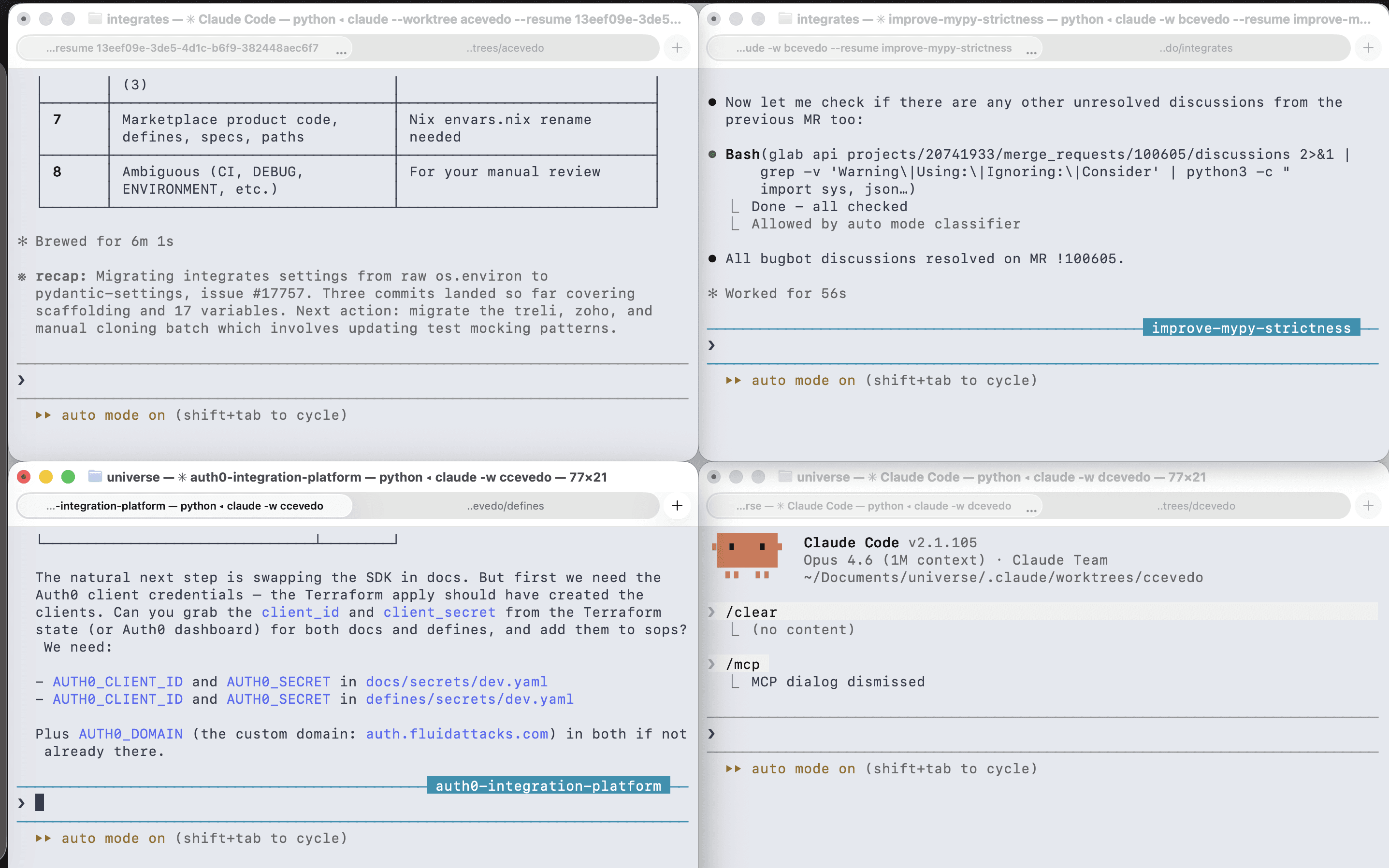
Thus, the AI agents work (documenting their reasoning and modifications), validate the changes with linters, push the code (where additional linters run via Git Hooks), and, once in GitLab, the CI pipeline begins to run. If it fails, David reports the error to the agents so they can understand the issue and iterate.
Ultimately, it's he who reviews the changes in the repository and decides whether they are acceptable or need improvement. Likewise, he is the one who defines when to open the merge request (MR, where peer review takes place) and who assumes responsibility for the modifications made by the agents; at the end of the day, those commits are logged under his name.
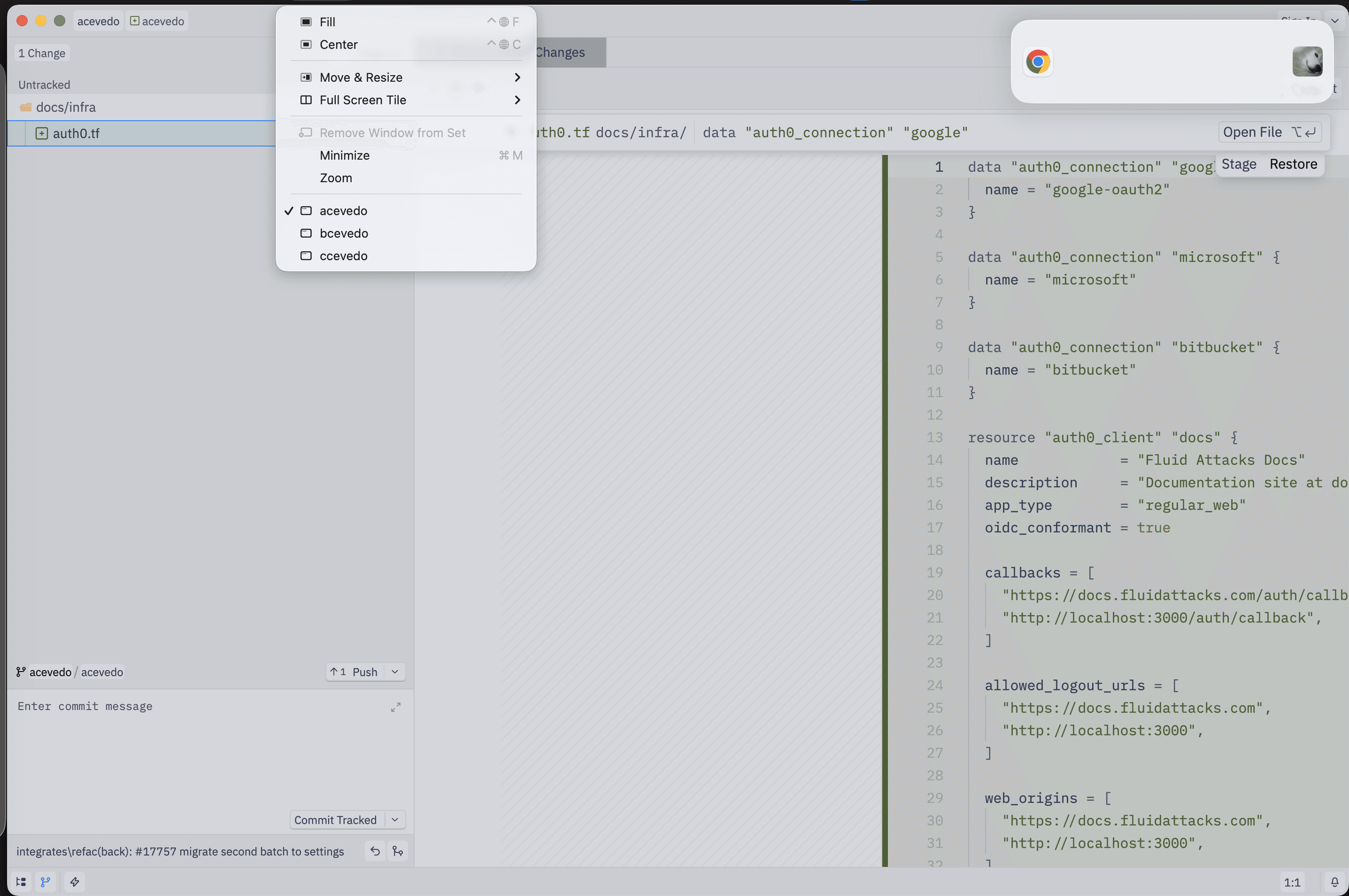
In David's case, Zed, the code editor, becomes a window into the agents' parallel worlds, allowing him to comfortably verify the 'diff' and explore the codebase at a specific point in the software development history to understand and evaluate it.
CLI vs. MCP?
In the agentic ecosystem, there is occasional discussion regarding the debate between CLIs and MCP (Model Context Protocol) servers. However, framing it as a choice between one or the other seems to overlook the fact that they are complementary.
CLIs offer clear advantages when the tools involved are already well-represented in training data. Utilities like 'git,' 'curl,' and 'grep' (command-line utilities used for version control, data transfer, and text processing, respectively) can be invoked with minimal additional context, and agents can access help documentation progressively rather than loading all tool definitions upfront. These advantages diminish, however, when dealing with custom tools or proprietary APIs, where agents require detailed instructions that offset any token savings.
MCP servers address a different set of problems. By centralizing tools and APIs behind a standardized protocol, they simplify authentication (sensitive API keys stay on the server; developers authenticate via OAuth), improve auditability (every tool call by an agent is logged and traceable), and enable dynamic knowledge delivery (organizations can push up-to-date best practices and documentation to agents across the entire team through a single endpoint). They also ensure consistency: prompts, resources, and tool definitions can be updated centrally so that every user interacts with the latest version.
In practice, CLIs excel in the inner loop, where speed and flexibility matter most; MCP servers are more effective in the outer loop, where structured access to shared infrastructure is the priority. The two are complementary layers in a maturing ecosystem.
The skills and principles that matter now
If AI agents are writing, let's say, 90% of the code, what will be left for the engineer? In fact, some say that the value of being a "language polyglot" is declining. The skills that set developers apart today seem to center on three areas:
Problem decomposition: breaking down complex business requirements into well-defined tasks that an AI agent can easily handle.
System architecture: making high-level decisions about the technology stack, component and service interactions, and scalability.
Verification and trust calibration: developing the judgment to know when an agent's outputs can be trusted and when manual intervention is necessary.
Organizations face parallel challenges: integrating AI into legacy architectures, for example, that were never designed to accommodate it, often requires significant reengineering; a monolithic codebase with tightly coupled dependencies may not always lend itself to the task decomposition required by agentic workflows. Furthermore, the bottlenecks that were acceptable yesterday are no longer tolerable today, given the pace of work enabled by these agentic workflows. Then, it is necessary to rethink the planning, prioritization, and maintenance of the paths through which all changes flow to the code repositories to keep them free of congestion.
Data quality, flaws in reasoning, and intellectual property concerns add another layer of complexity. AI systems rely on training data that can introduce biases or lead to the unintended replication of protected content. Addressing these issues effectively requires frameworks for governance, transparency, and ongoing evaluation, rather than one-off audits.
The workforce dimension is equally important: developers need new competencies to interpret LLM behavior, evaluate outputs critically, and integrate AI into existing workflows. Continuous learning becomes a prerequisite, not a nice-to-have, and the gap between teams that invest in this and those that do not will widen rapidly.
The continuous lifecycle and its security implications
It has been said that another significant change brought about by agent-driven development is the breakdown of the traditional stages of the SDLC (software development lifecycle). The boundaries between development, testing, and production seem to be blurring. Code is generated, tested, deployed, and replaced in rapid cycles; environments increasingly resemble production even during development, with feature flags and "canary releases" becoming standard practice. Development environments are not disappearing, but their role is shifting from clearly defined phases to spaces for controlled experimentation within a unified, continuous flow.
This continuity has direct implications for the security of systems under development. Traditional checkpoints, such as "scan before release," lose their relevance when releases occur continuously. Code validation and security assessments for operational applications must keep pace. The very concept of a "pre-production gate" assumes a clear boundary between development and production, and that boundary appears to be dissolving.
Agent-based development also expands the attack surface in certain ways. Applications are becoming more distributed, APIs are proliferating, and AI models are integrated into both development and runtime environments. New interfaces, such as chat and voice, introduce entirely new categories of vulnerabilities that have no equivalent in traditional web applications. Agents that execute commands, access systems, and modify infrastructure require strong isolation, permission control, and auditability. The combination of autonomous execution and broad access to systems creates risk profiles that most existing security tools were not designed to address.
At Fluid Attacks, we want to reiterate a principle that is worth keeping in mind today: security responsibility does not transfer to the agent. AI-generated code, no matter how syntactically clean it may be, can still contain logical flaws or be vulnerable in a live environment. Static analysis, even when powered by AI, only reads the source code; it cannot detect vulnerabilities that arise during runtime, such as misconfigured middleware, faulty service integrations, or authentication issues that manifest only when the system is assembled and processing real-world inputs.
Understanding security in modern applications requires observing how they behave under realistic conditions, including how attackers might analyze them. In practice, many of the most consequential vulnerabilities do not stem from what the code says, but from how it interacts with everything around it.
To safely adopt agentic tools, organizations should implement
sandboxing: agents must run in isolated containers to prevent hallucinated commands from reaching the host;
permission controls: enforcing allow/deny lists at the shell level so that agents cannot access credential files or escalate privileges; and
ASPM as a system of record: an application security posture management platform that consolidates findings from AI scans, automated testing, and manual penetration testing into a governed dataset, ensuring continuity even as the tools of creation become transient.
What comes next
Although some details remain to be worked out, the direction is clear: AI is becoming a structural component of software development, not merely a productivity booster. Developers provide context, judgment, and oversight; agents handle execution and automation.
The partnership has real potential to raise both efficiency and quality, but success hinges on maintaining the balance. Over-reliance on AI introduces risks that compound silently: degraded architectural coherence, security blind spots from trusting agent output without adequate verification, and a gradual erosion of the deep technical intuition that only comes from working close to the metal. Insufficient integration, on the other hand, leaves teams competing against organizations that have already figured out how to multiply their engineering capacity.
The software development lifecycle is no longer a sequence of discrete stages; it has become a continuous, overlapping system where the boundaries between writing, testing, deploying, and securing code blur into a single flow. Navigating that flow requires treating development, operations, and security as a unified discipline rather than adjacent silos.
The organizations that get this right will not be the ones that adopt the most tools or deploy the most agents. They will be those who understand the system as a whole: where human judgment is irreplaceable, where automation genuinely reduces risk rather than merely displacing it, and where the velocity gains from agentic workflows are anchored in rigorous security oversight that keeps those systems trustworthy once they reach production.
In today's software development context, we are no longer defined by the code we write; we are architects of autonomous systems, and the engineering discipline required to keep them secure and reliable is the very same one that has always distinguished thoughtful building from rushed and sloppy building.

Get started with Fluid Attacks' application security solution right now
Tags:
cybersecurity
software
devsecops
Subscribe to our newsletter
Stay updated on our upcoming events and latest blog posts, advisories and other engaging resources.
Other posts