LimeSurvey 7.8.0 - SQL injection via Archive Attributes
7,1
High
Detected by

Fluid Attacks AI SAST Scanner
Disclosed by
Miguel Gómez
Abstract
Fluid Attacks' AI SAST detected CVE-2026-116645, a high-severity SQL injection vulnerability (CWE-89) in LimeSurvey 7.8.0. An authenticated user permitted to create surveys can import a crafted archive and read sensitive database data through SPSS export. It has a CVSS v4.0 base score of 7.1. As of Nov 11, 2026, no patch is available. Fluid Attacks assigned this CVE as a CNA, and this advisory includes a proof of concept.
Summary
Full name
LimeSurvey 7.8.0 - SQL injection through participant attribute names in survey archives
Code name
State
Public
Release date
Affected product
LimeSurvey
Vendor
LimeSurvey
Affected version(s)
7.8.0
Vulnerability name
SQL injection
Vulnerability type
Remotely exploitable
Yes
CVSS v4.0 vector string
CVSS:4.0/AV:N/AC:L/AT:N/PR:L/UI:N/VC:H/VI:N/VA:N/SC:N/SI:N/SA:N
CVSS v4.0 base score
7.1
Exploit available
Yes
CVE ID(s)
CWE
CAPEC
Description
LimeSurvey Community Edition 7.8.0 contains an SQL injection in the survey-archive participant import and SPSS-response export workflow. An authenticated user with the global surveys.create permission can import a crafted .lsa archive. Its participant-data XML (.lst) causes LimeSurvey to create attacker-named participant-table columns. When the user exports responses from the imported, non-anonymous survey, LimeSurvey inserts those persisted names into the SELECT list without quoting names that contain parentheses.
Vulnerability
Root cause
XMLImportTokens() reads each <fieldname> in an archive's .lst file and, for every non-existing name containing attribute, calls addColumn() without enforcing the identifier grammar used for participant attributes (application/helpers/admin/import_helper.php:3714-3752). The schema API correctly quotes the name during ALTER TABLE; consequently, special characters become part of a real column name rather than executing at import time.
Later, getAttributeFieldNames() obtains the column names directly from database metadata and retains every name containing attribute_ (application/helpers/common_helper.php:3326-3351). SPSSGetQuery() prefixes each returned name with t. and supplies the resulting array to Yii's CDbCommand::select() (application/helpers/export_helper.php:725-756). Yii deliberately leaves an array item unquoted when it contains (, assuming it is a trusted SQL expression (vendor/yiisoft/yii/framework/db/CDbCommand.php:604-626). Thus an archive-created column name such as attribute_1,(SELECT DATABASE()) AS injected_value becomes executable SQL in the later export query.
The importer assigns the importing user every permission on the new survey (application/helpers/admin/import_helper.php:3617-3619), including the response-export permission required by the classic SPSS export. Therefore, the user does not need access to an existing survey or administrator credentials.
Source-to-sink path
A user holding global
surveys.createimports a.lsaarchive throughSurveyAdministrationController::actionImport()(application/controllers/SurveyAdministrationController.php:2536-2577).importSurveyFile()extracts the.lstparticipant file and callsXMLImportTokens()after creating the new survey's participant table (application/helpers/admin/import_helper.php:1460-1502).XMLImportTokens()accepts an attacker-controlled<fieldname>containingattributeand creates it as a column (application/helpers/admin/import_helper.php:3735-3752).getAttributeFieldNames()discovers that column from schema metadata because its name containsattribute_(application/helpers/common_helper.php:3326-3351).SPSSGetQuery()concatenatest.with the discovered name and passes it toCDbCommand::select()(application/helpers/export_helper.php:725-756).CDbCommand::select()does not quote an array element containing((vendor/yiisoft/yii/framework/db/CDbCommand.php:604-626), which yields an SQL-expression injection in the response export.
Impact
An attacker can persist SQL syntax in an imported participant attribute name and cause it to execute when exporting responses from the new survey. The resulting export can include values selected from database objects that the LimeSurvey database account can read. This can disclose application data beyond the imported survey, including user data if that account can read it.
PoC
Preconditions
Use LimeSurvey CE 7.8.0 and a non-Superadmin account with global surveys.create. Build a valid survey archive containing a survey structure (.lss), participant data (.lst), and one response (.lsr). The survey must be non-anonymous, and the response must be linked to a participant token.
Step-by-step
Sign in with an account that has global
surveys.createpermission. The account must not be a Superadmin.In the archive's
.lstfile, retain the ordinaryattribute_1field and define the following public validation field name:The scalar expression returns the constant
1; it does not reference application tables or application data.Navigate to Surveys → Create, import, or copy a survey → Import, select the archive, and import it. Record the new survey ID.
For the newer editor, open the imported survey, go to Menu → Responses, select Export results, select All data and SPSS (.sav), and export. This sends
POST /rest/v1/survey-responses-export/<SURVEY_ID>with the SPSS export type.For the classic editor, open the imported survey, go to Responses → Export → Export responses to SPSS, and select Export data. This invokes
POST /index.php/admin/export/sa/exportspss/surveyid/<SURVEY_ID>.Inspect the exported response. The
idfield contains the value1, demonstrating that the persisted participant-field name was interpreted as an SQL expression during the SPSS export path rather than quoted as an identifier.
Evidence of Exploitation
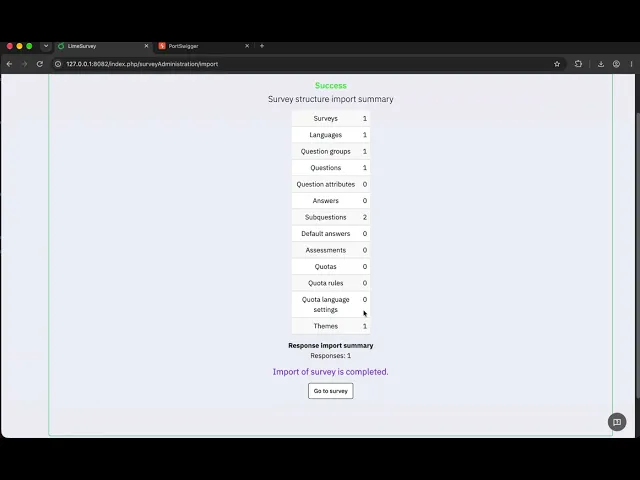
Video of exploitation:
Static evidence:

Our security policy
We have reserved the ID CVE-2026-116645 to refer to this issue from now on.
System information
Product: LimeSurvey Community Edition
Version: 7.8.0
Operating System: Any supported web-server platform
References
GitHub Repository: https://github.com/baserow/baserow
Release: https://github.com/LimeSurvey/LimeSurvey/releases/tag/7.8.0%2B261026
Solution and workaround
Validate imported participant attribute identifiers against a strict allowlist, for example ^attribute_[1-9][0-9]*$, before creating columns. Independently, quote every schema-derived column name in SPSSGetQuery(); do not use the presence of ( as a trust decision. The export code should build qualified identifiers with the database quoting API rather than concatenate t. with a string obtained from metadata.
Until an upstream fix is available, do not grant untrusted accounts global survey-creation permission and do not import untrusted .lsa archives. Administrators should inspect imported participant-table schemas for unexpected column names.
Credits
The vulnerability was detected by AI SAST Scanner and disclosed by Miguel Gómez from Fluid Attacks' Offensive Team.
Timeline
Vulnerability discovered
Vendor contacted
Public disclosure
Does your application use this vulnerable software?
During our free trial, our tools assess your application, identify vulnerabilities, and provide recommendations for their remediation.