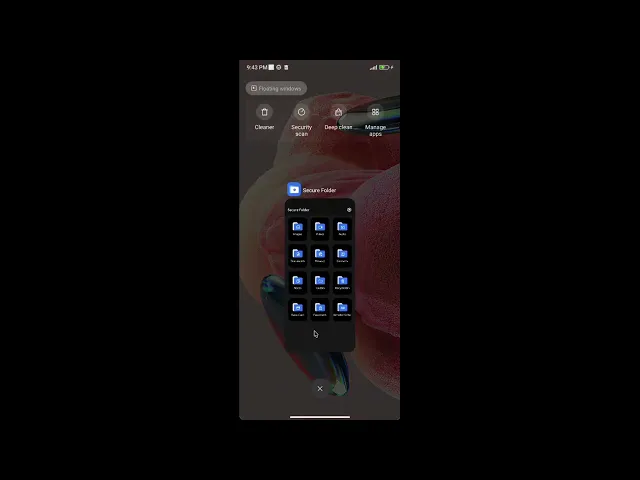
Secure Folder 1.2 - Plaintext vault files in shared storage bypass the PIN gate
6,8
Medium
Discovered by

Offensive Team, Fluid Attacks
Summary
Full name
Secure Folder 1.2 - Plaintext vault files in shared storage bypass the PIN gate
Code name
State
Public
Release date
Affected product
Secure Folder
Vendor
FluteCode
Affected version(s)
1.2
Vulnerability name
Non-encrypted confidential information
Vulnerability type
Remotely exploitable
Yes
CVSS v4.0 vector string
CVSS:4.0/AV:L/AC:L/AT:N/PR:L/UI:N/VC:H/VI:N/VA:N/SC:N/SI:N/SA:N
CVSS v4.0 base score
6.8
Exploit available
Yes
CVE ID(s)
Description
Secure Folder 1.2 stores files selected for its password-protected vault as unencrypted files in the Android shared-storage tree. A local application or file manager that has access to the relevant shared-storage path can enumerate, copy, and open those files without authenticating to Secure Folder.
The issue defeats the confidentiality property that the product presents to users. The Google Play listing describes the application as a private vault for files in a protected folder "that only you can access", advertises strong privacy and a multi-layer security system, and states that bank cards, passwords, and sensitive information are stored with encryption. A PIN that merely gates the application UI is not equivalent to protecting the bytes of vaulted files from other principals on the device.
Root Cause
The submitted technical description states that the application builds its vault below the public Documents directory:
and moves imported files below paths such as:
Android classifies Documents/ as shared storage. Android's storage guidance distinguishes app-specific storage, including internal storage for sensitive data, from shared storage, which is intended for files shared with other apps. On Android 11 and later, an application granted MANAGE_EXTERNAL_STORAGE has read and write access to all files in shared storage. A dot-prefixed directory and a .nomedia marker can reduce casual discovery or gallery indexing; neither provides an access-control boundary or encryption.
Impact
An attacker who can operate a file manager on the target device, or code running in another application that has been granted sufficiently broad shared-storage access, can read and copy vaulted images, videos, audio files, and documents without the Secure Folder PIN. The PIN remains an interface gate only.
The impact is confidentiality loss of the original files. The evidence does not show remote exploitation, compromise of Android's sandbox, bypass of the device lock screen, disclosure of Secure Folder's notes/password/card database, integrity modification, or availability impact.
PoC
Preconditions
Secure Folder version 1.2 installed on an Android device.
A PIN configured in Secure Folder.
A test image available outside the vault.
A file manager that can read the device's shared
Documents/storage. For an application-based test on modern Android, this normally means a file-manager/backup/security application with user-granted all-files access; use only software and devices you are authorized to test.
Steps to reproduce
Open Secure Folder and configure a PIN.
Select Images, use +, choose a test image, and select Hide Files.
Leave or lock Secure Folder. Do not enter its PIN again.
Open the separate file manager.
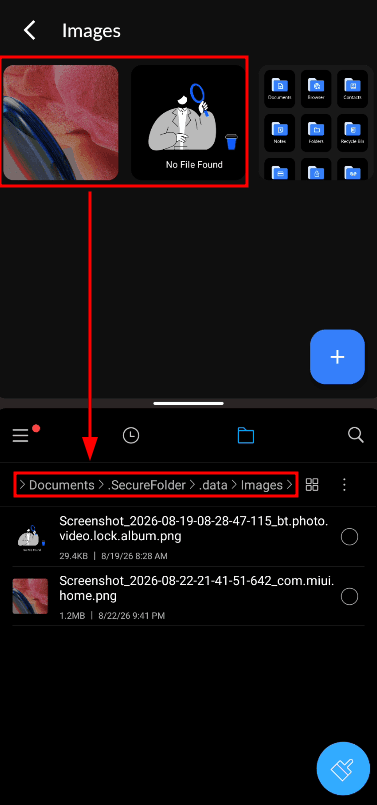
Browse to:
Open or copy the imported image.
Expected result:
The file manager reads the original image even though it has not authenticated to Secure Folder.
Evidence of Exploitation
Video of exploitation:
Static evidence:
Our security policy
We have reserved the ID CVE-2026-84283 to refer to this issue from now on.
System Information
Secure Folder by FluteCode
Package: com.securefolder.securevault
Version: 1.2
Operating System: Android 7.0 or later
References
Google Play listing: https://play.google.com/store/apps/details?id=com.securefolder.securevault
Vendor privacy policy: https://sites.google.com/view/securefolderpolicy/home
Vendor website: https://tdtechapps.blogspot.com/
Mitigation
There is currently no patch available for this vulnerability.
Credits
The vulnerability was discovered by Andrés Ramos from Fluid Attacks' Offensive Team.
Timeline
Vulnerability discovered
Vendor contacted
Public disclosure
Does your application use this vulnerable software?
During our free trial, our tools assess your application, identify vulnerabilities, and provide recommendations for their remediation.