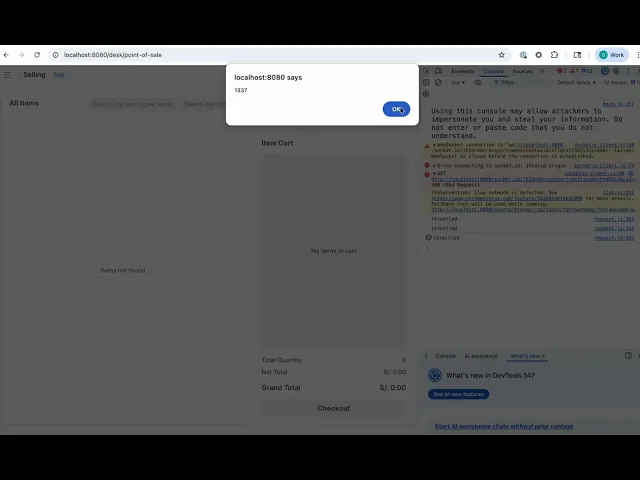
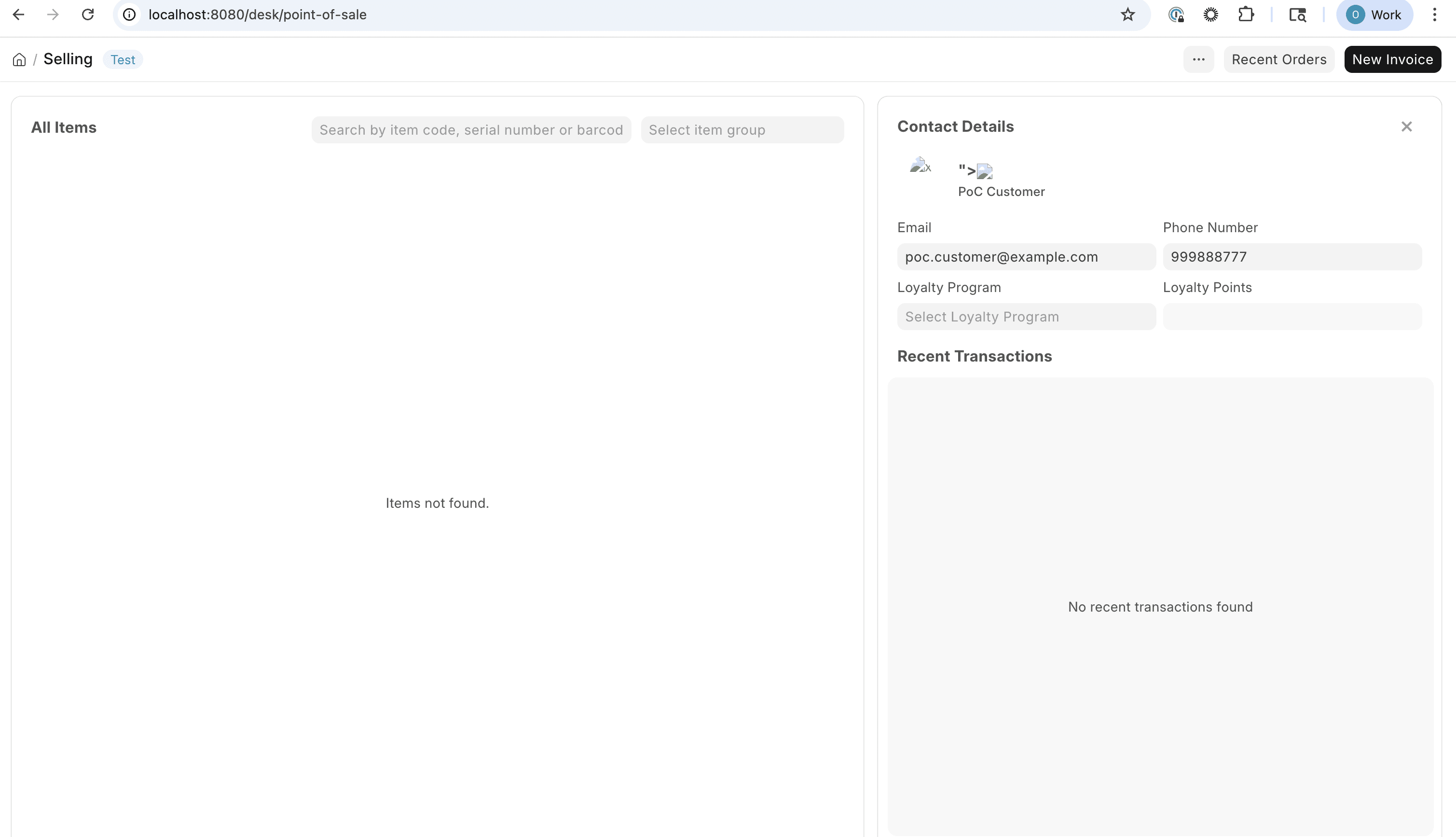
An authenticated user can persist arbitrary HTML/JavaScript in the email_id or mobile_no fields of a Customer record and trigger unescaped rendering in the Point of Sale (POS) interface for every operator who selects that customer.
The sink is update_customer_section in erpnext/selling/page/point_of_sale/pos_item_cart.js:462, which constructs an HTML string using template literals that directly embed customer_name, email_id, mobile_no, and the output of get_customer_image() (which embeds image into src and alt attributes), then passes the result to jQuery's .html() without any HTML sanitization. The server-side whitelisted method point_of_sale.set_customer_info writes attacker-supplied values to the database with no sanitization, completing the source→sink path.
Vulnerability
Source → sink path
Source — user-controlled Customer fields via whitelisted setter (point_of_sale.py:428-465):
The method set_customer_info is decorated with @frappe.whitelist(), which in Frappe makes it callable by any authenticated user without additional role checks:
@frappe.whitelist()defset_customer_info(fieldname: str,customer: str,value: str = ""):
...frappe.db.set_value("Customer",customer,"email_id",value)# raw valuefrappe.db.set_value("Customer",customer,"mobile_no",value)# raw valuecontact_doc.save()
@frappe.whitelist()defset_customer_info(fieldname: str,customer: str,value: str = ""):
...frappe.db.set_value("Customer",customer,"email_id",value)# raw valuefrappe.db.set_value("Customer",customer,"mobile_no",value)# raw valuecontact_doc.save()
@frappe.whitelist()defset_customer_info(fieldname: str,customer: str,value: str = ""):
...frappe.db.set_value("Customer",customer,"email_id",value)# raw valuefrappe.db.set_value("Customer",customer,"mobile_no",value)# raw valuecontact_doc.save()
@frappe.whitelist()defset_customer_info(fieldname: str,customer: str,value: str = ""):
...frappe.db.set_value("Customer",customer,"email_id",value)# raw valuefrappe.db.set_value("Customer",customer,"mobile_no",value)# raw valuecontact_doc.save()
No input sanitization is performed before the database write. An attacker can set email_id or mobile_no to any HTML/JS payload by calling this endpoint directly or via the POS customer info panel.
Additionally, customer_name and image are writable by any user with Customer record edit permissions and are also fetched without sanitization.
Insufficient sanitization — escape() is URL-encoding, not HTML-escaping (pos_item_cart.js:470):
escape() here is window.escape(), the deprecated global URI-encoding function (converts spaces to %20, etc.). It does not escape HTML-special characters (<, >, ", &). It is applied only to the data-customer attribute, not to any of the displayed fields (customer_name, email_id, mobile_no, image).
Sink — jQuery .html() with unescaped template literals (pos_item_cart.js:457-494):
jQuery's .html() is an innerHTML setter. Any HTML tags in the interpolated values are parsed and executed by the browser. No call to frappe.utils.escape_html, DOMPurify.sanitize, or any equivalent appears in this function.
Malformed HTML in get_customer_image() aids attribute injection (pos_item_cart.js:496-503):
get_customer_image(){const{customer,image} = this.customer_info || {};if(image){return`<div class="customer-image"><img src="${image}" alt="${image}""></div>`;// ^^^// extra " here (malformed)}else{return`<div class="customer-image customer-abbr">${frappe.get_abbr(customer)}</div>`;}}
get_customer_image(){const{customer,image} = this.customer_info || {};if(image){return`<div class="customer-image"><img src="${image}" alt="${image}""></div>`;// ^^^// extra " here (malformed)}else{return`<div class="customer-image customer-abbr">${frappe.get_abbr(customer)}</div>`;}}
get_customer_image(){const{customer,image} = this.customer_info || {};if(image){return`<div class="customer-image"><img src="${image}" alt="${image}""></div>`;// ^^^// extra " here (malformed)}else{return`<div class="customer-image customer-abbr">${frappe.get_abbr(customer)}</div>`;}}
get_customer_image(){const{customer,image} = this.customer_info || {};if(image){return`<div class="customer-image"><img src="${image}" alt="${image}""></div>`;// ^^^// extra " here (malformed)}else{return`<div class="customer-image customer-abbr">${frappe.get_abbr(customer)}</div>`;}}
The template contains an extra double-quote after alt="${image}". The closing sequence is alt="${image}"" instead of alt="${image}". With image = '" onerror="alert(1)':
Produces: src="" onerror="alert(1)"" alt=...
The onerror attribute escapes the expected attribute context and executes as an event handler.
Full path from fetch to render (pos_item_cart.js:352-395):
fetch_customer_details(customer){frappe.db.get_value("Customer",customer,["email_id","customer_name","mobile_no","image",...]).then(({message})=>{this.customer_info = {...message,customer};// raw DB values, no escaping});}
fetch_customer_details(customer){frappe.db.get_value("Customer",customer,["email_id","customer_name","mobile_no","image",...]).then(({message})=>{this.customer_info = {...message,customer};// raw DB values, no escaping});}
fetch_customer_details(customer){frappe.db.get_value("Customer",customer,["email_id","customer_name","mobile_no","image",...]).then(({message})=>{this.customer_info = {...message,customer};// raw DB values, no escaping});}
fetch_customer_details(customer){frappe.db.get_value("Customer",customer,["email_id","customer_name","mobile_no","image",...]).then(({message})=>{this.customer_info = {...message,customer};// raw DB values, no escaping});}
frappe.db.get_value returns raw database values. After fetch, update_customer_section is called, placing those values directly into the DOM.
Open the POS interface as a POS operator (a different user/session):
Navigate to Point of Sale → open any POS session → search for and select CUST-00001.
fetch_customer_details fires, loads the malicious email_id into this.customer_info, and update_customer_section renders it via .html(). The onerror event fires and executes alert(document.cookie) in the operator's browser.
Attack path 2 — via Customer record (user with Customer edit permissions)
Save. When any POS user selects that customer, the <script> tag is injected via ${customer_name} in the template literal and executed by jQuery .html().
Evidence of Exploitation
Video of exploitation:
Static Evidence:
Our security policy
We have reserved the ID CVE-2026-42840 to refer to this issue from now on.