Helpy 2.8.0 - Stored XSS in knowledgebase Doc body rendering
4,8
Medium
Detected by

Fluid Attacks AI SAST Scanner
Disclosed by
Oscar Uribe
Summary
Full name
Helpy 2.8.0 - Stored XSS in knowledgebase Doc body via DocsHelper#sanitize_doc_content allowing JavaScript execution in any visitor session
Code name
State
Public
Release date
Affected product
helpy
Vendor
helpy.io
Affected version(s)
2.8.0
Vulnerability name
Stored cross-site scripting (XSS)
Vulnerability type
Remotely exploitable
Yes
CVSS v4.0 vector string
CVSS:4.0/AV:N/AC:L/AT:N/PR:H/UI:P/VC:L/VI:L/VA:N/SC:L/SI:L/SA:N
CVSS v4.0 base score
4.8
Exploit available
Yes
CVE ID(s)
Description
Helpy 2.8.0 contains a stored cross-site scripting vulnerability in the knowledgebase Doc rendering logic. An authenticated attacker with admin or agent editor privileges can persist arbitrary HTML or JavaScript in the body field of a knowledgebase Doc and cause it to execute in the browser of any user who views the rendered article, including unauthenticated visitors.
The vulnerability exists in DocsHelper#sanitize_doc_content, which marks rendered Doc content as trusted with .html_safe without performing sanitization. The affected data flow is: attacker-controlled body input is stored in the database, converted to HTML by RDiscount, which preserves raw HTML tags, then passed to sanitize_doc_content, marked .html_safe, and emitted through ERB templates with <%= ... %>. Because Rails auto-escaping is bypassed, malicious HTML or JavaScript stored in the Doc body is rendered verbatim.
Vulnerability
Source → sink path
Source persistence: attacker-controlled
bodyparameter accepted by:
Admin::DocsController#createand#update(web form, requiresverify_editorbefore_action)API::V1::Docs POST /api/v1/docsandPATCH /api/v1/docs/:id(requiresadminoragentrole viaX-Tokenheader)No input sanitization is performed before
Doc.save/Doc.update_attributes.
Storage:
Doc#body(PostgreSQLtextcolumn) stores the raw payload.Markdown-to-HTML conversion (
app/models/doc.rb:89-92):
RDiscount passes raw HTML tags in the Markdown source through to the output unchanged. A <script> block in body survives to_html verbatim.
Misleadingly-named sink (
app/helpers/docs_helper.rb:29-31):
.html_safe instructs Rails ERB not to HTML-escape the string. No sanitization whatsoever is performed despite the method name.
Render in public and admin views — four templates call
<%= sanitize_doc_content(@doc.content) %>:
app/views/docs/show.html.erb:50— public, unauthenticated accessapp/views/admin/internal_docs/show.html.erb:39— internal admin viewapp/themes/nordic/views/docs/show.html.erb:56— Nordic theme (public)app/themes/singular/views/docs/show.html.erb:34— Singular theme (public)
Relevant code:
app/helpers/docs_helper.rb:29-31app/models/doc.rb:89-92app/controllers/admin/docs_controller.rb:24-33(create) and35-58(update)app/controllers/api/v1/docs.rb:46-60(POST) and80-95(PATCH)app/views/docs/show.html.erb:50app/views/admin/internal_docs/show.html.erb:39app/themes/nordic/views/docs/show.html.erb:56app/themes/singular/views/docs/show.html.erb:34
PoC
Reproduction used in the validation environment
Environment: http://localhost:3000 running via docker compose up from the repo root. Seed credentials: [email protected] / 12345678
Log in as admin at
http://localhost:3000/en/users/sign_inusing[email protected]/12345678.Navigate to
http://localhost:3000/admin/docs/new?lang=en.The
?lang=enparameter is required — without it the category dropdown is not rendered and the form submits with no category assigned.Fill in the form:
Title:
Stored XSS PoCCategory:
Getting StartedBody: click the
</>(Code View) button in the Summernote toolbar and paste the payload directly into the HTML editor:Status:
Published
Click Save Changes. The application stores the raw
<script>tag verbatim indocs.bodywith no sanitization.Note the doc ID from the redirect URL (e.g.
/admin/docs/7/edit) and open the public article as an unauthenticated visitor (incognito window):The
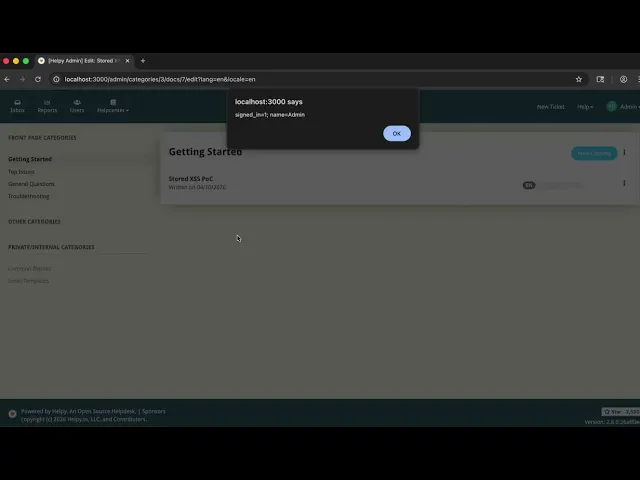
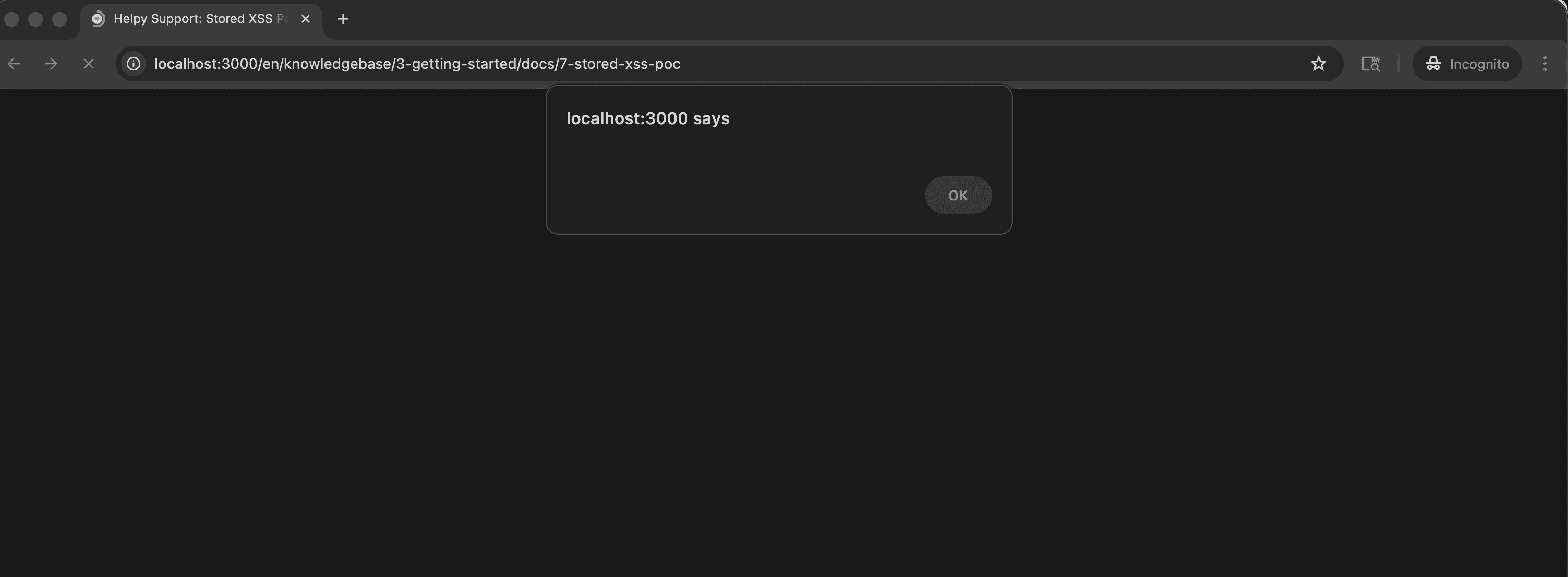
alert(document.cookie)dialog fires immediately on page load, confirming JavaScript execution in the visitor's browser context.
Evidence of Exploitation
Video of Exploitation
Static Evidence as an anonymous user visiting the document.
Our security policy
We have reserved the ID CVE-2026-40230 to refer to this issue from now on.
System Information
Helpy
Version 2.8.0
Operating System: Any
References
Github Repository: https://github.com/helpyio/helpy
Security: https://github.com/helpyio/helpy/security
Mitigation
There is currently no patch available for this vulnerability.
Credits
The vulnerability was discovered by Oscar Uribe from Fluid Attacks' Offensive Team using the AI SAST Scanner.
Timeline
Vulnerability discovered
Vendor contacted
Public disclosure
Does your application use this vulnerable software?
During our free trial, our tools assess your application, identify vulnerabilities, and provide recommendations for their remediation.